The documentation in this chapter is for editors and encoders working on semi-diplomatic
transcriptions. Its contents are relevant to those encoding either print or manuscript
plays; it is the starting point for all those working on semi-diplomatic transcriptions.
Introduction
Whether or not an edition includes a semi-diplomatic transcription of a single copy
of an early printed or manuscript text is an anthology-level decision. If an anthology
decides to include transcriptions, LEMDO strongly recommends that the anthology prescribe
a semi-diplomatic transcription. Given the increasing availability of open-access
digital surrogates of copies of early publications, as well as LEMDO’s ability to
host those surrogates and embed links from the semi-diplomatic transcription to those
surrogates, anthologies need to think carefully about what users most need. LEMDO’s
position is that most users of a digital transcription will be far more interested
in the transcription than in the mise-en-page of the book, which will always be better
understood by looking at the digital surrogate or, better yet, the material object
itself.
Note that LEMDO is moving away from the legacy term old-spelling and using the term semi-diplomatic transcription instead.
Learning Outcomes
The Semi-Diplomatic Transcription documentation is designed to support you through
encoding your semi-diplomatic transcription. By the time you have worked through this
chapter, you will:
Know how to find and cite base transcriptions from EEBO-TCP.
Understand what LEMDO allows in its semi-diplomatic transcriptions.
Know how LEMDO styling works in semi-diplomatic transcriptions and what your options
are for modifying style in your semi-diplomatic transcription.
Be able to encode key features of your playbook including speeches, stage directions,
pages, and columns.
Semi-Diplomatic Principles, Requirements, and Prohibitions
Principles
LEMDO semi-diplomatic transcriptions are transcribed and encoded truthfully to facilitate
a specific set of objectives. They are designed to:
Give editors a starting point for their modernized editions.
Capture bibliographic information about a playbook that is not included in the modernized
edition.
Provide a readable and searchable text for occasional undergraduate classroom work
on textual questions (e.g., comparing a modernized edition to the early text or texts).
Provide an accessible reference to scholars looking for original and alternate readings
of a text.
Enumerate running speech numbers for citational purposes.
Enumerate compositorial lines (witness line numbers) for citational purposes.
Tag certain features for future harvesting and processing, including stage directions,
speeches, and speakers.
Allow for potential linking to a modernized copytext edition.
LEMDO’s semi-diplomatic transcriptions are not meant to help with:
Advanced bibliographical analyses.
Typographical questions.
Physical bibliographical questions.
If you are interested in such analyses and questions, you will want to consult our
high-resolution facsimile images (keeping in mind that we usually have images of just
one copy from one library) and/or visit libraries to work with extant playbooks in
person.
Requirements
LEMDO semi-diplomatic transcriptions are required to do the following:
Capture all page beginnings using the milestone
<pb>
element.
Transcribe the content of the title page using the full suite of elements allowed
as children of the
<titlePage>
element.
Retain capitalization and all punctuation.
Regularize long s.
Modernize space between words.
Retain u/v as composited.
Wrap speeches in the
<sp>
element with a child
<ab>
element.
Wrap speech prefixes in the
<speaker>
element.
Wrap stage directions in the
<stage>
element, indicate stage direction type(s) using the
@type attribute and LEMDO’s controlled vocabulary of stage direction types, and indicate
the placement of the stage direction on the printed page using the
@place attribute and LEMDO’s controlled vocabulary for indicating placement.
Indicate the beginning of compositorial lines with the milestone
<lb>
element.
Capture headings (e.g., acts and scenes) where they are present in the source using
the
<label>
element. (Note that LEMDO does not wrap acts and scenes in
<div>
elements in semi-diplomatic transcriptions, largely because literary divisions are
not consistently present in early playbooks.)
Capture ruled lines and printer’s ornaments using the
<figure>
element.
Transcribe and tag forme works (signature marks, catchwords, running titles) with
the
<fw>
element, the
@type attribute, and the correct value from LEMDO’s controlled vocabulary for forme work
types.
Capture italicization through our global SCSS file for semi-diplomatic transcriptions,
the
<tagsDecl>
element, or
@style attributes and inline CSS.
Indicate vertical white space and semantically significant horizontal white space
with the
<space>
element.
Transcribe accented letters and digraphs (e.g., é, æ).
Tag abbreviations with the
<abbr>
element and provided an expanded form tagged with
<expan>
.
Prohibitions
Semi-diplomatic transcriptions are not the place to:
Add editorial character lists (character lists are transcribed if they are part of
the early publication).
Indicate the mode of the language (prose or verse).
Assign or reassign speeches.
Regularize speech prefixes.
Expand digraphs (e.g., æ).
Encode strings of text in a foreign language. (Use the
<hi>
element plus the
@rendition to capture any typographic features of foreign text. Normally, compositors use italic
type for foreign words if the rest of the text is in roman.)
One possible starting point for a LEMDO semi-diplomatic transcription of a printed
playbook is the text created by the Text Creation Partnership (TCP), if one exists. An EEBO-TCP text offers a transcription of the copy microfilmed
for Early English Books (EEB) and subsequently digitized for Early English Books Online (EEBO). EEBO-TCP transcriptions are encoded in TEI. The EEBO-TCP customization of
TEI is similar to LEMDO’s customization, which means we can run a conversion on the
EEBO-TCP file to give you or an RA a convenient—if imperfect—starting point.
TCP is an imperfect starting point for various reasons:
TCP does not transcribe certain features that LEMDO does transcribe (e.g., forme works).
TCP’s transcriptions leave gaps and occasionally mistranscribe.
TCP transcriptions are made from digitized black-and-white microfilms and are thus
two removes from the physical book.
The copy filmed for EEB is not necessarily either the best copy of the printed playbook
or the copy that we will take as the basis for the LEMDO transcription. We try to
obtain a high-resolution colour scan of a copy so that we can embed images in the
transcription, and we align the transcription with the copy for which we have scans.
Even so, having much of the transcription and tagging in place does save time.
Normally, the LEMDO RAs remediate (i.e., correct) the converted TCP transcriptions
for editors.1 The editor’s job consists of two tasks:
Identify the correct TCP transcription to take as a starting point. This task needs
to happen before LEMDO runs the conversion.
Peer review LEMDO’s work and submit any corrections to LEMDO. This task happens after
the LEMDO RAs have completed their remediation.
How to find an EEBO-TCP GitHub File ID
Once you have identified the STC or Wing number of the publication for which you want
a semi-diplomatic transcription prepared,2 you will need to find the ID of the XML file of the corresponding TCP transcription.
The TCP file ID is an alphanumeric string that begins with an upper case letter. Example:
A68727.
The TCP’s XML files are stored on GitHub, along with a master list in the form of
a CSV file with the file extension .csv. CSV stands for “comma separated values.”
The direct link to this master list of TCP texts is as follows (link valid as of August
21, 2026): https://raw.githubusercontent.com/textcreationpartnership/Texts/master/TCP.csv. If the link does not work, visit https://github.com and type “EEBO texts” into the search bar. One of the top results will be textcreationpartnership/Texts. Navigate to this page and click TCP.csv from the list of files. Click “View raw” to open the file in your browser. Even though
the file is plain text with no formatting, it is very large and may take a few minutes
to fully load in your browser. Be patient and resist the urge to refresh the page.
Each TCP XML file is represented by a row in the master list. There are ten fields
in each row, each field wrapped in double quotation marks. The fields are separated
from each other by a comma. The field headings are:
The first ("TCP") and fourth ("STC") fields are the ones that matter, although the other fields are helpful for confirming
that you have found the right publication.
When the TCP.csv file has fully loaded, use ctrl+f to search the file for the STC or Wing number. Be sure to include STC or Wing in your search string. (The ESTC number is also listed in the STC field, if you prefer
to search by ESTC number.) It will take time for your browser to perform a search
on the file. Example: Q1 Merchant of Venice is STC 22296. If you search the CSV file for STC 22296, you will find this entry:
"A68727","99846609","11589","STC 22296; ESTC S111215","Free","Shakespeare, William,
1564-1616.","1600","The most excellent historie of the merchant of Venice VVith the
extreame crueltie of Shylocke the Iewe towards the sayd merchant, in cutting a iust
pound of his flesh: and the obtayning of Portia by the choyse of three chests. As
it hath beene diuers times acted by the Lord Chamberlaine his Seruants. Written by
William Shakespeare.; Merchant of Venice","",70
The STC or Wing (and ESTC) number for which you searched is captured in the fourth
field. The first field contains the TCP ID that LEMDO needs. For Q1 Merchant, the ID is A68727. Send this number to the LEMDO team at lemdo@uvic.ca.
The TCP Editorial Declaration
Every TCP transcription will have information about the EEBO-TCP transcription and
encoding process contained in the file’s
<editorialDecl>
element. LEMDO’s RAs will move EEBO-TCP’s
<editorialDecl>
into
<xenoData>
so that we can use the
<editorialDecl>
to describe our remediation process. Once the file is fully remediated to comply
with LEMDO’s practices, we normally delete the entire
<xenoData>
element and use the
<sourceDesc>
element to capture the fact that we took the TCP transcription as our starting point.
For reference, we include a typical
<editorialDecl>
below.
<editorialDecl> <p>EEBO-TCP is a partnership between the Universities of Michigan and Oxford and the
publisher ProQuest to create accurately transcribed and encoded texts based on the
image sets published by ProQuest via their Early English Books Online (EEBO) database
(http://eebo.chadwyck.com). The general aim of EEBO-TCP is to encode one copy (usually
the first edition) of every monographic English-language title published between 1473
and 1700 available in EEBO.</p> <p>EEBO-TCP aimed to produce large quantities of textual data within the usual project
restraints of time and funding, and therefore chose to create diplomatic transcriptions
(as opposed to critical editions) with light-touch, mainly structural encoding based
on the Text Encoding Initiative (http://www.tei-c.org).</p> <p>The EEBO-TCP project was divided into two phases. The 25,368 texts created during
Phase 1 of the project (2000-2009), initially available only to institutions that
contributed to their creation, were released into the public domain on 1 January 2015.
The approximately 40,000 texts produced during Phase 2 (2009- ), of which 34,963 had
been released as of 2020, originally similarly restricted, were similarly freed from
all restrictions on 1 August 2020. As of that date anyone is free to take and use
these texts for any purpose (modify them, annotate them, distribute them, etc.). But
we do respectfully request that due credit and attribution be given to their original
source.</p> <p>Users should be aware of the process of creating the TCP texts, and therefore of any
assumptions that can be made about the data.</p> <p>Text selection was based on the New Cambridge Bibliography of English Literature (NCBEL).
If an author (or for an anonymous work, the title) appears in NCBEL, then their works
are eligible for inclusion. Selection was intended to range over a wide variety of
subject areas, to reflect the true nature of the print record of the period. In general,
first editions of a works in English were prioritized, although there are a number
of works in other languages, notably Latin and Welsh, included and sometimes a second
or later edition of a work was chosen if there was a compelling reason to do so.</p> <p>Image sets were sent to external keying companies for transcription and basic encoding.
Quality assurance was then carried out by editorial teams in Oxford and Michigan.
5% (or 5 pages, whichever is the greater) of each text was proofread for accuracy
and those which did not meet QA standards were returned to the keyers to be redone.
After proofreading, the encoding was enhanced and/or corrected and characters marked
as illegible were corrected where possible up to a limit of 100 instances per text.
Any remaining illegibles were encoded as <gap>s. Understanding these processes should
make clear that, while the overall quality of TCP data is very good, some errors will
remain and some readable characters will be marked as illegible. Users should bear
in mind that in all likelihood such instances will never have been looked at by a
TCP editor.</p> <p>The texts were encoded and linked to page images in accordance with level 4 of the
TEI in Libraries guidelines.</p> <p>Copies of the texts have been issued variously as SGML (TCP schema; ASCII text with
mnemonic sdata character entities); displayable XML (TCP schema; characters represented
either as UTF-8 Unicode or text strings within braces); or lossless XML (TEI P5, characters
represented either as UTF-8 Unicode or TEI g elements).</p> <p>Keying and markup guidelines are available at the <ref target="http://www.textcreationpartnership.org/docs/.">Text Creation Partnership web site</ref>.</p> </editorialDecl>
Gadd, Ian. The Use and Misuse of Early English Books Online.Literature Compass 6 (2009): 680–692. DOI 10.1111/j.1741-4113.2009.00632.x.
Gavin, Michael. How To Think About EEBO.Textual Cultures: Text, Contexts, Interpretation 11.1–2 (2019): 70–105. DOI 10.14434/textual.v11i1-2.23570.
Gavin, Michael. EEBO and Us.Textual Cultures: Text, Contexts, Interpretation 14.1 (2021): 270–278. DOI 10.14434/tc.v14i1.32860.
Herman, Peter C.EEBO and Me: An Autobiographical Response to Michael Gavin, How to Think About EEBO.Textual Cultures: Text, Contexts, Interpretation 13.1 (2020): 207–216. DOI 10.14434/textual.v13i1.30078.
Kichuk, Diana. Metamorphosis: Remediation in Early English Books Online (EEBO).Literary and Linguistic Computing 22.3 (2007): 291–303. DOI 10.1093/llc/fqm018.
Mäkelä, Eetu, James Misson, Devani Singh, and Mikko Tolonen. Opening the black box of EEBO.Digital Scholarship in the Humanities 41.1 (2026): 236–254. DOI 10.1093/llc/fqaf086.
Maurer, Margaret C.Facsimiles and Transcription: EEBO-TCP and Narratives of Textual Production.Journal of Early Modern Studies 14 (2025): 17–31. DOI 10.36253/jems-2279-7149-16516.
Quiring, Ana. Fingerprints of British Book History: A Feminist Labor History of EEBO.Digital Humanities Quarterly 18.1 (2024). DOI 10.63744/4c9n5tkrpqeq.
Encode File Categories in Semi-Diplomatic Transcriptions
LEMDO processes different types of documents in different ways. The processor looks
for the
<catRef>
elements inside the
<textClass>
element in the
<teiHeader>
of your document and then applies the appropriate processing for the document types
that are captured in the
<catRef>
elements. If you document does not have
<catRef>
elements, our processor will not know what type of file it is. If your document has
the wrong values in the
@target attribute of the
<catRef>
elements, our processor will apply the wrong processing to your file.
LEMDO has special processing for semi-diplomatic transcriptions (i.e, semi-diplomatic
transcriptions), so it is particularly important to get the
<catRef>
s right for these types of documents.
One indicates the general document type, using the value ldtPrimaryText from the LEMDO Document Type Taxonomy. (See Document Type Taxonomy.)
One indicates the format of the printed book, using a value from the LEMDO Book Formats
Taxonomy: lbfQuarto, lbfFolio, lbfBroadside, or lbfOctavo. (See Print Book Formats Taxonomy.) Note that transcriptions of manuscript playbooks will have the value lbfManuscript.
One indicates the editorial treatment, using the value letSemiDiplomatic from the LEMDO Editorial Treatments Taxonomy. (See Editorial Treatments Taxonomy).
One indicates the work type (i.e., genre), using a value from the LEMDO Work Types
Taxonomy: lwtPlay, lwtPoetry, lwtProse, or lwtShow. (See Work Type Taxonomy.)
Each
<catRef>
element has two attributes:
@scheme and
@target. Use the
@scheme attribute to point to the xml:id of the taxonomy; the value must have the tax: prefix. Use the
@target attribute to point to the value as defined in that taxonomy; the value must have
the cat: prefix.
Optionally, you can add a
<catRef>
to describe the origin of the document using the LEMDO Document Histories Taxonomy.
Semi-diplomatic transcriptions might have come from a converted IML file or from TCP. If this is the case for your file, use the appropriate value: edhSourceIML or edhSourceTCP. If you have transcribed the play yourself into a LEMDO XML template file, you do
not need to describe the origin of the document; in this case, you will simply record
your witness in the
<sourceDesc>
element.
We do not generally encode structural divisions in semi-diplomatic transcriptions.
Instead, we treat the printed page as the main unit. Each new page is encoded with
the milestone
<pb>
element (page beginning). The
<pb>
elements allows us to capture inferred or bibliographic signature numbers via the
@n attribute. We also link to a facsimile or digital surrogate of the page using the
@facs attribute. For information on linking to digital surrogates, see Practice: Link to Facsimile Images.
Capture the fact that a new page has begun before you transcribe and encode the running title and/or printed page numbers. I.e., the
<pb>
element precedes the
<fw>
element.
Indicate bibliographical signature numbers (aka editorial signature numbers) in the
<pb>
element with the
@n attribute, as illustrated in the signature number of G2 verso below:
<!-- ... --> <pb n="G2v"/> <!-- ... -->
These signature numbers are used by LEMDO processing to generate a table of contents
for the semi-diplomatic transcription (except in cases like the Douai Shakespeare Manuscript Project where the labels take precedence over the signature.
Some early modern playbooks have text arranged in multiple columns. For example, folios
typically have two columns, while broadsides may have one, two, or more columns depending
on the orientation of the text and the size of the font. Semi-diplomatic transcriptions
of texts that have more than one column must tag those columns. Encoding columns allows
us to generate rendering for column beginnings in the HTML output for semi-diplomatic
transcriptions.
Practice
Use the
<cb>
element to mark the beginning of each column on a page. Give the
<cb>
element an
@n attribute and numerical value of 1, 2, and so on. Start at 1 on each new page.
Examples
<body> <pb/> <cb n="1"/> <!-- Text in the left column here --> <cb n="2"/> <!-- Text in the right column here --> <pb/> <cb n="1"/> <!-- Text in the left column here --> <cb n="2"/> <!-- Text in the right column here --> </body>
Special Case: End of the Text
At the end of the folio texts, sometimes the column structure deviates for a closing
remark of finis or even to show a cast or character list. In these cases, the top of a page may have
the typical two-column structure, but the bottom of the page will have just one column.
In this case, encode the single column as <cb n="0"/>
Example:
<pb/> <cb n="1"/> <!-- Text in the left column here --> <cb n="2"/> <!-- Text in the right column here --> <cb n="0"/> <figure type="horizontal-rule"/> <label rendition="rnd:letterspace">FINIS.</label> <figure type="horizontal-rule"/>
LEMDO is interested in capturing some key bibliographic features of early modern playbooks
and mimicking them in our online rendering of semi-diplomatic transcriptions. We do
this using three levels of style: the default style written by the LEMDO team that applies to all semi-diplomatic
transcriptions, file-wide style that you edit to apply across your entire semi-diplomatic
file, and inline style that you add to capture peculiarities in your sourcebook. Many
semi-diplomatic transcriptions will require all three levels. This documentation will
introduce our principles for styling semi-diplomatic transcriptions as well as providing
some information about when you will use each level of style.
Principles
LEMDO follows the Endings Principle for Digital Longevity for all of our encoding. For styling in semi-diplomatic transcriptions, we must keep
the following principles in mind:
Massive redundancy: every page contains all the components it needs, so that it will
function without the rest of the site if necessary, even though doing so means duplicating
information across the site.
(Endings Project, Principles 4.6)
Graceful failure: every page should still function effectively even in the absence
of JavaScript or CSS support.
(Endings Project, Principles 4.7)
For our semi-diplomatic transcriptions, this means that:
Each file must be able to exist on its own and contain all necessary information.
No key information about what our sourcebook looks like should be captured in our
SCSS file (default styling) alone.
We use TEI to describe and CSS to prescribe; if something is not described in the
TEI file, its style should not be prescribed in the SCSS file.
Additionally, we do not expect to exactly recreate the mise-en-page of our sourcebooks.
Instead, we normally provide facsimile images of the books side-by-side with our semi-diplomatic
transcriptions so that those interested in detailed bibliographic features can see
how the page is laid out. We are interested in capturing some key bibliographical features, as outlined in Semi-Diplomatic Principles, Requirements, and Prohibitions.
Practice: Update Your Encoding Description
To ensure that we describe style in every TEI file for semi-diplomatic transcriptions
before we style them in our SCSS file, we outline our styling assumptions in our encoding
descriptions. To update your encoding description, follow these steps:
Find the
<encodingDesc>
element in the
<teiHeader>
of your file.
Add a child
<p>
element to the
<encodingDesc>
.
Paste the following text into the text node of the
<p>
element:
Encoded in TEI P5 according to the LEMDO Customization and Encoding Guidelines. The
encoding makes the following assumptions (rendered based on the _semi-dip.scss file):
text is aligned left and set in roman type unless otherwise specified; titlepage components
and running titles are centered; signatures are centered and letterspaced; catchwords
are aligned right; speech prefixes are indented and set in italic type; and stage
directions are set in italic type and aligned left unless the stage element has a
place attribute. Where this playbook differs generally from LEMDO’s default assumptions,
the TEI Header includes one or more tagsDecl elements describing this playbook’s particular
imposition and composition. Where this playbook contains local deviations from its
own general patterns, the encoding includes element-level and inline CSS to describe
the playbook’s unique features.
Add a child
<editorialDecl>
element to the
<encodingDesc>
.
Paste the following text into the text node of the
<editorialDecl>
element:
This semi-diplomatic text has been prepared according to the DRE Editorial Guidelines
and the LEMDO Encoding Guidelines. Long s, rotunda r, and ligatures have not been
transcribed or encoded.
(Note that you and your anthology lead may decide modify this editorial declaration.)
Your
<encodingDesc>
should look as follows:
<encodingDesc> <p>Encoded in TEI P5 according to the LEMDO Customization and Encoding Guidelines. The
encoding makes the following assumptions (rendered based on the _semi-dip.scss file):
text is aligned left and set in roman type unless otherwise specified; titlepage components
and running titles are centered; signatures are centered and letterspaced; catchwords
are aligned right; speech prefixes are indented and set in italic type; and stage
directions are set in italic type and aligned left unless the stage element has a
place attribute. Where this playbook differs generally from LEMDO’s default assumptions,
the TEI Header includes one or more tagsDecl elements describing this playbook’s particular
imposition and composition. Where this playbook contains local deviations from its
own general patterns, the encoding includes element-level and inline CSS to describe
the playbook’s unique features.</p> <editorialDecl> <p>This semi-diplomatic text has been prepared according to the DRE Editorial Guidelines
and the LEMDO Encoding Guidelines. Long s, rotunda r, and ligatures have not been
transcribed or encoded.</p> </editorialDecl> </encodingDesc>
Terms for Working on Style
It is helpful to understand some key terms for styling:
CSS: Cascading Style Sheets is the language that we use to style our Web pages. CSS
is a core language used across the Web.
SCSS: Sassy Cascading Style Sheets is an extension language for CSS that allows us
to nest styling. This extension makes it easier to group style for semi-diplomatic
transcriptions.
Cascade: Refers to the way that style trickles down from generic files that govern
our project to individual files and elements. When we style something at a high project level, that style applies to our files on the lower level. For example, when we write in our generic stylesheet that stage directions
should render in italic font, that style cascades down through our file structure
to make the stage directions in your semi-diplomatic transcription appear italicized
on the LEMDO site.
Specificity: Refers to how specific a piece of style is. More specific style overrides
less specific style, which is what allows us to use file-wide and inline style to
override default style.
SCSS files: Refers to our lemdo-dev.scss file, which governs project-wide style such as font family, and _semi-dip.scss file, which governs semi-diplomatic transcriptions only. The SCSS files include all
of our default styling.
Selector: The piece in CSS styling that defines which element we are styling.
Declaration: The piece in CSS styling that prescribes what style we are applying.
The declaration is composed of two pieces: the property and the value. Declarations
are always followed by a semi-colon (;).
Property: The property is the first part of a CSS declaration. It gives the category
of style that we want to apply. This is similar to attributes in XML in that it is
a category of adjectives. Properties include things such as font-family and color (note that CSS uses American spellings). Properties are always followed by a colon
(:).
Value: The value is the second part of a CSS declaration. It gives the actual style
that we want to apply. This is similar to values in XML in that it is an adjective.
Values include things such as Times New Roman and red. If a property has multiple values, separate each value with a single space.
LEMDO’s Levels of Style
LEMDO uses three levels of style, each of which fits specific needs:
Default style: Written in our SCSS files, our default style determines how the LEMDO
site should look as a whole (e.g., colours and fonts) and how semi-diplomatic transcriptions
should look. Our default style is meant to mimic what is generally true across early
modern playbooks and includes style that makes stage directions appear in italic font.
File-wide style: Written in your file and encoded with the
<tagsDecl>
element, file-wide style is used for things that are true across your playbook that
are not captured in the default style. This includes things like making labels appear
in italic font.
Inline style: Written on the element that you wish to style, inline style refers to
three things:
Renditions: Style on a specific element that can be captured using one of the values
from LEMDO’s pre-formed Renditions Taxonomy. Includes making a single speech prefix appear in roman font.
Placement: The placement of a specific element that can be captured using one of the
values from LEMDO’s pre-formed Placement Taxonomy. This is typically used for describing the placement of stage directions on the page.
Placement is described using the
@place attribute in your XML file, but styled through the SCSS file.
Style: Specific style on a specific element that cannot be captured using pre-formed
rendition or placement values. This type of styling requires CSS to be written on
an individual element using the
@style attribute, and is most commonly used for styling hungwords and long braces.
Style Specificity
Although our style generally follows the cascade of default styling to file-wide styling
to inline styling, there are some exceptions that come from the complexity and size
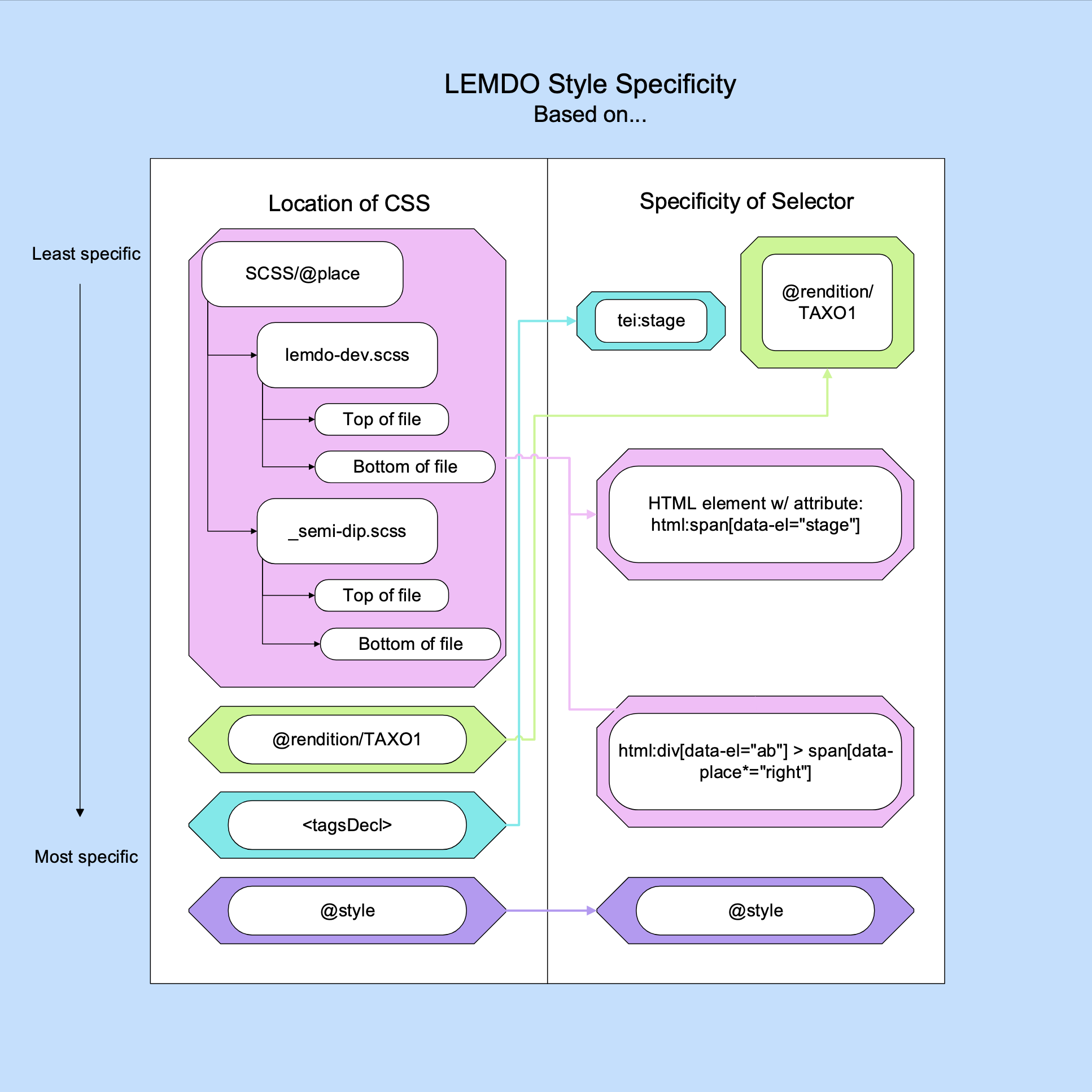
of the LEMDO project. As outlined in the chart below, our style specificity is based
on two criteria: location of CSS and specificity of selector.
Location of CSS is a fairly straightforward criterion. The key principle is that the
closer CSS is to the element it styles, the more specific it is. In practice, this
means that our style follows the following pattern from least specific to most specific:
SCSS files:
lemdo-dev.scss
_semi-dip.scss
These are the shared generic files and are the least specific. In both cases, the
bottom of the file is more specific than the top of the file.
Renditions (
@rendition): Because the style for renditions comes from the shared TAXO1 file, renditions are not very specific.
File-wide style (
<tagsDecl>
): This is unique to your file and is more specific than the styling from shared files.
@style: This is the most specific location because it is put directly on the element that
you are styling.
Selector specificity is determined by how you write your selector. In practice, the
specificity varies depending on your CSS, but generally follows this pattern from
least to most specific:
Selectors in the
<tagsDecl>
element with no attributes and pre-formed renditions.
Selectors in the SCSS files and in the
<tagsDecl>
that do have attributes.
Selectors in the SCSS files that include a pathway.
LEMDO has developed a default stylesheet by looking at many playbooks, consulting
Claire M. L. Bourne’s Typographies of Performance in Early Modern England, and using the measurements she generously shared with us. This stylesheet is applied
to all documents with the category letSemiDiplomatic.
Generally speaking, printed playbooks are composited and laid out similarly on the
printed page. Our default stylesheet captures most key features of this composition
and allows for a nice on-screen approximation of an early modern book. Although it
typically gives appropriate base styling for the layout of most playbooks, you will
usually use it in conjunction with more granular styling, including file-wide styling
in your
<tagsDecl>
element and inline styling done using the
@style and
@rendition attributes.
Because our default styling is written in a different file from your semi-diplomatic
transcription, it is important that you update your
<encodingDesc>
and
<editorialDecl>
elements in your semi-diplomatic file. See Practice: Update Your Encoding Description for more information.
Practice: Use Default Style
LEMDO’s default stylesheet will be applied to your semi-diplomatic transcription at
rendering time. It will likely generally capture the composition and mise-en-page
of your playbook, though you will still need to describe more specific style such
as stage direction placement using file-wide or inline styling mechanisms. In most
cases, our default stylesheet will make your text readable and usable, but it will
not capture all of the bibliographical details of your specific playbook.
Our default stylesheet relies on truthful and correct encoding in your semi-diplomatic
transcription. If the HTML output does not look right, check your encoding. For example,
if a line is not beginning where it should, check that you have put the
<lb>
element in the correct place.
You will encode
@place attributes for all
<stage>
elements excluding hungwords, which then triggers styling from our semi-diplomatic
stylesheet. For information on what values to use, see Placement Taxonomy.
Placement
@place Value
Styling
Right
plc-right
Renders aligned right
Right margin
plc-right-margin
Renders in the right margin
Right inline
plc-right
Renders aligned right
Right adjacent
plc-right-adjacent
Renders aligned right beside other text
Right top
plc-right-top
Renders aligned right
Right bottom
plc-right-bottom
Renders aligned right
Left
plc-left
Renders aligned left
Left margin
plc-left-margin
Renders in the right margin
Left inline
plc-left-inline
Renders aligned left
Left top
plc-left-top
Renders aligned left
Left bottom
plc-left-bottom
Renders aligned left
Centre
plc-centre
Renders centered
Centre top
plc-centre-top
Renders centered
Centre bottom
plc-centre-bottom
Renders centered
Bottom
plc-bottom
No default styling
Top
plc-top
No default styling
Special Case: Renditions for Marginal Stage Directions
Stage directions tagged as being in the margin will render in the right margin regardless
of whether the
@place attribute on
<stage>
has the value plc-right-margin or plc-left-margin.
LEMDO is not interested in replicating the exact mise-en-page of early modern books.
We provide facsimiles for those who are interested in the exact layout of source playbooks.
Additionally, the online environment is fundamentally different from early modern
printed books—we do not have the same need as early modern compositors to change which
side marginal stage directions appear on based on whether a page is recto or verso
as we do not have recto and verso pages.
You will still truthfully capture which side of the page marginal stage directions
appear on using the value of the
@place attribute. For more information on capturing the placement of stage directions in
semi-diplomatic transcriptions, see Practice: Encode Placement.
Encode File-Wide Style in Semi-Diplomatic Transcriptions
This documentation outlines how to apply styling across your entire file when your
playbook consistently deviates from LEMDO’s default styling for semi-diplomatic transcriptions.
If you do not have experience with Cascading Style Sheets (CSS), you will likely want
to email a LEMDO team member for help.
LEMDO has created a default stylesheet for semi-diplomatic transcriptions that should
capture the key aspects of composition and mise-en-page of most early modern playbooks.
Some playbooks deviate from the basic composition represented by our stylesheet. If
your anthology is interested in capturing bibliographical features and your playbook
consistently deviates from LEMDO’s semi-diplomatic style, you can use the
<tagsDecl>
element in the
<teiHeader>
to add styling across your file.
The
<tagsDecl>
element allows you to capture key bibliographical features of your playbook and control
how your semi-diplomatic transcription will be rendered. Encode it as a child of your
<encodingDesc>
, after the
<editorialDecl>
. For each element that deviates from standard style, you will add a child
<rendition>
element. Each
<rendition>
element requires the
@selector attribute, which specifies the element that you wish to style, and a
@scheme attribute with a value of css. You will write the CSS style in the text node of the
<rendition>
element. If you have correctly and consistently encoded the elements in your file,
the style from each
<rendition>
element will apply globally across your file.
To add a
<rendition>
element, follow these steps:
Identify the elements that are consistently composited in ways that deviate from LEMDO’s default styling.
Add a
<tagsDecl>
element as a child of the
<encodingDesc>
element in the TEI header of your file.
Add a
<rendition>
element as a child of the
<tagsDecl>
element for each element that consistently deviates from LEMDO’s semi-diplomatic
styling.
Put the
@selector attribute on the
<rendition>
element. Add the element that consistently deviates as the value of the
@selector attribute.
Put the
@scheme attribute with the value css on the
<rendition>
element.
Type the appropriate CSS into the text node of the
<rendition>
element.
If a consistent bibliographical deviation only occurs in elements with a specific
attribute and value on them (for example, if the deviation is in running titles, which
are tagged with <fw type="runningTitle">), indicate the attribute and value in the
@selector attribute on the
<rendition>
element. To do this:
Put the
@selector attribute on the
<rendition>
element. The value of
@selector should follow this format: <rendition selector="element[attribute='value']">.
Put the
@scheme attribute with the value css on the
<rendition>
element.
Type the appropriate CSS into the text node of the
<rendition>
element.
Although LEMDO’s default stylesheet likely captures most key features of your playbook,
all early modern playbooks have some unique features that must be captured using inline
style. Where your playbook sporadically deviates from our standard styling for semi-diplomatic transcriptions, you have the option of three attributes for inline style:
@rendition,
@place, and
@style. This documentation will guide you through choosing which attribute to use and through
encoding the
@rendition and
@place attributes. LEMDO has written pre-formed values for these two attributes and has
associated styling with them. Because of this, they require no knowledge of Cascading
Style Sheets (CSS). The
@style attribute requires knowledge of CSS and is covered in Encode Inline Style Using CSS and CSS Flex in Semi-Diplomatic Transcriptions.
Principles: Choose Inline Styling Attributes
Inline style should be used in cases where your playbook sporadically deviates from
LEMDO’s default styling (i.e., if the deviations are not consistently on an element
throughout your entire semi-diplomatic transcription file). Use the following list
to determine which attribute to use when you have style deviations:
Typographical styling that can be described using one of LEMDO’s pre-formed
@rendition values: use the
@rendition attribute. E.g., a name in a speech is in italic type.
Placement of stage directions, page numbers, and labels: use the
@place attribute with one of LEMDO’s pre-formed placement values. E.g., a stage direction is in the centre of a line.
Styling that is unique and/or complex and cannot be described using either LEMDO’s
pre-formed
@rendition or
@placevalues: use the
@style attribute with CSS as a value. E.g., a hungword is located on the compositorial line
below the one that it semantically belongs to.
Note that you must put the
@place attribute on all
<stage>
elements that are not wrapped in <seg type="turnover"> or <seg type="turnunder">. We recommend putting the
@place attribute on all page numbers (<fw type="pageNum">.
You may also use inline style to override file-wide style from your
<tagsDecl>
in cases where there are some elements that deviate from the typical styling of your
playbook. Most of the time, CSS specificity requires you to use the
@style attribute to override your own
<tagsDecl>
. See Style Specificity for more information on specificity in CSS.
Practice: Encode Inline Style with Pre-Formed Renditions
There are two scenarios when applying inline style:
You wish to apply styling to the entire text node of an element (e.g., an entire speech
is italicized). In this scenario, add the
@rendition attribute to the container element.
You wish to apply styling to a string of text that is not already the sole contents
of an element’s text node (e.g., only one word in a speech is italicized). In this
scenario, wrap the string that you want to add styling to in the
<hi>
element. Put the
@rendition attribute on the
<hi>
element.
Example of the
@rendition attribute on a container element:
In this case, the entire catchword is in italic font, so the
@rendition attribute should go on the
<fw>
element. Putting your
@rendition attribute on a container element keeps your encoding tidy.
Example of the
@rendition attribute on the
<hi>
element:
<lb type="wln" n="148"/>Of which take you one quarter into <hi rendition="rnd:italic">France</hi>,
In this case, only one word is in italic font, so the
@rendition attribute must go on the
<hi>
element.
Practice: Encode Stage Direction, Page Number, and Heading Placement
We use the
@place attribute rather than the
@rendition attribute to describe the placement of stage directions (
<stage>
), page numbers (<fw type="pageNum">), and headings (<label type="head">). The
@place attribute must always go directly on the container element; it cannot go on a
<hi>
element. Read more about how to use our placement values in Practice: Encode Placement. For more information about how to encode the
@place attribute on
<stage>
elements specifically, go to Rendering.
Example of the
@place attribute on a
<stage>
element:
<stage type="business" place="plc-centre">
They drawe.
</stage>
Encode Inline Style Using CSS and CSS Flex in Semi-Diplomatic Transcriptions
This documentation will teach you about LEMDO’s practice for using advanced styling
options. It is designed primarily for people who have previous experience using CSS.
We describe occassional deviations from LEMDO’s default styling for semi-diplomatic
transcriptions using inline style. If your playbook sporadically deviates from the
features described in our default stylesheet in a way that cannot be captured by our
pre-fabricated renditions, you will use CSS or, in some cases, CSS Flex to describe
specific styling.
Principles
Only use the CSS options outlined in this documentation if:
Some aspect of your playbook deviates from LEMDO’s default styling, your anthology’s
default styling, and any renditions in the
<teiHeader>
of your XML file.
If you think that your file requires CSS but you do not have the knowledge necessary
to use it, please contact a LEMDO team member.
Options: No Preformed Rendition
If LEMDO does not have a preformed rendition that describes the deviations in your
text, you may choose to either:
Add a
<rendition>
element to the
<tagsDecl>
of your file and put an
@xml:id attribute on it rather than a
@selector attribute. Point to the rendition where you want to apply the style by putting the
@style attribute on either a container element or the
<hi>
element and giving it the value of the xml:id defined in your
<tagsDecl>
preceded by a hash character. For more on adding a
<tagsDecl>
to your file, see Practice: Encode File-Wide Style.
Add a
@style attribute to a container element or the
<hi>
element and add the appropriate CSS as the value.
If you are uncertain which option is right for your edition, contact the LEMDO team.
Introduction to CSS
CSS is a core language for styling Web pages. It allows us to capture key bibliographic
features of early modern playbooks. You may use explicit CSS as the value of the
@style attribute in your semi-diplomatic transcription to capture style variants that are
not captured by our SCSS, your file-wide styling from your
<tagsDecl>
, or any preformed
@renditionvalues.
Note when writing CSS that it follows US American spelling (e.g., color, not colour).
CSS Syntax
CSS follows regular syntax. We have written Schematron to require good stynax in CSS,
but it is important to also know about the standard syntax of CSS. For background
on the key terms of CSS syntax, see Terms for Working on Style.
Your inline CSS will be formed as @style="property: value;". You must always include a colon after the property and a semi-colon after the value.
For information on what properties and values you may use in your CSS, see mdn, CSS Reference and W3Schools, CSS Reference.
Introduction to CSS Flex
CSS Flex allows us to truthfully encode and accurately render features that cannot
be captured by the layouts allowed by typical CSS.
CSS typically uses either block formatting, which renders an element on the line below the previous element, or inline formatting, which renders an element on the same line as the previous element. CSS
Flex allows for elements that do not fit either the block or inline format and are
not tables. For example, although we could potentially encode long braces using a
table with styling, that method would not be a truthful depiction of the page layout
in early modern playbooks.
We primarily use CSS Flex for inline long braces. There may be other features that
are best captured by CSS Flex. If you come across a different use case for CSS Flex
in your edition, email the LEMDO team.
Practice: Encode Long Braces with CSS Flex
The first step to encode long braces is to break down the relevant compositorial units
on the page that you are encoding. You have to think like an early modern compositor.
What are the basic blocks on the page that you need to be able to style in some way?
Each thing that needs to be styled (stretched, centered, italicized, grouped) needs
to be contained in its own element.
If you are encoding a cast list wrapped in a pair of long braces, your components
might be:
List heading (
<label>
)
Brace (
<metamark>
)
Cast list (
<castList>
)
Cast item(s) (
<castItem>
)
Brace (
<metamark>
)
Each of these components will be represented as an element in TEI. If there is no
obvious element to act as a container for the component, you may use the
<hi>
or
<seg>
element.
Next, group all of the components that you have identified by wrapping them in a
<seg>
element. Put a
@style attribute on the
<seg>
. There are three properties included in the value of
@style:
display: Give the display property a value of flex;. This is what make the element a CSS Flex element rather than a block or inline element.
flex-direction: You may give the flex-direction property a value of either row; or column; depending on how you want to lay out the components. If you choose row as your flex
direction, content will be centered in vertical space. If you choose column as your
flex direction, content will be centered in horizontal space. In almost all cases,
we want to use row.
align-items: There are a number of values that you may put on the align-items property. In most cases, we use center; (for braces spanning multiple lines) or flex-end; (for braces spanning a single line).
Format these as you do for typical CSS (i.e., put a semicolon after each component
and separate components with a space).
You should now have something that looks either like this:
To stretch your braces, add a
@style attribute to the
<metamark>
element. There are three properties for
@style on the
<metamark>
element:
transform: Defines the axis that you wish to stretch. For long braces, you will stretch the
vertical or Y axis. To do this, give the transform property a value of scaleY followed by a number equivalent to the number of sizes larger that you want the element
to stretch wrapped in parentheses (for example, to stretch a brace to three times
its normal height, the transform component would be encoded as: transform: scaleY (3);).
transform-origin: Defines where the stretch starts. Give this a value of left-top;.
margin: Contains four numerical values separated with spaces. The first value corresponds
to the top, the second to the right, the third to the bottom, and the fourth to the
left. You will need to tweak these values until your braces look correct. Note that
after values other than zero, you will need to specify rem as the unit after the number. If the value is 0, you do not need to specify the unit.
This is an example of a brace encoded to be three times its original height and transformed
to have a margin of -2.4 rems from the top and 0.2 rems from the left:
There are three ways to check and tweak your CSS. The first is to commit your file
to the LEMDO repository, wait for it to build on the website, and use inspector view
to change the CSS. The second is to use a computer that has Ant installed and create
a local build. The third is to use a coding site such as CodePen. The first option works well as long as there is at least one successful build of
your page on the Jenkins site. The second option works even if there is not yet a
successful build. The third option requires at least one successful build of your
page on the Jenkins site, but shows immediate results from tweaks to CSS and has a
clearly laid out code editor.
To tweak your CSS in inspector, follow these steps:
Commit your file to the repository and wait for it to build. This will take a few
hours.
Once there is one successful build with your styling in place, open your file’s page
on the LEMDO-dev site.
Right click the item that you are styling (e.g., if you are using CSS Flex to create
a long brace, right click the long brace). Select inspect from the dropdown menu.
Try using different values in the style pane of your browser’s inspector.
Once you have determined the correct values that you want to use, enter them into
your file in Oxygen.
To check and tweak your CSS using a local build, follow these steps:
Save your file locally.
In your terminal, change directory into your lemdo directory.
Once you are in the correct directory, copy and paste ./getSiteFromJenkins.sh into your command line, then click Enter. This command will download the most recent successful Jenkins site. Alternatively,
you can type the command ls into your command line and select ./getSiteFromJenkins.sh.
Once you have downloaded the static site, copy and paste the following command into
your command line: ant quick -DdocsToBuild=filename (with the name of your file rather than filename).
You can then tweak your CSS and build your page until your styling appears correct.
Note that not all JavaScript will work correctly when you download the static site,
but the layout and styling will appear. You will not need the JavaScript for tweaking
your CSS.
To tweak your code with CodePen, go to the Pen feature of the CodePen website, then follow these steps:
Open your page on the Jenkins site.
Right click the item that you are styling (e.g., if you are using CSS Flex to create
a long brace, right click the long brace). Select inspect from the dropdown menu.
Right click the HTML line (or lines) for the item that you are styling and select
Copy and then Outer HTML.
Paste the outer HTML into the HTML box.
You can then tweak your
@style values directly in the HTML box and see immediate results below.
Further Examples
This example shows how to apply CSS Flex to a stretched brace used to group characters
that share a role description in a manuscript cast list. The parent element containing
all the boxes is the first
<castGroup>
element. The first box is the child
<castGroup>
element. The second box is the
<metamark>
element containing the brace (French: accolade), which has styling to stretch the
brace. The third box is the
<roleDesc>
:
Figures in early modern playbooks include fleurons, ruled lines, and printer’s ornaments.
Because LEMDO users will almost always have access to digital surrogates of the playbooks,
we do not try to reproduce these figures. Instead, we use the
<figure>
element to indicate where a figure occurs and provide some description of the figure.
Practice: Encode Figures
To encode a figure, add a
<figure>
element where the figure appears in your text. Add a
@type attribute with a value from the drop-down list of allowed figure types. Do not add
an
<lb>
element before the
<figure>
element. We do not count figures as lines in LEMDO. At rendering time, LEMDO will
place each figure on its own line with padding before and after it.
We use a controlled vocabulary to ensure consistency in describing figures across
the LEMDO platform. This makes figures searchable and navigable in our texts. LEMDO
uses a subsection of the categories described by the Early Modern Dramatic Paratexts (EMDP) project. For the definitions of illustration,ornament, and portrait, the wording was provided by Heidi Craig and Sonia Massai of EMDP. When you add the
@type attribute to a
<figure>
element, Oxygen will give you a drop-down list of those allowed values:
Value
Description
addition
Something that was added after printing such as a library stamp.
asterism
Two or more asterisks (often used to separate sections).
device
A printer’s device is a woodcut or copper-plate block with a picture or design that
served as the printer’s trademark, generally appearing on title pages or on the final
leaf of a book (Rasmussen and De Jong 296). Previously printer’s ornament.
fleuron
A fleuron.
horizontal-rule
A horizontal line or rule.
illustration
Pictorial elucidation.
manicule
A pointing finger.
ornament
A decoration used in conjunction with type.
portrait
Illustration of a person, real or historical, depicting the face, head, and shoulders.
virgule
A virgule.
Special Case: Encode Figure Descriptions
Some types of figures either require or are allowed to have a figure description,
encoded using the
<figDesc>
element.
Additions, illustrations, and portraits all require a figure description. Asterisms
may have a figure description. Figure descriptions are prohibited for devices, fleurons,
horizontal rules, manicules, ornaments, and virgules.
To encode the figure description, add a
<figDesc>
element as a child of the
<figure>
element. Type your figure description into the text node of
<figDesc>
. Because there is not a visible image generated in the HTML rendering of the
<figure>
element, we provide information similar to alt text in the
<figDesc>
element for additions, illustrations, and portraits in semi-diplomatic transcriptions.
For LEMDO’s practice for writing alt text, see Write Alternate Text for Images.
Special Case: Encode McKerrow Numbers for Devices
If you have identified the McKerrow number for a device in your copytext, you may
capture that information using the
@n attribute on the
<figure>
element. For the value of the
@n attribute, put McKerrow followed by a space and then the McKerrow citation number. For example:
<figure type="device" n="McKerrow 168"/>
Encode Front Matter in Semi-Diplomatic Transcriptions
While some digital documentary editions exclude some or all of the front matter, LEMDO
considers the entire playbook to be significant. However, in many cases, the front
and back matter will already have been transcribed and encoded by the Early Modern Dramatic Paratexts (EMDP) project, which is in the process of moving to LEMDO. EMDP’s transcriptions
will be included in your edition. Confer with LEMDO, your anthology lead(s), and EMDP
(represented by Heidi Craig) to determine which front matter you need to include.
In the case of plays in collections (e.g., the 1616 Ben Jonson folio and the 1623
folio of Shakespeare’s plays), the anthology containing those plays will decide on
how to handle the front matter of the collection.
Practice
LEMDO allows a set list of types of front matter. Our front matter taxonomy is a subset
of the taxonomy of paratexts developed by Sonia Massai and Heidi Craig for EMDP. Our taxonomy consists of:
Address to printer.
Address to reader.
Catalogue (may also appear in back matter).
Commendatory verse.
Dedication.
Dedicatory verse.
Half title.
Table of contents (may also appear in back matter).
Note that a few types of paratext can appear in either the front matter or the back
matter of early modern playbooks.
Front matter belongs inside the
<front>
element (a child of
<text>
) unless it has already been fully transcribed and encoded by EMDP. Wrap each discrete
section of front matter in its own
<div>
element. Add the
@type attribute and the appropriate value from the table below. Wrap the title of the section
in the
<head>
element. If there are subheadings in the section, wrap them in
<label>
and style with CSS as needed.
Front Matter
Value on
@type
Address to printer
addressToPrinter
Catalogue
catalogue
Commendatory verse
commendatoryVerse
Dedication
dedication
Dedicatory verse
dedicatoryVerse
Half title
halfTitle
Table of Contents
tableContents
Title page
titlePage
Translator’s note
translatorsNote
Examples
<front> <pb n="A2r"/> <div type="dedication"> <figure type="ornament"/> <label type="heading" rendition="rnd:center"> <lb/>To the right Wor<g ref="lig:longS_h">sh</g>ipfull, Mr. Ni-
<lb/>cholas Bacon of Gi<g ref="lig:ll">ll</g>ingham,
<lb/>E<g ref="g:longS">s</g>quire.
</label> </div> </front>
Back matter is non-spoken text that appears in a playbook after the spoken text. While
some digital documentary editions exclude some or all of the back matter, LEMDO considers
the entire playbook to be significant. Our semi-diplomatic texts are meant to reflect
a specific copy-text and all that it contains, including blank pages.
The most likely types of back matter are colophons and imprints (which LEMDO treats
the same way) and cast lists. Many LEMDO semi-diplomatic transcriptions contain no
back matter at all.
You will include all paratexts in your semi-diplomatic transcription. Before you transcribe
the paratext, check with the LEMDO Team or the Early Modern Dramatic Paratexts team (EMDP) to see if EMDP already has a transcription of it. If they do, copy and
paste it into the correct location of your semi-diplomatic transcription. Add a
@resp attribute with a value of org:EMDP1 to give credit for the transcription to the EMDP project. Check that the transcription
matches what is in your copy-text.
In the case of plays in collections (e.g., the 1616 Ben Jonson folio and the 1623
folio of Shakespeare’s plays), the anthology containing those plays will decide on
how to handle the back matter of the collection.
Practice
The
<back>
element may contain one or more
<castList>
and
<docImprint>
elements, in whichever order they appear in your playbook. Cast lists require more
complex encoding than other types of front/back matter. See Encode Character Lists, Actor Lists, and Cast Lists in Semi-Diplomatic Transcriptions. You will treat a colophon and an imprint line the same way: both are encoded with
the
<docImprint>
element. For more information on encoding the
<docImprint>
element, see our documentation on encoding the imprint in title pages: Practice: Encode the Imprint.
If there is other text that you think belongs in back matter, use
<ab>
, which can contain other elements like
<label>
.
Capture line beginnings (
<lb>
), column beginnings (
<cb>
), page beginnings (
<pb>
), forme works (
<fw>
), and horizontal/vertical spaces (
<space>
) exactly as you would in any other part of your semi-diplomatic transcription. You
will also add
@rendition or
@style attributes to capture typography and placement on the page.
Examples
This first example gives a simplified version of the setting given at the end of the
folio Measure for Measure, followed by the cast list so that you can see how a
<label>
and a
<castList>
can be coordinated in the
<back>
element. Column beginnings have been omitted from this example.
<back> <lb/> <ab> <label type="heading">The Scene Vienna.</label> </ab> <castList> <lb/> <head>The names of all the A<g ref="lig:ct">ct</g>ors.</head> <lb/> <castItem>Vincentio: the Duke.</castItem> <lb/> <castItem>Angelo, the Deputie.</castItem> <!-- Other castItem elements follow --> <lb/> <castItem>Mistris Ouer-don, a Bawd.</castItem> </castList> </back>
This example shows the encoding of a simple colophon from Q2 of Jack Juggler:
<docImprint> <lb/>¶Imprinted at London in <pubPlace ref="mol:LOTH1">Lothbury</pubPlace> by me <persName ref="pros:COPL3">Wyllyam Copland</persName>.
</docImprint>
See London Toponyms to learn how to link to the Map of Early Modern London.
This next example gives you a simplified example of an encoded imprint. Notice that
the stationers are tagged with the
<persName>
element and linked to the Prosopography (PROS1). We tag London with the
<pubPlace>
element but do not add a link:
<back> <docImprint> <lb/>Imprynted at <pubPlace>London</pubPlace> by <persName ref="pros:PICK2">Wyllyam Pickerynge</persName> <lb/>and <persName ref="pros:HACK3">Thomas Hacket</persName>, and are to be solde at
<lb/>theyre shoppes.
</docImprint> </back>
This full example from the 1594 quarto of Henry VI, Part I includes figures, spaces, and entity tagging:
<back> <docImprint> <figure type="device" rendition="rnd:centre"/> <space dim="vertical" unit="line" quantity="1"/> <lb/> <pubPlace>LONDON</pubPlace>.
<lb/>Printed by <persName ref="pros:CREE1">Thomas Creed</persName>, for <persName ref="pros:MILL2">Thomas Millington</persName>,
<lb/>And are to be sold at his shop vnder <pubPlace ref="mol:STPE3">Saint Peters
<lb/>Church in Cornwall</pubPlace>.
<lb/> <docDate>1594</docDate>.
</docImprint> </back>
Finis commonly appears at the end of playbooks. Finis also occasionally appears within playbooks. For example, in the case of the quarto
Pericles, Finis appears twice, once before and once after Gower’s final chorus; likewise, in the
folio Henry IV, Part 2, Finis appears before the Epilogue.
Even when Finis is the last word of the text, LEMDO does not treat this word as back matter, even
though it is unspoken text. We include it in the body of the text, just like the printer’s
headpiece and the main title that conventionally appear on the first page above the
spoken text are included in the
<body>
element even though they are unspoken text.
Note that Finis goes in the
<body>
element even if it is followed by a cast list, colophon, or imprint. However, if
the Finis appears at the end of the cast list, colophon, or imprint, you will include it in
the
<back>
element. Do not move where Finis appears in the transcription.
Practice
Wrap the word Finis and any terminal punctuation in the
<label>
element.3
Do not add a
@type. Even though we usually add
@type to the
<label>
element with the heading in other contexts, Finis is clearly not a heading.
Finis is often centered, italicized, and/or letterspaced. By default, Finis will render as centered in roman type with no letterspacing. To indicate that Finis is in italic type or is letterspaced in your copytext, add a
@rendition attribute to the
<label>
element with a pre-composed rendition (i.e., rnd:italic or rnd:letterspace). For more information on using pre-formed renditions, see Encode Inline Style Using Pre-Formed Values in Semi-Diplomatic Transcriptions.
In this example from the quarto of Pericles, Finis occurs in the body of the text both before and after Gower’s final speech:
<label rendition="rnd:italic rnd:letterspace">FINIS.</label><lb/><sp> <speaker>Gower.</speaker> <ab> <lb/>In <hi rendition="rnd:italic">Antioch<g ref="lig:us">us</g> </hi> and his daughter you haue heard
<lb/>Of monstrous lust, the due and iust reward:
<!-- Gower’s speech continues --><lb/>So on your Patience euermore attending,
<lb/>New ioy wayte on you, heere our play has ending.
</ab> </sp><lb/><label>FINIS.</label>
In this example from the folio Henry IV, Part 2, Finis occurs before the Epilogue:
Most early witnesses (folios, quartos, and octavos) have few or inconsistent act and
scene numbers. We do not impose act and scene divisions on witnesses that lack them.
The semi-diplomatic transcription is meant to be a conservative documentary edition
and is therefore not the place to make critical decisions about when scenes break.
However, when an early witness does have act, scene, or act-scene divisions (including
consistent divisions, mostly likely to occur after 1616), we do tag the headings for
these divisions using the
<label>
element.
Practice: Inconsistent Act and Scene Headings
If headings for acts and/or scenes are inconsistently provided, do not use the
<div>
elements. Instead, transcribe the act and scene headings that do appear in the witness.
Treat them not as literary divisions but as labels. Tag them with the
<label>
element and the
@type attribute with the value heading.
You may use the self-closing
<milestone>
element with the
@unit attribute and the value act or scene to indicate the beginning of the literary division. You may also add an
@n attribute and a value consisting of a number. In the case of the first scene of the
first act, place the
<milestone>
element after the title of the play and before the act/scene heading. Use the
<label>
element for the heading. Once your edition is complete, we will use these milestones
to make links between the semi-diplomatic transcription and your modern text.
Examples
These examples contain some inline styling. See section on Rendering below.
LEMDO renders
<label>
as centered, but does not have other default styling for
<label>
elements in semi-diplomatic transcriptions because label-like things can appear in
many places in early modern playbooks and because printers tend to exercise some creativity
with labels. You may need to add CSS styling for labels, either in your TEI header
(if the things you are tagging with
<label>
are consistently styled across your document) or inline.
We do not add proleptic act and scene divisions to our semi-diplomatic transcriptions
unless the witness has clear and consistent divisions that contain the entire text.
To impose acts and scenes on a witness that does not have them already would be an
editorial intervention. Even now, acts and scenes are subject to editorial emendation
and differ from one edition to another. For example, the scenes often numbered 2.1
and 2.2 in editions of Romeo and Juliet are treated as one scene in the Oxford Shakespeare (and the Norton 1 and Norton 2 based thereon).
However, we do plan to make links between your semi-diplomatic text and your modern
text. To do so, we need you to add anteleptic (i.e., “anticipatory”) milestones to
your semi-diplomatic transcription. While you are preparing your semi-diplomatic transcription,
you may add tentative anteleptic
<milestone>
elements to mark where you are likely to make a new scene in your modern text. Add
<milestone>
elements at the points where you expect to have act and scene divisions begin in
your modernized text (i.e., the opening
<div>
tag in your modernized text). At this stage, you will add the
@unit attribute with a value of act or scene, and an
@n with the appropriate digit.
<body><!-- Preceding text. --> <stage>Exeunt.</stage> <milestone unit="act" n="2"/> <milestone unit="scene" n="1"/> <stage>Enter Morochus a tawnie Moore all in white, and three or foure followers accordingly,
with Portia, Nerrissa, and their traine.</stage> <!-- Text continues --> </body>
Firm up these anteleptic milestones to the semi-diplomatic transcription once your modernized text based on this copytext is stable. Add a
@resp attribute to the
<milestone>
element. The value of
@resp will be the pers: prefix plus your own xml:id. Add a
@corresp attribute that points to the modern document and the xml:id of the
<div>
to which you want to point.
<body><!-- Preceding text. --> <stage>Exeunt.</stage> <milestone unit="act" n="2" resp="pers:JENS1" corresp="doc:emdMV_M#emdMV_M_a2"/> <milestone unit="scene" n="1" resp="pers:JENS1" corresp="doc:emdMV_M#emdMV_M_a2_s1"/> <stage>Enter Morochus a tawnie Moore all in white, and three or foure followers accordingly,
with Portia, Nerrissa, and their traine.</stage> <!-- Text continues --> </body>
Practice: Witnesses with Consistent Act/Scene Headings
In cases where a witness does have consistent and inclusive act and/or scene boundaries, you may use the
<div>
element to structure your semi-diplomatic transcription. Do add a
<milestone>
element; it may seem redundant to do so, but LEMDO is relying on those milestones
to make future correspondences between the semi-diplomatic transcriptions and the
modern text. These milestones may be adjusted once you have finalized the modern text.
<!-- This example omits most of the CSS so that you can see the order of the elements
more clearly. --><body> <pb n="B1r"/> <figure type="ornament"/> <lb/> <label type="heading">
RHODON
<lb/>AND IRIS.
</label> <figure type="horizontal-rule"/> <milestone unit="act" n="1"/> <div type="act" n="1"> <milestone unit="scene" n="1"/> <lb/> <div type="scene" n="1"> <head>Act. 1. Scen. 1.</head> </div> <!-- Scene 1 continues. --> <!-- Act 1 continues with subsequent scenes, each in their own div. --> </div> </body>
LEMDO is interested in the information that we can gather from early modern title
pages. We encode title pages using the TEI’s full suite of
<titlePage>
elements so that we can easily harvest that information. This documentation explains
how to use this full suite of elements and provides some key information about transcribing
title pages and correcting transcriptions from EEBO-TCP.
Practice: Add the Title Page to Your File
The title page in your semi-diplomatic transcription goes in the
<front>
element of your XML file. To add your title page, you first must add a
<titlePage>
element as a child of
<front>
:
You must tag each section of the title page using one of the elements described in
this documentation. The basic elements of a
<titlePage>
typically follow this content model:
<titlePage> <docTitle> <titlePart type="main"><!-- title --></titlePart> </docTitle> <byline><!-- text --></byline> <figure type="device"/> <epigraph><!-- epigraph --></epigraph> <docImprint><!-- imprint text --></docImprint> </titlePage>
The
<docTitle>
element contains the full title of the playbook. Titles of playbooks are often long,
with extended descriptions of the action of the play and possibly information about
performance. Wrap the entire title in the
<docTitle>
element.
The
<docTitle>
element must include one or more
<titlePart>
elements. LEMDO has adopted a subset of the TEI-recommended values for the
@type attribute on
<titlePart>
: main (main title), alt (alternate title), and desc (descriptive title). Although we allow these three values, most title pages will
not use all of them. The values main and desc are the most common values we use to encode early modern title pages Use the descriptions
given below to guide your decisions about which values to give to the different parts
of your title. Do note that you may choose to use the same value more than once. If
you are uncertain which values you should use for your title, consult with your anthology
lead.
To encode the title:
Wrap each component of your title in the
<titlePart>
element.
Add a
@type attribute to each
<titlePart>
.
Add one of the allowed values to the
@type attribute.
(Note that punctuation is part of the title. Include any punctuation within the text
nodes of your
<titlePart>
elements.)
Title Type Values
The following list describes when to use which
@type value in your document’s title.
Main Titles
Use the value main for the main or initial part of the title. Make sure that all the information needed
to disambiguate one play from another is included in your main title. For example,
for a two-part play, include in the main title the words indicating the relationship
of this playbook to a previous or successive play. Note that the first part of a two-part
play might not indicate on the title page of the first publication that it is a first
part. 4
The play now known as If You Know Not Me, You Know Nobody, Part 1 has this main title in the first quarto publication:
If you knovv not me, You Know no bodie:
The main title of the play now known as If You Know Not Me, You Know Nobody, Part 2 has this main title in the first quarto publication—
THE Second Part of, If you know not me, you know no bodie.
— and this main title in the fourth quarto publication:
If you know not me, You know no body. THE SECOND PART.
Descriptive titles
Use the value desc for parts of the title that describe the play’s genre or content, or for parts that
indicate where, by whom, or when the play was performed. Use multiple
<titlePart>
elements if there are multiple descriptions (especially if they are separated by
white space).
The title page of the first quarto of The Merchant of Venice features this content description:
VVith the extreame crueltie of Shylocke the Iewe towards the sayd Merchant, in cutting a iust pound of his flesh: and the obtayning of Portia by the choyse of three chests.
The title page of the first folio edition of Every Man in His Humor features this genre description:
A Comœdie
The title page of the first quarto of Fair Em features this description of where and by whom the play was originally performed:
As it was sundrie times publiquely acted in the honourable citie of London, by the right honourable the Lord Strange his seruaunts.
Alternate Titles
Use the value alt for alternative titles that may follow the main title. The word or is a common beginning for an alternative title.
The title page of the first folio edition of Volpone features this alternate title:
OR THE FOXE.
Practice: Encode Bylines
The byline on a playbook title page is usually short. Wrap any text that indicates
authorship (whether accurate or spurious) in the
<byline>
element. Include terminal punctuation inside the
<byline>
element. Tag any names with the
<persName>
element and point to the xml:id of the person in the LEMDO Prosopography of Historical
People (PROS1). If your historical person is not yet in PROS1, use the value PRRR1
and email the LEMDO team with a request for a person to be added.
<byline>Written by <persName ref="pros:DEKK1">Thomas Dekker</persName>.</byline>
Practice: Encode Epigraphs
Some playbooks include an epigraph above or below the byline. The
<epigraph>
element alone cannot contain text. Wrap the text in an
<ab>
element and use the milestone
<lb>
element to capture compositorial line beginnings in the epigraph. Note that although
epigraphs are often in a foreign language, they should not include the
<foreign>
element. LEMDO does not tag foreign languages in semi-diplomatic transcriptions.
Instead, simply add a
@rendition attribute with a value of rnd:italic if the text is in italic font.
Practice: Encode the Imprint
Use the
<docImprint>
element to capture all the information on the title page about where, by whom, and
when the book was created and made available. Transcribe the entire imprint line within
the
<docImprint>
element and use child
<pubPlace>
,
<persName>
, and
<docDate>
elements to capture specific entitites contained therein and make them processable.
Use the
<pubPlace>
element for the city of publication, the location of the publisher’s shop or stall,
and the sign of the shop or stall.
Wrap the names or initials of all printers, publishers, and booksellers in the
<persName>
element. The TEI does provide a unique element for a publisher (the
<publisher>
element) but not for a printer. Rather than make a potentially false claim about
publication, we have elected to tag the printer simply with the
<persName>
element. The LEMDO team will give each person named in the imprint line an xml:id
in the historical prosopography (PERS1) and make a link later so that the final encoding will link to information about
each person. If we now know that the people named in the imprint line are not the
agents who printed, published, or sold the book, we will be able to capture the correct
agents in the document’s metadata. LEMDO is interested in the claims made by the title
page, whether or not they are correct. Note that any punctuation that does not belong
to the name should go outside the closing tag of the
<persName>
element.
Use the
<docDate>
element to tag the date that the playbook’s title page gives, even if we know that
it is not accurate. (E.g., the Pavier quartos are dated 1601 even though we now know
they were printed in 1619. We can capture the true date of printing in the document
metadata.)
A fully encoded
<docImprint>
will look as follows:
<docImprint>
AT <pubPlace>LONDON</pubPlace>,
<lb/>Printed by <persName ref="pros:ROBE11">I. R.</persName> for <persName ref="pros:HAYE2">Thomas Heyes</persName>,
<lb/>and are to be <g ref="g:longS">s</g>old in <pubPlace>Paules Church-yard, at the
<lb/> <g ref="g:longS">s</g>igne of the Greene Dragon</pubPlace>.
<lb/> <docDate>1600</docDate>.
</docImprint>
Example
Below is a full example of an encoded title page:
<titlePage> <lb/> <titlePart type="main">
The mo<g ref="g:longS">s</g>t excellent
<lb/>Hi<g ref="g:longS">s</g>torie of the Merchant
<lb/>of Venice.
</titlePart> <lb/> <titlePart type="desc">
VVith the extreame crueltie of Shylocke the Iewe
<lb/>towards the <g ref="g:longS">s</g>ayd Merchant, in cutting a iu<g ref="g:longS">s</g>t pound
<lb/>of his fle<g ref="g:longS">s</g>h: and the obtayning of Portia
<lb/>by the choy<g ref="g:longS">s</g>e of three
<lb/>che<g ref="g:longS">s</g>ts.
</titlePart> <lb/> <titlePart type="desc">
As it hath beene diuers times acted by the Lord
<lb/>Chamberlaine his Seruants.
</titlePart> <lb/> <byline>Written by William Shake<g ref="g:longS">s</g>peare.</byline> <figure type="horizontal-rule"/> <figure type="device"/> <figure type="horizontal-rule"/> <lb/> <docImprint>
AT <pubPlace>LONDON</pubPlace>,
<lb/>Printed by <persName ref="pros:ROBE11">I. R.</persName> for <persName ref="pros:HAYE2">Thomas Heyes</persName>,
<lb/>and are to be <g ref="g:longS">s</g>old in <pubPlace>Paules Church-yard, at the
<lb/> <g ref="g:longS">s</g>igne of the Greene Dragon</pubPlace>.
<lb/> <docDate>1600</docDate>.
</docImprint> </titlePage>
<titlePage> <docTitle> <titlePart type="main"> <lb/>If you know not me,
<lb/>You know no body.
<!-- <figure type="horizontal-rule"/> --><lb/> <hi rendition="rnd:letterspace">THE SECOND PART.</hi> <!-- <figure type="horizontal-rule"/> --> </titlePart> <titlePart type="desc"> <lb/>VVith the building of the Royall Exchange.
<lb/> <hi rendition="rnd:letterspace">AND</hi> <lb/>The famous Victory of Queene <hi rendition="rnd:italic">Elizabeth: Anno</hi> 1588.
</titlePart> </docTitle> <figure type="device"/> <docImprint> <lb/> <pubPlace rendition="rnd:letterspace">LONDON</pubPlace> <lb/>Printed for <hi rendition="rnd:letterspace"> <persName ref="pros:BUTT1">NATHANAEL BVTTER</persName>, 1633.</hi> </docImprint> </titlePage>
Special Case: Title Pages from EEBO-TCP
If you are working from a converted EEBO-TCP text, correct the transcription as necessary
(see the DRE Editorial Guidelines). TCP texts include the
<titlePage>
element. All the components of the
<titlePage>
are tagged with the
<titlePart>
element because our conversion processes cannot read the title page the way you can. You will need to parse the title page and tag the
components correctly, using the content model described in this documentation page.
Special Case: Cast List on Title Page
There may be instances that a cast list appears on a title page. When a cast list
appears on a title page, encode it with the
<titlePart>
element and a
@type attribute with a castList value.
The
<castList>
element is used only for character or cast lists that appear in early modern playbooks
(manuscript or print). Do not add a character list to a semi-diplomatic transcription
unless there is already a character list in the document. LEMDO does not use the
<castList>
element for editorial character lists in modernized texts; instead, the editor will
create a
<listPerson>
in the
<teiHeader>
of the modernized text. See Encode Character Lists in Modernized Texts.
There may be instances when a cast list appears on a title page. When that occurs,
LEMDO encodes the cast lists differently than when they appear elsewhere in the text.
See Special Case: Cast List on Title Page for more information.
Rationale
The print or manuscript character, actor, or cast list is part of the text that you
are transcribing in a semi-diplomatic transcription. It contains important information
for book and performance historians. The list either precedes the body of the play
(as in the case of Rhodon and Iris) or follows it (as in the case of Timon of Athens in F1). We encode them so that we can answer research questions about early modern
character and actor lists. In the future, we will be able to tag the names of actors
and link them to further information.
LEMDO Definitions
In early modern playbooks, the terms actor and character are used more or less interchangeably. For documentation purposes, we will use these
terms:
Term
Definition
Example(s)
Character list
A list of characters in the play
Character lists appear at the end of Measure for Measure, Timon of Athens, and The Winter’s Tale in the 1623 folio publication of Shakespeare’s plays. A character list that is effectively
a doubling chart appears in the texts of Mucedorus.
Actor list
A list of actors’ names
appears in the preliminary material in the 1623 folio.
Cast list
A list of characters plus the actor who played each character
The 1623 quarto text of The Duchess of Malfi includes the names of the characters and King’s Men actors.
Practice: Set up the
<castList>
Element
LEMDO uses the
<castList>
element for all three types of lists.
If the list precedes the spoken text of the play, then the
<castList>
belongs in the
<front>
element. If the list follows the spoken text of the play, then the
<castList>
belongs in the
<back>
element. Where there are other preliminary or postliminal materials, encode the
<castList>
where it appears in the sequence of paratexts in the copy you are transcribing.
Wrap the entire list in the
<castList>
element. If there is a header (e.g., “Dramatis Personae” or “The Names of the Actors,”
transcribe it accurately and wrap it in a
<head>
element as the first child of
<castList>
.
Practice: Encode Character Lists
The basic model for encoding each character within the
<castList>
element is as follows:
<castList> <castItem> <role>Name of character</role> <roleDesc>Description of role</roleDesc> </castItem> </castList>
Special Case: Encode Grouped Characters
If characters are grouped together (e.g., with a brace) so as to share a
<roleDesc>
, use the
<castGroup>
element to group two or more
<castItem>
elements. In this case, the
<roleDesc>
goes outside of the
<castItem>
elements. The basic model for encoding a character group is as follows:
<castList> <castGroup> <castItem> <role>Name of first character</role> </castItem> <castItem> <role>Name of second character</role> </castItem> <roleDesc>Shared descriptor</roleDesc> </castGroup> </castList>
If you want to capture the mise-en-page and the length of the brace using CSS Flex,
you will need to wrap an additional
<castGroup>
element around your
<castItem>
elements and add the
<metamark>
element around the brace. The basic model for encoding a character group with the brace is as follows:
<castList> <castGroup> <castGroup> <castItem>Name of first character</castItem> <castItem>Name of second character</castItem> </castGroup> <metamark>}</metamark> <roleDesc>Shared descriptor</roleDesc> </castGroup> </castList>
Optional: You may assign an xml:id to the
<castItem>
element if you want to associate
<sp>
elements with characters (using the
@who attribute and the xml:id you assigned to the
<castItem>
.
Practice: Encode Actor Lists
To encode actors in an actor list, wrap each name in the following three elements:
<castItem>
,
<actor>
, and
<persName>
. Add a
@ref attribute to
<persName>
and point to an xml:id defined in our prosopography (PROS1). The basic model for encoding an actor in an actor list is as follows:
<castList> <castItem> <role>Name of character</role> <roleDesc>Description of role</roleDesc> <actor> <persName ref="pros:ADAM9">John Adams</persName> </actor> </castItem> </castList>
Example of a Character List
<castList> <head>Names of the Actors</head> <lb/> <castItem xml:id="emdDouai_Mac_duncan"> <role>Duncan</role> <roleDesc>King of Scotland</roleDesc> </castItem> <lb/> <castGroup style="display: flex; flex-direction: row; align-items: center;"> <castGroup> <castItem xml:id="emdDouai_Mac_malcolm"> <role>Malcolme</role> </castItem> <lb/> <castItem xml:id="emdDouai_Mac_donalbain"> <role>Donalbaine</role> </castItem> </castGroup> <metamark style="transform: scaleY(3); transform-origin: center; margin: 0 1em;">}</metamark> <roleDesc>his sons</roleDesc> </castGroup> <!-- castItem and castGroup elements continue until the castList is complete --> </castList>
Encode Cast Lists Contained by Tables in Semi-Diplomatic Transcriptions
This documentation is intended for experienced encoders. It presupposes that you are
comfortable using CSS and CSS Flex, and that you are familiar with LEMDO’s practice
for encoding cast lists in semi-diplomatic transcriptions. If you do not yet feel
confident in these skills, read through each hyperlink in the prior reading section
of this documentation.
In some early print publications, cast lists appear inside of a table. These tables
vary in size, shape, and form, making it difficult to capture them with standard CSS.
Instead, we use CSS Flex to truthfully encode and accurately render cast list tables.
We encode cast lists differently depending on where they are located in the playbook.
Most cast list tables appear on the play’s title page, but others can appear on their
own page or at the end of the play text. This documentation will demonstrate how to
encode the cast list table itself. If your cast list table is located on the title
page, please see Special Case: Cast List on Title Page to nest the table within the title page. If your table is located anywhere else,
please see Encode Character Lists, Actor Lists, and Cast Lists in Semi-Diplomatic Transcriptions to encode a typical cast list.
Practice: Encode the Table
We encode tables according to the following pattern:
<table> <row> <cell/> <cell/> </row> </table>
To encode a cast list table, you will apply CSS and CSS Flex to this pattern. Style
the elements in the hierarchical order they appear: first
<table>
, then
<row>
, and finally
<cell>
. Include as many
<row>
and
<cell>
elements as you need to accurately capture all the rows and columns of your table’s
mise-en-page. To learn more about the basic encoding for a table, see Create Tables in Critical Paratexts.
Begin by adding CSS values to the
<table>
element. Using the
@style attribute, place two CSS values on
<table>
: display: block; and width: 100%;. These two values ensure that the table appears on its own line, and that it fills
the available width of the page. Your completed
<table>
element should look like this:
After encoding
<table>
, apply the following CSS styling to each
<row>
element:
display: flex; to define
<row>
as a flex container. This value establishes a specialized environment for its direct
children (in this case,
<cell>
), which can be aligned, spaced, and resized as needed.
flex-direction: row; to align your flex content horizontally.
(Optional) min-height: with a numerical value to set the minimum vertical space that each cell must take
up. You may wish to use this if you have an empty row that needs to be a certain size.
Then, apply the following CSS styling to each
<cell>
element:
display: flex; to define
<cell>
as a flex item. This means that each cell can move around independently within the
<row>
element.
flex-direction: row; to align your flex content horizontally.
align-items: center; to align your flex content in the middle of the cell.
flex: 1; to allow your flex items to grow and shrink to fill available space as needed.
(Optional) padding: with up to four numerical values to add space inside the cell between its border
and its content. You may wish to add padding if you need to indent your text or create
space away from the edges of the cell.
When you finish styling the table, your encoding for one row should look like this
(if it includes the optional padding):
Practice: Style
<castList>
,
<castGroup>
, and
<castItem>
Now that you have encoded your table, you can use it as a guide to style your cast
list.
Place a
<castList>
element inside each
<cell>
. The
<castList>
element contains three children in the following order:
A
<castGroup>
element with a child
<castItem>
. Encode one
<castItem>
for each role and wrap the character’s name in the
<role>
element.
A
<metamark>
element with the curly bracket character (i.e., “}”) in the text node. If your cast
list contains a vertical line instead, you can use the pipe character (i.e., “|”).
A second
<castGroup>
with a child
<roleDesc>
. In the text node of
<roleDesc>
, include any casting notes (such as “For one man”).
Before adding any styling, your cast list for one cell should look like this:
Generally, the styling for
<castList>
,
<castGroup>
, and
<castItem>
is consistent across plays. Apply the following styling to your cast list, ignoring
(for now) the
<metamark>
and second
<castGroup>
elements:
This styling defines the cast list itself as a flex row (items will be stacked horizontally),
but the list of names as a flex column (items will be stacked vertically). It also
ensures that names don’t wrap and that all content is evenly spaced. If your table
requires more specific placements, you can add padding to the first
<castGroup>
element.
Practice: Style
<metamark>
The curly bracket that groups a set of roles is encoded as a
<metamark>
element with the curly bracket character in the text node. To reproduce the stretched
bracket used in many early print publications, we use the CSS value transform to scale the bracket along both the X and Y axes. Apply the following styling to
your
<metamark>
element, keeping in mind the specific needs of your play’s cast list table:
display: flex;
align-items: center;
transform: scaleX(0) scaleY(0);. The value 0 means that the bracket will be scaled 0 times its own size along the
X and Y axes (so, not scaled at all). Change this number to something that better
fits your particular cast list table. For example, scaleX(3) scaleY(10) would scale your bracket three times its width and ten times its height. It is not
imperative that your values are exactly correct when you first encode them; you can
always tweak your CSS using your browser’s inspector view (see Practice: Tweak CSS Values).
transform-origin: left center; to anchor the scaling to the left edge so the bracket grows rightward without shifting
its position.
align-self: stretch; to ensure the bracket spans the full height of its flex container, matching the height
of the role list beside it.
width: 2em; min-width: 2em; to reserve space in the flex layout for the bracket before scaling is applied. You
will likely not need to change these values.
(Optional) margin: with up to four numerical values to move your bracket left, right, up, or down. You
may not recognize that you need this value until after your initial CSS builds on
the website, so keep it in mind when tweaking your encoding.
Practice: Style
<roleDesc>
The casting note is encoded in a
<roleDesc>
element. It must be wrapped in its own
<castGroup>
element, rather than placed directly inside the first
<castGroup>
, so that it can be independently styled with CSS Flex. Both
<castGroup>
and
<roleDesc>
require their own CSS styling.
Begin by applying the following styling to your second
<castGroup>
element:
display: flex;
align-items: center;
align-self: stretch;
padding-left: 3.5em;. This value pushes the casting note away from the bracket so it doesn’t overlap.
Although 3.5em is a standard value that works for most cast list tables, you may need
to adjust it depending on the mise-en-page of your specific playbook.
These values ensure that the casting note is vertically centered along the right
side of the bracket.
Next, apply the following styling to your
<roleDesc>
element:
display: block;
white-space: nowrap;
align-self: center;
These values ensure that the text of the casting note appears on its own line, doesn’t
wrap, and aligns itself to the centre of the space.
Example: One Row
This is a complete example of a single
<row>
with two cells that has been fully encoded and correctly styled using CSS and CSS
Flex. You will need to repeat this pattern for each row in your cast list table, using
as many
<cell>
elements as you need to accurately capture the table in your playbook.
LEMDO wants to faithfully capture text in source playbooks. For that reason, we wrap
the
<sp>
element around single speeches as they are composed in the source books. We do not
supply who delivers a speech—it is the editor’s job to assign this in the modernized
text only.
Practice: Encode Speeches
To encode speeches, follow these steps:
Wrap the speech, including the speech prefix, in the
<sp>
element.
Wrap the speech prefix (if present in your source playbook) in the
<speaker>
element. Do not add a
<speaker>
element if there is not a speech prefix present in your source playbook.
Wrap the speech in the
<ab>
(anonymous block) element.
Use the milestone
<lb>
element to demarcate the beginning of a compositorial line. When the compositorial
line begins with the speech prefix, put the
<lb>
element before the
<sp>
element.
Note that we do not use the
@who attribute in semi-diplomatic transcriptions.
For example:
<lb/><sp> <speaker>Duke</speaker> <ab>Kinsmen and friends, take from your manly sides
<lb/>Your weapons to keepe backe the desprate boy
<lb/>From doing violence to the innocent dead.</ab> </sp>
Practice: Number Speeches
LEMDO has an XSLT to programmatically number the speeches in your semi-diplomatic
transcription. This transformation makes it quick and simple to give consecutively
numbered xml:ids to the
<sp>
elements in your file.
Running the XSLT to number your speeches should be one of the last steps that you
undertake when encoding your semi-diplomatic transcription, followed only by running
the XSLT to number lines. This is because speeches are often revised during the encoding
process and you cannot simply undo the numbering transformation. If you do need to
renumber speeches after running the XSLT, you can remove the speech numbering using
a regular expression.
To run the XSLT to number speeches, follow the instructions outlined in Transformations. You will use the transformation called LEMDO: Add ids to speeches in semi-dip texts.
Special Case: Speeches Split Across a Page or Column Break
You will find cases when speeches continue onto the following page or into the right
column of a page with text columns. When this occurs, encode the speech as one speech
and include any formwork information (catchword, signature number, running title,
facsimile link, figure descriptions, page number, etc.). Do not create a new speech
on the following page or column. When a split speech occurs in your text, follow this
practice:
Wrap the entire speech in a single
<sp>
element (as usual).
Wrap the speech prefix in a
<speaker>
element.
Wrap the entire speech in a single
<ab>
element as usual.
Where there is a page beginning, put a milestone
<pb>
element. Encode all forme works.
Where there is a column beginning, put a milestone
<cb>
element.
An example from a folio play when the speech continues from the left column into the
right column:
<lb type="wln"/><sp> <speaker>Vint.</speaker> <ab>
What, stand’st thou still, and hear’st such a cal<pc force="weak">-</pc> <cb n="2"/> <lb type="wln"/>ling? Looke to the Guests within: My Lord, olde Sir
<lb type="wln"/> <hi rendition="rnd:italic">Iohn</hi> with halfe a dozen more, are at the doore: shall I let
<lb type="wln"/>them in?
</ab> </sp>
An example from a quarto play when the speech continues onto the next page:
<lb type="wln"/><sp> <speaker>Bungay.</speaker> <ab>
What meanes the frier that frolickt it of late,
<lb type="wln"/>To sit as melancholie in his cell:
<fw type="catch">A</fw> <pb n="H1r"/> <fw type="runningTitle">The honourable historie of Frier Bacon.</fw> <lb type="wln"/>To sit as melancholie in his cell,
<lb type="wln"/>As if he had neither lost nor wonne to day.
</ab> </sp>
Special Case: Floating Speeches
You may come across a speech that spans multiple lines floating within the compositorial
block beside other speeches or stage directions in your source playbook. If you come
across this scenario, you will put the
@rendition attribute with the value rnd:rightAdjacent on the
<sp>
element. Do not add an
<lb>
element before the opening
<sp>
tag. Do add
<lb>
elements at the start of each subsequent line within the speech. Do not add the
@type or
@n attributes on these
<lb>
elements.
For example:
<sp xml:id="emdHam_Q2_sp5" rendition="rnd:rightAdjacent"> <speaker>Hamlet</speaker> <ab>
If <g ref="lig:longS_h">sh</g>e <g ref="lig:longS_h">sh</g>ould
<lb/>breake it now.
</ab> </sp>
LEMDO recognizes and accounts for various layouts of speech prefixes. For example,
speech prefixes are generally on the same compositorial line as the speech but we
allow encoding to indicate instances where they appear on a separate compositorial
line.
Practice: Encode Speech Prefixes
Encode the speech prefix by wrapping it in the
<speaker>
element.
Oftentimes, character names are abbreviated in the speech prefix and indicated as
such with terminal punctuation (e.g., “Cor.” for Coriolanus, or “Tim.” for Timon of
Athens). Make sure to include the terminal punctuation within the
<speaker>
tag because it is part of the speech prefix.
<sp> <speaker>Lear.</speaker> <ab>Nothing, I haue <g ref="g:longS">s</g>worne, I am <g ref="lig:fi">fi</g>rme.
</ab> </sp>
Practice: Style Non-Italic Speech Prefixes
Largely, speech prefixes appear italicized in early modern playbooks. Therefore, LEMDO’s
default styling for semi-diplomatic transcriptions renders speech prefixes as italic.
Occasionally, speech prefixes are in roman type. When the entirety of a speech prefix
is in roman type, style your speaker tags with the
@rendition attribute and the rnd:normal value.
Practice: Style Speech Prefixes with Both Italic and Roman Type
Sometimes speech prefixes contain both italic and roman type. These instances often
occur in group scenes when character names have two parts, such as “1. Citizen,” or
“2. Lord.” Wrap the portions of the speech prefix that appear in roman type with the
<hi>
element and add the
@rendition attribute with a value of rnd:normal:
<sp> <speaker> <hi rendition="rnd:normal">2.</hi> Lord.</speaker> <ab>We did my Lord, weeping and commenting
<lb type="wln"/>Vpon the <g ref="g:longS">s</g>obbing Deere.
</ab> </sp>
Encoding 2 with <hi rendition="rnd:normal"> allows Lord to remain italicized.
Special Case: Multiple Speakers
When there is more than one speaker for a single speech, wrap all speaker names in
the same
<speaker>
element.
<sp> <speaker>Alb. Cor.</speaker> <ab>Deare Sir forbeare.
</ab> </sp>
Special Case: No Speech Prefix
Some speeches do not have a speech prefix. When a speech does not have a speaker tag,
we simply do not add one.
<sp> <ab>In happy time, <hi rendition="rnd:italic">Iago</hi>.
</ab> </sp>
Special Case: Stage Directions as Speech Prefixes
Sometimes, stage directions provide the same information as speech prefixes because
a stage direction will note both character that speaks the following speech and their
actions or whereabouts on the stage. For cases such as Imogen reads or Banquo within, see Special Case: Speech Prefixes and Stage Directions
Some early modern playbooks contain speeches that do not have a speech prefix. In
most cases, a stage direction or a heading or some other information indicates who
is speaking. In semi-diplomatic transcriptions of such playbooks, we will of necessity
have a speech element without a child speaker element.
Practice
Do not supply a speech prefix in semi-diplomatic transcriptions. This work will happen
at the level of the modernized text. Instead, encode the stage direction or other
information truthfully.
Examples
In this example, we have a stage direction indicating that Banquo speaks a one-line
speech from within the tiring house. The editor of the modern text might decide to
encode Banquo as a speech prefix and within as a stage direction, but the mise-en-page of the playbook clearly sets Banquo within as a single typographical unit. The placement of the opening tag of the
<sp>
is tricky. The encoding is valid with the opening
<sp>
tag before or after the
<stage>
element. However, because the stage direction contains information that could be turned into a speech prefix in the modern text, LEMDO prefers to put the stage
direction inside the
<sp>
element to show that it contains information intrinsically connected to the speech.
Note that we put the stage direction before the
<ab>
element. (For a rationale of the
@type values on
<stage>
, see Practice: Encode
@type Values.)
<lb type="wln" n="1220"/><sp xml:id="emdMac_F1_sp290"> <stage type="delivery location" place="plc-left-inline">Banquo within.</stage> <ab>Giue vs a Light there, hoa.
</ab> </sp>
This example is similar to the Macbeth example, where the stage direction is the first item in the speech.5
<sp xml:id="emdCym_F1_sp393"> <stage type="business" place="plc-centre">Imogen reades.</stage> <ab rendition="rnd:italic"> <lb type="wln" n="1693"/>
THy Mistris (Pisanio) hath plaide the Strumpet in my
<lb type="wln" n="1694"/>Bed: the Testimonies whereof, lyes bleeding in me.<!-- Letter continues, followed by a speech by Imogen. --></ab> </sp>
Special Case: Pageantry
Books describing pageants and entertainments are normally a hybrid of prose, poetry,
and dramatic interludes. Printers of such books usually set the names of speakers
in the same type as the headings for prose and poetry sections. We encode such headings
with the
<label>
element (and a
@type value of heading). For headings that function as speech prefixes, we follow the practice for encoding
headings but do not add a
@type value. Doing so is a truthful encoding of compositorial practice. The editor of the
modern text may well choose to shift this information inside the
<sp>
element and treat it as a speech prefix, but we avoid making such claims in the semi-diplomatic
text.
In this simplified example, “London” is the heading above the speech given by the
character named “London.”
<lb type="wln" n="74"/><label>London.</label><lb type="wln" n="75"/><sp xml:id="emdCivi_Q1_sp3"> <ab rendition="rnd:italic">ANd you our honour’d Sonnes, whose Loyalty,
<lb type="wln" n="76"/>Seruice, and zeale, shall bee exprest of mee,
<lb type="wln" n="77"/>Let not your louing ouer-greedy Noyse,
<lb type="wln" n="78"/>Beguile you of the Sweetnesse of your Ioyes.
<lb type="wln" n="79"/>My wish ha’s tooke effect, for ne’r was knowne
<lb type="wln" n="80"/>A greater Ioy, and a more silent one.
</ab> </sp>
Encode Stage Directions in Semi-Diplomatic Transcriptions
Rationale
LEMDO treats stage directions as a quasi-paratextual feature of the text and as a
function of the mise-en-page. We encode the type of stage direction using the
@type attribute in anticipation of a day when we will be able to generate a database of
stage directions. We capture the placement of the stage direction on the page using
the
@place attribute so that we can render the stage direction in a similar place to where it
appears in the early modern playbook.
Step-by-Step
Wrap the stage direction in the
<stage>
element. Include any terminal punctuation.
Add the
@type attribute and choose one or more values.
Add the
@place to describe where the stage direction appears on the compositorial page.
Add the
@rendition attribute if necessary.
Practice: Encode
@type Values
Stage directions provide information about what happens on stage, where the scene
takes place, time of day, character relationships, status, and much more. LEMDO has
created a list of allowed values on the
@type attribute to specify the function of the stage direction.
To encode
@type values, first read through the entire stage direction and parse out the functions
of any component parts. Next, add a
@type attribute and select the relevant value(s) from the dropdown menu in Oxygen. Many
stage directions are simple and need only one value on the
@type attribute. Some stage directions are more complicated and need multiple
@type values. If a stage direction in your file is more complex and needs multiple values,
type the first value followed by a space and then a second value, and so on (i.e.,
@type="value1 value2 value3").
LEMDO has built upon the TEI definitions for
@type values and expanded them based on our project-specific needs for working with early
modern dramatic works. See the table below for detailed information on each
@type value in the LEMDO project:
Value
LEMDO Definition
entrance
Marks the entrance of one or more characters.
exit
Marks the exit of one or more characters.
remain
Indicates that one or more characters remains on stage when others exit. The old IML
value was usually other. This is a LEMDO project-specific value.
business
Describes all business, both on and off the stage. LEMDO does not distinguish between
onstage and offstage business because we cannot know how certain directions might
have been implemented. Business includes character actions like kneeling, drawing
swords, gesturing, and reading, as well as directions that might require an onstage
actorly gesture and/or an offstage effect. From 2024-08-05 on, LEMDO does not use
this value for dumbshows; use dumbshow instead.
dumbShow
Describes a non-verbal series of actions (a dumb show). LEMDO follows the OED (3rd edition) definition of this historically specific term: Esp. in English drama of the 16th and 17th centuries: a part of a play acted in mime
to summarize, supplement, or comment on the main action. Later also more generally:
any dramatic performance in mime (dumb show n.2.). This is a LEMDO project-specific value.
delivery
describes how or to whom a character speaks. Use for addressee clarification, addressee
change, asides, and dialogue delivered in a particular way (e.g., “crying,” “weeping,”
“calling,” “singing”), normally onstage but also allowed for offstage stage directions
(e.g., “They cry within”). Do not use this value for “reading” aloud unless the stage
direction also indicates how or to whom the speaker reads.
sound
Describes a sound made onstage or offstage such as flourish, instrumental music, thunder,
a shot, drums, whistle. Note that songs should be given the value delivery.
setting
Describes a setting (e.g., in her bed, a council chamber). Do not use this value to
describe a location on the stage.
location
Describes a physical location on stage (e.g., “above or at one door”) or within the
tiring house (e.g., “within”) or a real location where the performance took place
(e.g., At Chelsea in a river pageant or In Paul’s Churchyard in a mayoral show). Do not use this value for stage directions marked in the playbook
as dumbshows.
Our dropdown menu in Oxygen also allows optional and other as values on the
@type attribute. However, these are legacy values that we are depricating. Do not use these
values. Instead, use the more specific values as outlined in the table above.
Practice: Encode Placement
To describe the placement of a stage direction on the page, add a
@place attribute with a value from LEMDO’s placement taxonomy. Consult with your anthology lead to determine if your anthology is using generic
(e.g., plc-top) or specific (e.g., plc-left-top) placement values.
Read more about the placement taxonomy and see pages annotated with examples of
@place values in Placement Taxonomy.
Special Case: Stage Directions Inside Speeches
If a stage direction is inside a speech and on the same compositorial line as a line
of the speech, tag it with
<stage>
as usual. If the stage direction has parentheses around it, type the parentheses
and include them inside the
<stage>
element.6
Do not add an
<lb>
unless the stage direction is on its own line within the speech.
Use the
@place attribute to indicate the location of the stage direction on the line as you typically
would.
Special Case: Encode Marginal Stage Directions
If your source playbook has marginal stage directions, follow these steps:
Put the
@place attribute on
<stage>
with either the value plc-left-margin (if the stage direction is in the left margin) or plc-right-margin (if the stage direction is in the right margin).
Special Case: Speech Prefixes and Stage Directions
Occasionally, stage directions do the work of speech prefixes. Stage directions and
speech prefixes are both typically italicized, and information in the stage direction
can indicate which character speaks the following speech. When this occurs, encode
the speech prefix/stage direction as just a stage direction. Wrap the entire text
node in a
<stage>
element. Use the speaker for the
@type attribute, along with any other necessary
@type values. Encode
@place as usual.
<lb/><sp> <ab> <stage type="business speaker" place="plc-centre">Imogen reads.</stage> <!-- Added speaker on 2026-07-07 --> <lb/>He is one of the Noblest note, to whose kindnesses I am most in<pc force="weak">-</pc> <lb/>finitely tied. Reflect vpon him accordingly, as you value your
<lb/>trust. Leonatus.
</ab> </sp>
Note that there is no
<speaker>
element. The stage direction gives enough information about the speech to not need
a
<speaker>
tag.
Rendering
Our generic stylesheet for semi-diplomatic transcriptions automatically renders all
stage directions in italic font. Some stage directions in your playbook may be entirely
or partially composed in roman font. If your anthology wants you to capture font features
such as italic fonts, follow the steps outlined below.
If your stage direction is entirely in roman font:
Add the
@rendition attribute on your
<stage>
element.
Give a value of rnd:normal to the
@rendition attribute.
If your stage direction is partly in roman font:
Wrap the text that appears in roman font in the
<hi>
element.
Add the
@rendition attribute on your
<hi>
element.
Give a value of rnd:normal to the
@rendition attribute.
Encode Lineation of Semi-Diplomatic Transcriptions
Rationale
We do not use the
<lg>
(line group) element,
<l>
(line) element, or
<p>
(paragraph) element in our semi-diplomatic transcriptions. Compositors sometimes
set verse as prose to save space, or prose as verse to fill up more page space. We
do not make any claims in the semi-diplomatic transcription about whether a semi-diplomatic
transcription is verse or prose.
Practice: General
Use the milestone
<lb>
element to demarcate the beginning of a compositorial line. When the compositorial
line begins with the speech prefix, put the
<lb>
element before the
<sp>
element. See Practice: Encode Speeches.
Practice: End-of-Line Hyphens
If a compositor breaks a word across a line, type the hyphen and wrap it in the
<pc>
element. Add the
@force and the value weak.
The reason we ask you to encode these is that our static search engine is programmed
to ignore tagged hyphens so that it can find words that are broken across lines.7
Practice: Which Lines to Number
All LEMDO semi-diplomatic transcriptions are given witness line numbers (WLNs). Add
the
@type attribute to the
<lb>
element that begins the compositorial line with the value of wln. Add an
@n attribute with a numerical. Numerical values must be consecutive whole numbers. Do
not use decimals.
On the question of which compositorial lines are numbered, LEMDO follows Charles Hinman’s
practice for TLNs in The Norton Facsimile (Hinman xxiii-xxiv). The first countable WLN is the first compositorial line after the title. Usually, the first compositorial line after the title will be an introduction
such as ACTUS I or similar. It is important to remember that act and scene numbers
in these texts are inconsistent, so there may be times when the first compositorial
line after the title is not an act or scene number but rather the opening stage direction,
or the first speaker element. In these cases, you must still tag <lb type="wln" n="1"/> on the first compositorial line after the title. If the placement of the first WLN
is incorrect in your file, then all subsequent WLNs will need to be revised. Reassigning
WLNs is a process, so if you are unsure where the first compositorial line is on your
Old-Spelling text, check in with a project lead to get confirmation before proceeding.
In summation: lb type="wln" n="1"/ must appear on the first compositorial line after the title of the play, regardless
of what is on that compositorial line.
Neither forme works nor vertical spaces are encoded using
<lb>
. Therefore, neither receives WLNs.
Practice: Number Lines with a LEMDO XSLT
LEMDO has an XSLT to programmatically number the lines in your semi-diplomatic transcription.
This makes it quick and simple to give consecutively numbered xml:ids to the
<lb>
elements in your file that contain @type="wln".
Running the XSLT to number your lines should be the last step that you undertake when
encoding your semi-diplomatic transcription. This is because lines are often revised
during the encoding process and you cannot simply undo the numbering transformation.
If you do need to renumber lines after running the XSLT, you can remove the line numbering
using a regular expression.
To run the XSLT to number lines, follow the instructions outlined in Transformations. You will use the transformation called lemdo_number_wlns_lb_in_semi-dip. For a full written tutorial on numbering lines with our XSLT, see Example: Number Lines Using a Transformation.
Note that for the XSLT to number the correct lines in your semi-diplomatic transformation,
you must have added the
@type attribute with a value of wln to the
<lb>
elements that need to be numbered.
Special Case: Encode Lines in Marginal Stage Directions
If there are marginal stage directions in your source playbook, add an
<lb>
element at the beginning of each line regardless if they appear inline with lines
in the compositorial block. Do not put the
@type or
@n attributes on these
<lb>
elements. As marginal stage directions are not part of the compositorial block, they
are not included in the sequential numbering of compositorial lines.
Special Case: Interjections, Simultaneous Speech, and Floating Stage Directions
If you come across an interjection, simultaneous speech, or floating stage direction
that spans multiple lines and is to the right of a speech or other literary division
and is within the compositorial block (i.e., not in the margin), do not give the
<lb>
s in that floating block
@type or
@n attributes. They share a compositorial line with other text, which will have numbered
WLNs. To learn more about these cases, see plc-right-adjacent in Placement Values and Placement Value Examples.
Examples
<sp> <lb/> <speaker>Ia.</speaker> <ab>Awake, what ho, Brabantio,
<lb/>Theeues, theeues, theeues:
<lb/>Looke to your house, you Daughter, and your bags,
<lb/>Theeues, theeues.</ab> </sp>
<sp> <lb/> <speaker>Rod</speaker> <ab>Here is her fathers house, Ile call aloud.</ab> </sp>
<!-- Example with WLN numbers added. --><lb/><label>The true Chronicle Historie of King
<lb/>Leir and his three daughters.</label><label type="heading"> <lb type="wln" n="1"/>ACTVS I.</label><lb type="wln" n="2"/><stage type="entrance" place="plc-centre">Enter King Leir and Nobles.</stage>
Rendering Note
At rendering time, LEMDO breaks lines according to the placement of the
<lb>
elements in your encoding. On very narrow screens, long compositorial lines may wrap
dynamically but there will always be a break wherever you have captured an
<lb>
.
Encode White Space in Semi-Diplomatic Transcriptions
We use the
<space>
element in our semi-diplomatic transcriptions judiciously to capture vertical space
between printed units and to capture horizontal space within lines if it is semantically
significant.
Practice: Encode Vertical White Space
If there is white space with no type or ornaments between lines, use the
<space>
element. Add the
@dim attribute with the value vertical, the
@unit attribute with the value line, and the
@quantity attribute with the numerical value equivalent to the number of lines of white space
present in your source.
Practice: Encode Horizontal White Space
If there is horizontal white space, use the
<space>
element. Add the
@dim attribute with the value horizontal, the
@unit attribute with the value char, and the
@quantity attribute with the numerical value equivalent to the number of ems that are white space present in your source.
Note that we silently modernize spacing between words because it is too difficult
to exactly replicate the various spacing between words. We only encode horizontal
white space if it is of semantic significance. People interested in the exact spacing
between words can view our facsimiles.
Examples
Example of vertical space:
<lb/><sp> <speaker>Hip</speaker> <ab><!-- … --> <lb/>The pi<g ref="lig:ct">ct</g>ures which he makes are without coulour.
</ab> </sp><space dim="vertical" unit="line" quantity="1"/><lb/><stage type="entrance">
Enter his <g ref="g:longS">s</g>eruant.
</stage>
Example of horizontal space:
<sp> <ab> <space dim="horizontal" unit="char" quantity="1"/>And had <g ref="lig:longS_h">sh</g>e no time to turn hone<g ref="lig:longS_t">st</g> but now? what a vile
<lb/>woman is this? twenty pound a night, Ile be <g ref="g:longS">s</g>worne, <hi rendition="rnd:italic">Roger</hi>,
<lb/>in good gold and no <g ref="lig:longS_i">si</g>luer: why here was a time, if <g ref="lig:longS_h">sh</g>e
<!-- … --></ab> </sp>
Encode Letters and Songs in Semi-Diplomatic Transcriptions
LEMDO does not make editorial claims about type of text (e.g., whether text is verse
or prose) in semi-diplomatic transcriptions. Because of this principle, we do not
have special encoding practice for letters and songs. This documentation will guide
you through using our standard speech encoding practice in the context of letters
and songs in semi-diplomatic transcriptions.
Practice: Encode Letters and Songs
Generally, you will encode letters and songs as you encode speeches in semi-diplomatic
transcriptions. However, there are some special compositorial features that are common
to letters and songs. To encode these features, follow these steps:
Wrap any heading in the
<label>
element. Add a
@type attribute with a value of heading.
Wrap the letter or song in the
<sp>
(speech) element.
Wrap the letter or song in the
<ab>
(anonymous block) element. If the entire letter or song is in italic font, add the
@rendition attribute with a value of rnd:italic to
<ab>
.
Use the milestone
<lb>
element to demarcate the beginning of a compositorial line. Put the first
<lb>
element before the
<sp>
element.
If the compositorial lines are indented, use the
<space>
element for each line. Add the
@dim attribute with the value horizontal, a
@unit attribute with the value char, and a
@quantity attribute with the numerical value equivalent to the number of ems that the text is indented.
Encode Corrections in Semi-Diplomatic Transcriptions
Rationale
Occasionally, you will encounter obvious compositorial errors in the witness you are
transcribing. These errors might be typographical (e.g., if a piece of type has been
misdistributed into the case) or derive from a misreading of the manuscript. If your
anthology wants you to correct these errors, LEMDO has an encoding protocol that allows
you to capture the error and your correction thereof.
Disambiguation
Do not use this method to capture press variants. If your anthology wants you to do
a horizontal collation of press variants, you will need to create a collation file
for your semi-diplomatic transcription. See Collation Types, Terminology, and Workflow.
Practice
Transcribe the error and wrap it in the
<sic>
element. Provide the correction and wrap it in the
<corr>
element. Put the parent
<choice>
element around the sibling
<sic>
and
<corr>
elements.
Examples
<lb/>Shin’d on by Angels, blest with <choice> <sic>goodnes</sic> <corr>good mens</corr> </choice> loue.
Encode Abbreviations in Semi-Diplomatic Transcriptions
Introduction
All semi-diplomatic transcriptions capture the abbreviated and the expanded form of
abbreviated words. While these texts minimize editorial intervention, this decision
aims to increase the searchability of the XML file. By including expanded forms, it
is possible to search for all instances of a word regardless of how it was set at
the time of printing.
Practice: Encode Abbreviations
First, wrap the abbreviated word you want to expand in a
<choice>
element:
<ab> <choice>yt</choice> </ab>
Now wrap the abbreviated word in an
<abbr>
element nested within the
<choice>
element:
<ab> <choice> <abbr>yt</abbr> </choice> </ab>
Write the expanded form of the word beside the abbreviated term within the
<choice>
element:
<ab> <choice> <abbr>yt</abbr>
that
</choice> </ab>
For example, in Q1 Romeo and Juliet the frosē is wrapped in
<abbr>
with the expanded form frosen is wrapped in
<expan>
. Note that expansion does not mean modernization of spelling.
<ab>
True I talke of dreames,
<lb/>Which are the Chi dren of an idle braine,
<lb/>Begot of nothing but vaine fantasie,
<lb/>Which is as thinne a substance as the aire,
<lb/>And more inconstant than the winde,
<lb/>Which wooes euen now the <choice> <abbr>frosē</abbr> <expan>frosen</expan> </choice> bowels of the north,
<lb/>And being angred puffes away in haste,
<lb/>Turning his face to the dew-dropping south.
</ab>
Special Case: Encode Abbreviations that Include Superscript or Subscript
Abbreviations in sometimes involve superscript or subscript characters. To encode
these abbreviations, wrap the superscript or subscript character in a
<hi>
element. Give the
<hi>
element a
@rendition attribute with a value of rnd:superscript (if the character is superscript) or rnd:subscript (if the character is subscript).
The objective of our semi-diplomatic transcriptions is to provide faithful representations
of the text in source playbooks. For that reason, we supply materials sparingly in
semi-diplomatic transcriptions. Only supply emendations if there is material that
is:
To encode emendations, wrap your supplied text in the
<supplied>
element. Add the
@cert (certainty) attribute with a value from the drop-down menu (low, medium, high, or unknown) to indicate the certainty of your emendation. Add the
@reason attribute with a value from the drop-down menu to indicate why you are supplying
material. Add the
@resp attribute to give yourself credit for the emendation. Add the prefix pers: followed by your xml:id as the value of
@resp.
LEMDO’s practice with respect to glyphs and ligatures has evolved since we began remediating
the files recovered from the ISE, DRE, and QME projects. The ISE Editorial Guidelines called for all glyphs and ligatures to be encoded with braces. For example, {{s}t}
was the ISE’s clever way of indicating an “st” ligature where the “s” was a long s.
Given the amount of time invested by ISE editors in tagging glyphs and ligatures,
LEMDO elected to transform the braced characters into
<g>
elements (glyphs) and create a taxonomy of glyphs and ligatures.
In late 2025, the NISE and DRE Co-Coordinating Editors took the decision to cease
encoding the long s and all ligatures in newly prepared texts. As a result, any semi-diplomatic
transcriptions prepared for NISE and DRE from January 2026 or later will not indicate
long s or ligatures. However, LEMDO will retain the encoding done in earlier files.
Other anthologies are strongly encouraged to follow NISE and DRE’s lead.
Introduction
Early print playbooks contain typographical features that are uncommon in modern typography,
including brevigraphs (&), digraphs (æ), shortened forms (persō), ligatures (st), combining
forms (VV for W), and accented characters.
Similarly, manuscript playbooks may include special characters such as brevigraphs,
digraphs, and shortened forms. Ligatures are a printed convention designed to mimic handwriting without breaking type; therefore, we do
not capture ligatures in manuscript transcriptions.
In some instances—such as with ligatures—LEMDO semi-diplomatic transcriptions used
to provide a normalization and wrap the normalized letter(s) in the glyph
<g>
element. Tagging characters this way increased the accessibility of the transcriptions
and allows LEMDO to render the glyph as either a slightly modernized glyph or as the
original character. Our current practice is to type out the two or more letters in
the ligature (e.g., st, ct, ssl) and not tag them.
Common digraphs such as æ, œ, and accented characters were tagged with the
<g>
element. Now LEMDO encourages anthologies to fall in line with NISE/DRE practive,
which is to find the digraph or accented letter in the character map that is built
into every modern computer operating system and simply paste it into the file. See
Special Characters: Encode Characters from the Character Map for a breakdown of the most commonly used special characters.
Practice: Encode Glyphs and Ligatures
If you have a good reason to encode glyphs and ligatures, follow these procedures:
To tag a glyph, use the
<g>
element and
@ref attribute. The value of
@ref is the g: prefix plus the glyph’s xml:id. These xml:ids are listed in the Typographical Glyphs Taxonomy.
To tag a ligature, use the
<g>
element and
@ref attribute. The value of the
@ref attribute is the lig: prefix plus the glyph’s xml:id. These xml:ids are listed in the Typographical Glyphs Taxonomy.
If you encounter a glyph that is not on the LEMDO list, give it the value UNKNOWN. The processor will flag this tagging for us and we will write processing.
Examples
Example of an encoded glyph:
<lb/>Gardon, O sweete gardon, better then remunerati<g ref="g:otilde">õ</g>.
While LEMDO does not intend to exactly recreate mise-en-page of early modern playbooks
in our semi-diplomatic transcriptions, we do intend to provide access to digital surrogates
for most of our editions. This allows a more accurate look at the original mise-en-page
than is possible through an online transcription.
Typically, we store facsimiles on a LEMDO server and link to individual facsimile
images from each corresponding
<pb>
element in our semi-diplomatic transcriptions. In some rare cases, we are not able
to add facsimiles to our server, but we can link to an external source. In those cases,
we link to a full external source using the
<facsimile>
element. This documentation will explain both practices.
Practice: Link to Facsimile Images
Semi-diplomatic transcriptions in LEMDO are meant to be transcriptions of a single
copy of a publication. You may link to each page of that witness from the
<pb>
element using the
@facs attribute.
The
<pb>
element goes at the beginning of each new page of transcribed text. Add the
@facs attribute.
Note that you may also have an
@n attribute on the
<pb>
element. See Encode Page Beginnings for more information about how to encode the values of the
@n attribute and consult your anthology lead about your anthology’s practice. You will
often encode
@n and
@facs attributes at the same time. (The order of attributes does not matter, but it is
good practice to be consistent throughout your anthology. LEMDO recommends putting
the
@n attribute first.)
Construct the value of the
@facs attribute as follows:
The facs: prefix
The unique part of the xml:id of the metadata file (i.e., everything after facs_ in the name of the file in the lemdo/data/facsimiles folder) (eg., H5_Q1_Y)
A pipe character |
The unique component of the surface xml:id, normally a three-digit number beginning
with zero (e.g., 004)
For example, the metadata for our digital surrogates of the Beinecke copy of Henry V Q1 is captured in lemdo/data/facsimiles/facs_H5_Q1_Y.xml. The .jpg image of the title page is described thus:
The unique part of the surface ID is 004. In the transcription of this copy of the quarto, the
@facs attribute on the
<pb>
element gets the value facs:H5_Q1_Y|004.
<pb n="A1r" facs="facs:H5_Q1_Y|004"/>
There are three common issues when linking to facsimiles from semi-diplomatic transcriptions.
This list outlines what these issues are and what to check to prevent them:
Facsimile links are formatted incorrectly. To fix this issue, check your links to
ensure that they all follow the format outlined above and that there are no spelling
errors in your
@facs value.
The target surface does not exist in the facsimile file. To fix this issue, check
that the unique part of the surface xml:id in your facs link matches with an existing
facsimile file (e.g., if your
@facs value is facs:H5_Q1_Y|004, check that there is a facsimile image in facs_H5_Q1_Y.xml with the unique component 004).
The target surface element does not contain a graphic element pointing to an image.
To fix this issue, navigate to the XML file associated with the facsimile that you
are pointing to and check if the
<surface>
element that you are pointing to has a child
<graphic>
element with a
@url attribute.
Special Case: Link to External Online Facsimiles
In some cases, you will not be able to download facsimile images and save them in
the LEMDO content-management system, but you will want to point to an online facsimile
hosted elsewhere. If you wish to link to an external online facsimile, add a
<facsimile>
element after the
<teiHeader>
and before the
<text>
element. Give the
<facsimile>
element a
@url attribute with a value of the URL to an existing online facsimile.
1.LEMDO can commit to doing this work as long as Janelle has grant funding, donated
funds, or a revenue trickle to hire RAs. If you would like to hire an RA at your institution
to do the remediation (thereby making LEMDO funds go further), LEMDO will gladly train
your RA.↑
3.Readers who are well versed in TEI might wonder why LEMDO does not use the
<trailer>
for Finis. The
<trailer>
element is a member of model.divBottomPart, which means it can occur only at the end of a text division. Given the case of the quarto Pericles, we anticipate seeing other instances of Finis in places where
<trailer>
is not permitted. The TEI Guidelines’ definition of
<label>
—any label or heading used to identify part of a text— is loose enough to cover our particular use case.↑
4.Usually, you can follow the Short Title Catalogue, 2nd edition (or the Database of Early English Playbooks) to determine the extent of the main title.↑
5.Note that this situation occurs only if the stage direction is positioned so that
it stands in for a speech prefix. If a character begins reading aloud in the middle
of a speech, there will be a
<speaker>
element at the top of the speech.↑
6.Note for editors: When you turn to your modernized text, you will not add parentheses to intra-speech stage directions. Our processor will add them for
you at rendering time.↑
7.There is no such thing as a strong hyphen in our dataverse. The
@force has only the one value: weak.↑
Prosopography
Heidi Craig
Heidi Craig is Assistant Professor CLTA of English at the University of Toronto. She
is the editor of Early Modern Dramatic Paratexts. She is the author of Theatre Closure and the Paradoxical Rise of English Renaissance Drama in the Civil
Wars (Cambridge University Press, 2023), as well as many articles and chapters on early
modern drama, textual culture, bibliography, and digital humanities.
Illya
Illya has a BA in English and Sociocultural Anthropology and an MA in English. Prior
to joining the HCMC, he was a PhD candidate in English and Book History at the University
of Toronto and worked on Records of Early English Drama and on the Modernist Archives Publishing Project. His work at the HCMC focuses on creating web-based applications for research projects
led by members of the faculty of Humanities at the University of Victoria. This involves
creating schemas for new and existing datasets, writing XSLT and build files to transform
datasets into structured TEI and HTML formats, implementing staticSearch, and ensuring
that new projects are Endings Principles compliant.
Isabella Seales
Isabella Seales is a fourth year undergraduate completing her Bachelor of Arts in
English at the University of Victoria. She has a special interest in Renaissance and
Metaphysical Literature. She is assisting Dr. Jenstad with the MoEML Mayoral Shows
anthology as part of the Undergraduate Student Research Award program.
Janelle Jenstad
Janelle Jenstad is a Professor of English at the University of Victoria, Director
of The Map of Early Modern London, and Director of Linked Early Modern Drama Online. With Jennifer Roberts-Smith and Mark Beatrice Kaethler, she co-edited Shakespeare’s Language in Digital Media: Old Words, New Tools (Routledge). She has edited John Stow’s A Survey of London (1598 text) for MoEML and is currently editing The Merchant of Venice (with Stephen Wittek) and Heywood’s 2 If You Know Not Me You Know Nobody for DRE. Her articles have appeared in Digital Humanities Quarterly, Elizabethan Theatre, Early Modern Literary Studies, Shakespeare Bulletin, Renaissance and Reformation, and The Journal of Medieval and Early Modern Studies. She contributed chapters to Approaches to Teaching Othello (MLA); Teaching Early Modern Literature from the Archives (MLA); Institutional Culture in Early Modern England (Brill); Shakespeare, Language, and the Stage (Arden); Performing Maternity in Early Modern England (Ashgate); New Directions in the Geohumanities (Routledge); Early Modern Studies and the Digital Turn (Iter); Placing Names: Enriching and Integrating Gazetteers (Indiana); Making Things and Drawing Boundaries (Minnesota); Rethinking Shakespeare Source Study: Audiences, Authors, and Digital Technologies (Routledge); and Civic Performance: Pageantry and Entertainments in Early Modern London (Routledge). For more details, see janellejenstad.com.
Joey Takeda
Joey Takeda is LEMDO’s Consulting Programmer and Designer, a role he assumed in 2020
after three years as the Lead Developer on LEMDO.
John Adams
Actor with the Queen’s Men. See John Adams (fl. 1576–1588).
Kate LeBere
Project Manager, 2020–2021. Assistant Project Manager, 2019–2020. Textual Remediator
and Encoder, 2019–2021. Kate LeBere completed her BA (Hons.) in History and English
at the University of Victoria in 2020. During her degree she published papers in The Corvette (2018), The Albatross (2019), and PLVS VLTRA (2020) and presented at the English Undergraduate Conference (2019), Qualicum History
Conference (2020), and the Digital Humanities Summer Institute’s Project Management
in the Humanities Conference (2021). While her primary research focus was sixteenth
and seventeenth century England, she completed her honours thesis on Soviet ballet
during the Russian Cultural Revolution. She is currently a student at the University
of British Columbia’s iSchool, working on her masters in library and information science.
Laura Estill
Laura Estill is a Canada Research Chair in Digital Humanities and Associate Professor
of English at St. Francis Xavier University in Nova Scotia, Canada, where she directs
the digital humanities centre. Her monograph (Dramatic Extracts in Seventeenth-Century English Manuscripts: Watching, Reading, Changing
Plays, 2015) and co-edited collections (Early Modern Studies after the Digital Turn, 2016 and Early British Drama in Manuscript, 2019) explore the reception history of drama by Shakespeare and his contemporaries
from their initial circulation in print, manuscript, and on stage to how we mediate
and understand these texts and performances online today. Her work has appeared in
journals including Shakespeare Quarterly, Papers of the Bibliographical Society of America, Digital Humanities Quarterly, Humanities, and The Seventeenth Century, as well as in collections such as Shakespeare’s Theatrical Documents, Shakespeare and Textual Studies, and The Shakespeare User. She is co-editor of Early Modern Digital Review.
Mahayla Galliford
Project Manager, 2025-present; Assistant Project Manager, 2024-2025; Research Assistant,
2021-present. Mahayla Galliford (she/her) graduated from the University of Victoria
with a BA (honours with distinction) in 2024, and an MA English in 2026. Mahayla’s
undergraduate research explored early modern stage directions and civic water pageantry.
Her SSHRC-funded MA thesis project focuses on transcribing, editing, and encoding
early modern girls’ manuscripts, specifically Lady Rachel Fane’s May Masque in collaboration with LEMDO.
Martin Holmes
Martin Holmes has worked as a developer in the UVic’s Humanities Computing and Media
Centre for over two decades, and has been involved with dozens of Digital Humanities
projects. He has served on the TEI Technical Council and as Managing Editor of the
Journal of the TEI. He took over from Joey Takeda as lead developer on LEMDO in 2020.
He is a collaborator on the SSHRC Partnership Grant led by Janelle Jenstad.
Nathaniel Butter
Bookseller; active 1604-1664. BBTI 11586
Navarra Houldin
Training and Documentation Lead 2025–present. LEMDO project manager 2022–2025. Textual
remediator 2021–present. Navarra Houldin (they/them) completed their BA with a major
in history and minor in Spanish at the University of Victoria in 2022. Their primary
research was on gender and sexuality in early modern Europe and Latin America. They
are continuing their education through an MA program in Gender and Social Justice
Studies at the University of Alberta where they will specialize in Digital Humanities.
Nicole Vatcher
Technical Documentation Writer, 2020–2022. Nicole Vatcher completed her BA (Hons.)
in English at the University of Victoria in 2021. Her primary research focus was women’s
writing in the modernist period.
Rowan Grayson
Rowan is a BA and MA student in English and Latin American Studies at UNC Charlotte
working on his master’s thesis, a comparative study of the intersections of gender,
sexuality, and race in Brazilian and Dominican science fiction novels. He was a Mitacs
Research Intern with LEMDO at UVic in 2023.
Rylyn Christensen
Rylyn Christensen is an English major at the University of Victoria.
Samuel Seaberg
Samuel Seaberg, a University of Victoria English undergrad, enjoys riding his bike.
During the summer of 2025, he began working with LEMDO as a recipient of the Valerie
Kuehne Undergraduate Research Award (VKURA). Unfortunately, due to his summer being
spent primarily in working to establish an edition of Thomas Heywood’s If You Know Not Me, You Know Nobody, Part 2 and consequently working out how to represent multi-text works in a digital space,
his bike has suffered severely of sheltered seclusion from the sun. Note: Samuel now
works for LEMDO as the Assistant Project Manager, much to his bike’s chagrin.
Si Micari-Lawless
Si Micari-Lawless is a research assistant with LEMDO and MoEML, and an incoming fourth-year
English major at the University of Victoria.
Sofia Spiteri
Sofia Spiteri is currently completing her Bachelor of Arts in History at the University
of Victoria. During the summer of 2023, she had the opportunity to work with LEMDO
as a recipient of the Valerie Kuehne Undergraduate Research Award (VKURA). Her work
with LEMDO primarily includes semi-diplomatic transcriptions for The Winter’s Tale and Mucedorus.
Sonia Massai
Sonia Massai is Professor of Shakespeare Studies at King’s College London, UK. Her
publications include her books on Shakespeare’s Accents: Voicing Identity in Performance (Cambridge University Press, 2020) and Shakespeare and the Rise of the Editor (Cambridge University Press, 2007), collections of essays on Ivo van Hove (Bloomsbury, 2018), Shakespeare and Textual Studies (Cambridge University Press, 2015) and World-Wide Shakespeares (Routledge, 2005), and critical editions of The Paratexts in English Printed Drama to 1642 (Cambridge University Press, 2014) and John Ford’s ’Tis Pity She’s a Whore for Arden Early Modern Drama (Bloomsbury, 2011). She is co-editor of a new collection
of essays on Hamlet for the Arden Shakespeare State of Play series, and she is Principal Investigator (PI) on Wartime Shakespeare, a Leverhulme-funded research project, whose outcomes will include an exhibition at
the National Army Museum in London in 2023–2024 and accompanying exhibition book.
She is currently preparing a new Shakespeare Arden edition of Richard III, and she has recently been appointed as General Editor of the New Cambridge Shakespeare
(CSE) series.
Junior Programmer 2019–2020. Research Associate 2020–2021. Tracey received her PhD
from the Department of English at the University of Victoria in the field of Science
and Technology Studies. Her research focuses on the algorhythmics of networked communications. She was a 2019–2020 President’s Fellow in Research-Enriched
Teaching at UVic, where she taught an advanced course on Artificial Intelligence and Everyday Life. Tracey was also a member of the Map of Early Modern London team, between 2018 and 2021. Between 2020 and 2021, she was a fellow in residence
at the Praxis Studio for Comparative Media Studies, where she investigated the relationships
between artificial intelligence, creativity, health, and justice. As of July 2021,
Tracey has moved into the alt-ac world for a term position, while also teaching in
the English Department at the University of Victoria.
William Copland
Printer; active 1545–1569. BBTI 16058
William Pickering
Printer and bookseller in London, 1557–1571. BBTI.
Bibliography
Bourne, Claire M.L.Typographies of Performance in Early Modern England. Oxford University Press, 2020.
DEEP: Database of Early
English Playbooks. Ed. Alan B.
Farmer and Zachary Lesser.
2007. https://deepplaybooks.org/.
Gadd, Ian. The Use and Misuse of Early English Books Online.Literature Compass 6 (2009): 680–692. DOI 10.1111/j.1741-4113.2009.00632.x.
Greg, W.W.Dramatic Documents from the Elizabethan Playhouses: Stage Plots, Actors’ Parts, Prompt
Books. 2 vols. Clarendon Press, 1931.
Hinman, Charlton, and Peter W.M. Blayney, eds. The Norton Facsimile: The First Folio of Shakespeare: Based on Folios in the Folger
Shakespeare Library Collection. 2nd ed. W.W. Norton, 1996. WSB ao884.
Kichuk, Diana. Metamorphosis: Remediation in Early English Books Online (EEBO).Literary and Linguistic Computing 22.3 (2007): 291–303. DOI 10.1093/llc/fqm018.
Rasmussen, Eric and Ian H. De Jong. A–Z of key terms and concepts.The Arden Research Handbook of Shakespeare and Textual Studies. Ed. Lukas Erne. Bloomsbury/Arden Shakespeare, 2021. 286–319. WSB aaal207.
Glossary
empty element
“Empty elements are also called milestone or self-closing elements, but LEMDO uses the term empty element. Empty elements do not have child text or element nodes.”
ISE Markup Language (IML)
“The boutique markup language of the Internet Shakespeare Editions (ISE).”
semi-diplomatic transcription
“A semi-diplomatic transcription has the editorial treatment type letSemiDiplomatic. We are transitioning away from the ISE term old spelling and are now using the term semi-diplomatic in our documentation and titles. A semi-diplomatic transcription preserves the spelling
and punctuation of the witness. Depending on the anthology’s editorial practice, a
semi-diplomatic transcription might not preserve long s, variants in type (e.g., the
rotunda), or other typographical, scribal, or bibliographical features.”