
Remediate Semi-Diplomatic Transcriptions
Disambiguation
The documentation on this page is intended for those remediating semi-diplomatic transcriptions
from IML. For those remediating from EEBO-TCP texts, see the documentation in Chapter 12. Semi-Diplomatic Transcriptions.
Rationale
Many of our editions began as ISE texts encoded in IML. To turn those IML documents
into LEMDO files, we convert them into a base version of LEMDO’s TEI. From there,
the files must be remediated so that they fit LEMDO’s encoding standards for semi-diplomatic
transcriptions.
This documentation will guide you through the process of remediating a semi-diplomatic
transcription that has been converted from IML into LEMDO TEI. Follow the steps listed
in this documentation in order. For an overview of the process of remediating a converted
semi-diplomatic transcription, see the table of contents in the hamburger menu in
the top left corner of this page.
Give Credit in the Metadata
Semi-diplomatic transcriptions typically give credit to the following roles using
the
You will update the
<respStmt>
element:
Author
Transcriber
Encoder
Batch Changes and Metadata
Proofreader
Peer Reviewer
Copyright Holder (Content)
Copyright Holder (XML and interface)
<respStmt>
elements for the encoderand
batch changes and metadataroles as you begin remediating your semi-diplomatic transcription.
Give credit to yourself as an encoder in a
<respStmt>
element. Add a
<respStmt>
element after the ones for author and transcriber. As a child of
<respStmt>
, add a
<resp>
element with a
@ref attribute with the value "resp:edt_mrk". In the text node of the
<resp>
element, type Encoder.Following the
<resp>
element, add a
<persName>
element. Give the
<persName>
element a
@ref attribute with a value of "pers:" followed by your xml:id. Type your name as you wish for it to appear in the credits
for the file in the text node of the
<persName>
element.Your encoder
<respStmt>
should be formatted as follows:
<respStmt>
<resp ref="resp:edt_mrk">Encoder</resp>
<persName ref="pers:PPPP1">Your Name</persName>
</respStmt>
<resp ref="resp:edt_mrk">Encoder</resp>
<persName ref="pers:PPPP1">Your Name</persName>
</respStmt>
Note that each person who does significant remediation or encoding work in the file
will get a
<respStmt>
element crediting them as an encoder.After the encoder
<respStmt>
elements, add a
<respStmt>
element to credit the LEMDO team for work doing conversions, batch changes, and metadata.
As a child of
<respStmt>
, add a
<resp>
element with a
@ref attribute with the value "resp:edt_mrk". In the text node of the
<resp>
element, type Batch Changes and Metadata.Following the
<resp>
element, add a
<orgName>
element. Give the
<orgName>
element a
@ref attribute with a value of "org:LEMD1". Type LEMDO Teamin the text node of the
<orgName>
element.The LEMDO team
<respStmt>
should be formatted as follows:
<respStmt>
<resp ref="resp:edt_mrk">Batch Changes and Metadata</resp>
<orgName ref="org:LEMD1">LEMDO Team</orgName>
</respStmt>
<resp ref="resp:edt_mrk">Batch Changes and Metadata</resp>
<orgName ref="org:LEMD1">LEMDO Team</orgName>
</respStmt>
Note: LEMDO Director Janelle Jenstad is responsible for liaising with the editor and/or
anthology lead to ensure that the rest of the metadata in the
<titleStmt>
is correct. However, if you notice anything that is obviously missing or problematic,
leave an XML comment.Update Document Status: In Progress
Each time you begin remediating a file, you must change its status to reflect this.
To change the status of a semi-diplomatic transcription file that you are remediating,
do the following:
Change the value of
@status on
<revisionDesc>
to "IML-TEI_INP".Add a new
<change>
element as a child of
<revisionDesc>
.Write the substantive change in the text node (i.e., “Began remediating document”).
Add a
@who, a
@when, and a
@status attribute to the
<change>
element.Add the prefix pers: followed by your xml:id to the
@who attribute.Add the date you began the remediation to the
@when attribute.Add the the new status (i.e.,
"IML-TEI_INP") as the value of the
@status attribute. Note that if you did not change the
@status of the file you do not need to add a
@status attribute to your
<change>
element.For example:
<revisionDesc status="IML-TEI_INP">
<change when="2022-05-18" who="pers:ABBR1" status="IML-TEI_INP">Began remediating document.</change>
</revisionDesc>
<change when="2022-05-18" who="pers:ABBR1" status="IML-TEI_INP">Began remediating document.</change>
</revisionDesc>
Remove Extra Line Beginnings
If there is vertical space between lines of type, previous editors will often have
encoded two or more ISE
L elements, which we convert to
<lb>
elements. If this occurred, you will get a Schematron error saying that strings of
<lb>
elements are not allowed. To make your file valid so that you can begin remediating,
comment out any strings of
<lb>
elements. You will later decide whether or not these represent genuine white space
in the source material. If they do, follow the procedure given in Encode Vertical and Horizontal White Space.If they do not represent genuine white space, delete extra
<lb>
elements.Update the Source Description
Add the following information to the
<sourceDesc>
:
Which edition you are transcribing and the year that it was published.
The URI of the semi-diplomatic transcription on the old ISE site, if available.
The URI of the library or organization that owns the copy that you are transcribing.
Which facsimile you are using for your transcription.
Note that you may use more than one copy for transcription if there are no complete
facsimile copies available. In that case, include the information for each of the
copies that you use, as well as a note on which sections you transcribed from which
copy.
<sourceDesc>
<p>Quarto 1, 1622</p>
<p>Old URI: <idno type="oldURI">https://internetshakespeare.uvic.ca/doc/Oth_Q1/complete</idno>
</p>
<p>Facsimile from Boston Public Library</p>
</sourceDesc>
<p>Quarto 1, 1622</p>
<p>Old URI: <idno type="oldURI">https://internetshakespeare.uvic.ca/doc/Oth_Q1/complete</idno>
</p>
<p>Facsimile from Boston Public Library</p>
</sourceDesc>
<sourceDesc>
<p>
<ref type="bibl" target="bibl:ANON21">Quarto 1, 1598.</ref>
</p>
<p>Old URI: <idno type="URI">https://qme.internetshakespeare.uvic.ca/doc/FV_Q1/scene/Titlepage/index.html</idno>
</p>
<p>Witness used for the LEMDO transcription is the Huntington Library copy. Call number <idno type="call">61389</idno>; catalogue entry <idno type="call">https://catalog.huntington.org/record=b1498768</idno>. The Huntington Library copy is available in a print surrogate from the <ref type="bibl" target="bibl:FARM1">
<title level="s">The Tudor Facsimile Texts</title>
</ref>, in microfilm from the <title level="s">Early English Books</title> microfilm series, and in a digitization of the microfilm from <title level="s">Early English Books Online</title>.</p>
<p>Facsimile used for transcription of E3v-F1r from the Widener Library at Harvard University. Catalogue entry <idno type="URI">https://hollis.harvard.edu/permalink/f/1mdq5o5/TN_cdi_globaltitleindex_catalog_133993555</idno>.</p>
<p>.</p>
</sourceDesc>
<p>
<ref type="bibl" target="bibl:ANON21">Quarto 1, 1598.</ref>
</p>
<p>Old URI: <idno type="URI">https://qme.internetshakespeare.uvic.ca/doc/FV_Q1/scene/Titlepage/index.html</idno>
</p>
<p>Witness used for the LEMDO transcription is the Huntington Library copy. Call number <idno type="call">61389</idno>; catalogue entry <idno type="call">https://catalog.huntington.org/record=b1498768</idno>. The Huntington Library copy is available in a print surrogate from the <ref type="bibl" target="bibl:FARM1">
<title level="s">The Tudor Facsimile Texts</title>
</ref>, in microfilm from the <title level="s">Early English Books</title> microfilm series, and in a digitization of the microfilm from <title level="s">Early English Books Online</title>.</p>
<p>Facsimile used for transcription of E3v-F1r from the Widener Library at Harvard University. Catalogue entry <idno type="URI">https://hollis.harvard.edu/permalink/f/1mdq5o5/TN_cdi_globaltitleindex_catalog_133993555</idno>.</p>
<p>.</p>
</sourceDesc>
If LEMDO does not have a source copy of the text that you are remediating saved to
our facsimile storage database, you may need to search for a digitized copy. Follow
the steps provided in
Find a Digital Surrogate.
Comment out the Participation Description
The
<particDesc>
element contains the
<listPerson>
element and individual xml:ids for all the speakers. We do not supply which character
delivers each speech or add a
@who attribute on the
<sp>
element in semi-diplomatic transcriptions. Comment out the entire
<particDesc>
.Re-Encode the Title Page
You will have to encode your text’s title page (more or less) from scratch. To do
so, follow the instructions in
Encode Title Page of Semi-Diplomatic Transcriptions,or follow the example below.
Below is an example of an early modern title page and how it was encoded following
LEMDO protocol.
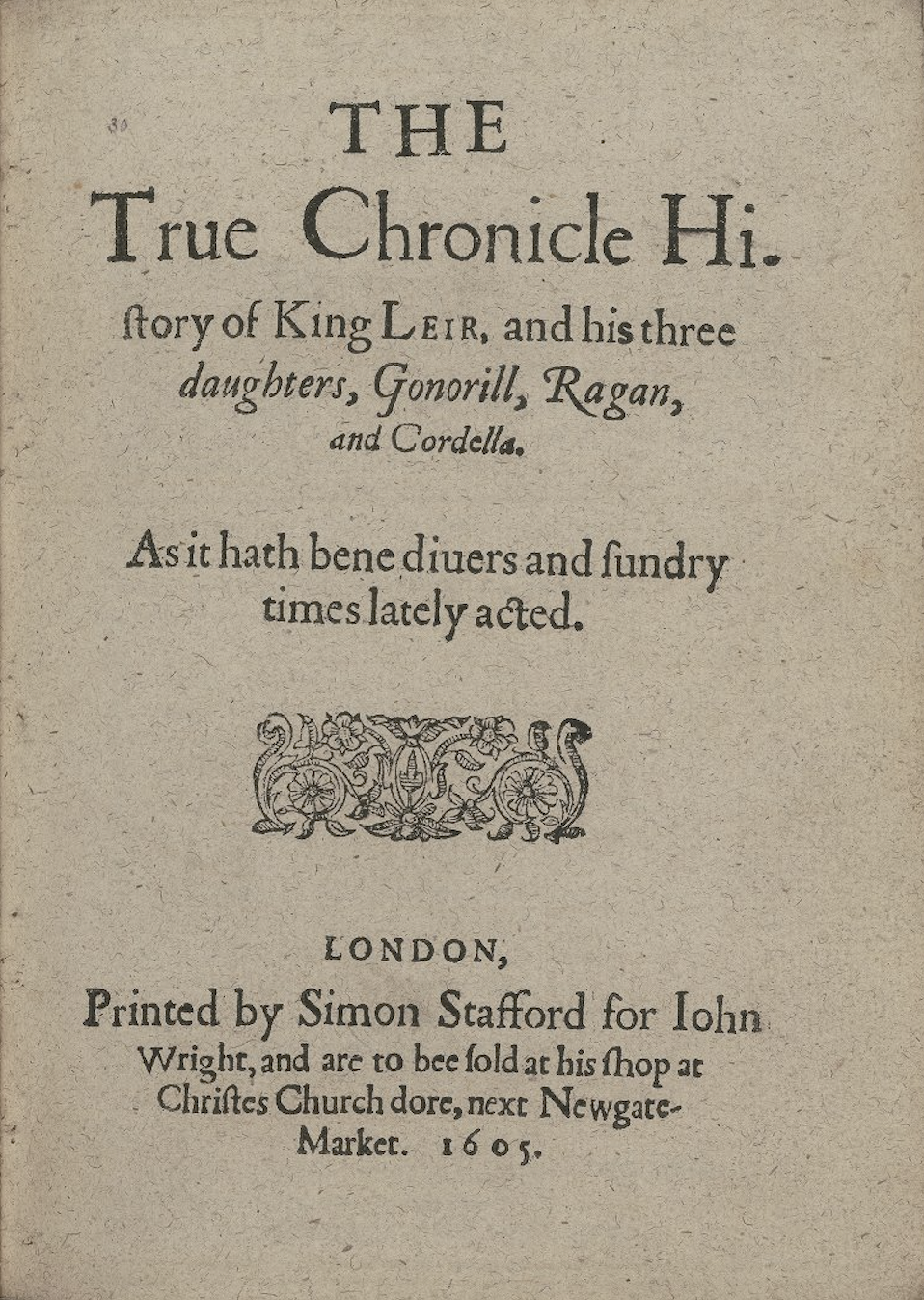
<front>
<titlePage>
<titlePart type="main">
<lb/>THE <lb/>True Chronicle Hi<pc force="weak">-</pc>
<lb/>storie of King Leir and his three <lb/>
<hi rendition="rnd:italic">daughters, Gonorill, Ragan, <lb/>and Cordella</hi>
</titlePart>
<titlePart type="desc">
<lb/>As it hath bene diuers and sundry <lb/>times lately acted. </titlePart>
<figure type="device"/>
<docImprint>
<lb/>
<pubPlace rendition="rnd:letterspace">LONDON</pubPlace>, <lb/>Printed by Simon Stafford for <publisher>Iohn <lb/>Wright</publisher>, and are to bee sold at his shop at <lb/>
<pubPlace>Christes Church dore, next Newgate- <lb/>Market.</pubPlace>
<docDate rendition="rnd:letterspace">1605</docDate>. </docImprint>
</titlePage>
</front>
<titlePage>
<titlePart type="main">
<lb/>THE <lb/>True Chronicle Hi<pc force="weak">-</pc>
<lb/>storie of King Leir and his three <lb/>
<hi rendition="rnd:italic">daughters, Gonorill, Ragan, <lb/>and Cordella</hi>
</titlePart>
<titlePart type="desc">
<lb/>As it hath bene diuers and sundry <lb/>times lately acted. </titlePart>
<figure type="device"/>
<docImprint>
<lb/>
<pubPlace rendition="rnd:letterspace">LONDON</pubPlace>, <lb/>Printed by Simon Stafford for <publisher>Iohn <lb/>Wright</publisher>, and are to bee sold at his shop at <lb/>
<pubPlace>Christes Church dore, next Newgate- <lb/>Market.</pubPlace>
<docDate rendition="rnd:letterspace">1605</docDate>. </docImprint>
</titlePage>
</front>
Remove Text Division and Heading Division Elements
Often, early modern playbooks do not contain consistent act or scene numbers. Even
if the source text you are working on does have act and scene numbers at the beginning
of the playbook, they may not be consistent throughout the play.
We do not use the
When your modernized text is ready to publish, we can link between the act and scene
divisions in the modernized text and the
<div>
element in our semi-diplomatic transcriptions. Instead, editorial act and scene divisions
are marked with the
<milestone>
element. Until the modern file of the edition that you are working on is ready to
be published, comment out any
<milestone>
elements. If the modern file of the edition that you are working on is ready to be
published, then follow this procedure:
For act divisions, use the
<milestone>
element with an
@unit attribute and "act" value.For scene divisions, use the
<milestone>
element with an
@unit attribute and "scene" value.
<milestone>
elements in the semi-diplomatic transcription so that readers can easily go between
the two and compare the two texts.Replace all
<head>
elements with the
<label>
element. Add the
@type attribute and "heading" value to the
<label>
element if the label is working as a heading.If act and scene numbers are in your XML file but not in the original text, comment
out
<div>
act and scene numbers. You must delete closing
<div>
tags, not comment them out. It is possible for the editor to add
<milestone>
elements pointing to the modernized text later, so it is important to keep these
commented out
<div>
elements.Conversion yields:
<div type="scene" n="2">
<lb/>
<head>The Second Acte.</head>
</div>
<lb/>
<head>The Second Acte.</head>
</div>
Amend to:
<!-- <div type="scene" n="2"> -->
<lb/>
<label type="heading">The Second Acte.</label>
<lb/>
<label type="heading">The Second Acte.</label>
Replace all
<closer>
elements with the
<label>
element.Encode Speaker Elements
Remove all instances of
<hi rendition="rnd:italic"> on the
<speaker>
element because speaker will render as italic by default. For more information about
our default styling for semi-diplomatic transcriptions, see Default Style in Semi-Diplomatic Transcriptions.
Special case: there may be instances wherein the first letter of the speaker’s name
appears in roman type rather than italic. If this occurs, wrap the first letter in
hi rendition="rnd:normal". Wrapping the first letter in hi rendition="rnd:normal" isolates this letter and ensures that it will appear in roman type while the rest
of the name will remain italicized.
<speaker>
<hi rendition="rnd:normal">L</hi>acie.</speaker>
<hi rendition="rnd:normal">L</hi>acie.</speaker>
If the entirety of the speaker’s name appears in roman type, simply put the
@rendition attribute with a value of "rnd:normal" on the
<speaker>
element.
<speaker rendition="rnd:normal">King.</speaker>
LEMDO has pre-formed regular expressions that will remove the majority of cases of
<hi rendition="rnd:italic"> in the
<speaker>
element.If there is no speech prefix at the beginning of a speech in your source text, do
not encode a
<speaker>
tag. Remove
@who Attributes
We do not state who delivers a speech in semi-diplomatic transcriptions—it is the
editor’s job to assign these attributes in the modernized text only. If there are
@who attributes in the semi-diplomatic transcription you are remediating, then remove
them.Conversion yields:
<sp who="#emd3LL_Q1_Love">
<speaker>Loue.</speaker>
<!-- ... -->
</sp>
<speaker>Loue.</speaker>
<!-- ... -->
</sp>
Amend to:
<sp>
<speaker>Loue.</speaker>
<!-- ... -->
</sp>
<speaker>Loue.</speaker>
<!-- ... -->
</sp>
LEMDO has a prefabricated regex that will remove the
@who attribute from the
<sp>
element in most instances. See the appropriate regex in our table of pre-formed regular expressions.Remove Foreign Language Tags
In early modern playbooks, instances of Latin and other languages may be indicated
through italic type. These languages are likely wrapped in the
<foreign>
element, which is inherited from IML. In LEMDO’s remediation of semi-diplomatic transcriptions,
we do not make decisions about language type or use. As remediators, we simply note
whether the text on the page is italicized.Remove all instances of
<foreign>
language tags. Use inline styling if the text previously wrapped in
<foreign>
is in italic type in your source text. Add the
@rendition attribute with a value of "rnd:italic" to the largest container of completely italicized text (e.g., if an entire speech
is italicized, add rendition="rnd:italic" to
<sp>
). If there are no container elements that have text completely in italic type, wrap
the italic section in the
<hi>
element and add a
@rendition attribute with a value of "rnd:italic".For more information on encoding inline style, see
Encode Inline Style Using Pre-Formed Values in Semi-Diplomatic Transcriptions.
Encode Stage Directions
Remove all instances of
<hi rendition="rnd:italic"> on the
<stage>
element because
<stage>
will render as italic by default. See Default Style in Semi-Diplomatic Transcriptions.
LEMDO has a prefabricated regular expression that will remove
<hi rendition="rnd:italic"> from
<stage>
elements. See the appropriate regex in our list of pre-formed regular expressions.Special case: there may be instances where a character or a word appears in roman
type rather than italic. If this occurs, wrap that text in
<hi rendition="rnd:normal">. This isolates that text and ensures that it will appear in roman type while the
rest of the stage direction will remain italicized. If the entire stage direction
appears in roman type, simply put the
@rendition attribute with a value of "rnd:normal" on the
<stage>
element. See also Encode Inline Style Using Pre-Formed Values in Semi-Diplomatic Transcriptions.
IML had fewer options for encoding the placement of stage directions than LEMDO does.
As a remediator, you will use LEMDO’s more precise vocabulary. LEMDO accounts for
the fact that stage directions sometimes appear in the margin area (especially in
early sixteenth-century playbooks) and sometimes within the compositorial line in
the text block.
To encode placement of stage directions, add a
@place attribute to the
<stage>
element. Oxygen offers the possible
@place values in a drop-down menu. For complete practice of encoding
@place attributes in the
<stage>
element, see Encode Stage Directions in Semi-Diplomatic Transcriptions.For a complete list of placement values, see
Placement Taxonomy.
Usually the unremediated texts will have stage directions tagged with the
<stage>
element already. They may have a
@type attribute with a value indicating what kind of stage direction they are (entrance,
exit, etc.). Make sure these type values are accurate and correct them if necessary.
We retain them in anticipation of making a future dictionary of stage directions.
For a list of
@type values, see Practice: Encode
@type Values.Sometimes stage directions are unusual and inconsistent in early modern playbooks.
They may be off to the side, in the margins, seemingly added after initial printing,
etc. If you are unsure how to proceed with a stage direction, leave XML comments for
a project lead.
Remove "g:zeroWidthSpace" Values
Remove any
<g>
elements with the "g:zeroWidthSpace" value. We silently modernize spacing between words because it is too difficult to
exactly replicate the various spacing present in early modern playbooks.You can use a find-and-replace to run this conversion. Follow these steps:
Go to Oxygen’s search function by clicking Ctrl+F.
Type the following into the search text boxes:
Find:
<g ref="g:zeroWidthSpace"> </g>
Replace with: Leave
Replace withempty.
Click
Find All.
If there are instances found, click
Replace All.
Validate your file.
Conversion yields:
<!-- ... -->
<ab>
<g ref="g:zeroWidthSpace"></g>Woman,<g ref="g:zeroWidthSpace"></g>do what thou canst to saue our honors, <lb/>Driue them from Orleance,<g ref="g:zeroWidthSpace"></g>and be immortaliz’d.</ab> <!-- ... -->
<g ref="g:zeroWidthSpace"></g>Woman,<g ref="g:zeroWidthSpace"></g>do what thou canst to saue our honors, <lb/>Driue them from Orleance,<g ref="g:zeroWidthSpace"></g>and be immortaliz’d.</ab> <!-- ... -->
Amend to:
<!-- ... -->
<ab>Woman, do what thou canst to saue our honors,
<lb/>Driue them from Orleance, and be immortaliz’d.</ab>
<!-- ... -->
Remove Tagging for Long S
Most semi-diplomatic transcriptions coming from the old ISE will have tagged the long
s. We do not retain this tagging. Remove any
<g>
elements tagging the long s, whether as a standalone glyph (i.e., <g ref="g:long">) or as a ligature (e.g., <g ref="lig:longS_t">). Remove "rnd:justify" Values
Remove
"rnd:justify" values. We do not capture justification in semi-diplomatic transcriptions. You can
do this step either as you go through the play (removing "rnd:justify" values one-by-one as you come across them) or by using our pre-formed regex to remove "rnd:justify" values.Conversion yields:
<sp>
<speaker rendition="rnd:justify rnd:italic">Par</speaker>
<ab>There is none: Man setting downe before you, <lb/>will vndermine you, and blow you vp.</ab>
</sp>
<speaker rendition="rnd:justify rnd:italic">Par</speaker>
<ab>There is none: Man setting downe before you, <lb/>will vndermine you, and blow you vp.</ab>
</sp>
Amend to:
<sp>
<speaker rendition="rnd:italic">Par</speaker>
<ab>There is none: Man setting downe before you, <lb/>will vndermine you, and blow you vp.</ab>
</sp>
<speaker rendition="rnd:italic">Par</speaker>
<ab>There is none: Man setting downe before you, <lb/>will vndermine you, and blow you vp.</ab>
</sp>
Tidy Line Beginning Elements
Make sure there is an
<lb>
element to capture the beginning of every typographical line bearing inked type (including
before stage directions that appear on their own line).
Caution! Do not use
<lb>
elements to create white space. Many IML users added extra
<lb>
elements to indicate white spaces between lines of type. You need to remove these
extra
<lb>
elements as you go and replace them with
<space>
elements. See Remove Extra Line Beginnings.
Use a find-and-replace to convert the value
"tln" inherited from IML to the LEMDO value "wln" (for Witness Line Number), including in the First Folio of Shakespeare’s plays.
Conversion yields:
<!-- ... -->
<lb type="tln" n="2"/>
<sp>
<speaker>Lu.</speaker>
<ab>Sir Valentines page: & sent I think from Protheus; <lb type="tln" n="192"/>He would haue giuen it you, but I being in the way, <lb type="tln" n="193"/>Did in your name receiue it: pardon the fault I pray.</ab>
</sp> <!-- ... -->
<speaker>Lu.</speaker>
<ab>Sir Valentines page: & sent I think from Protheus; <lb type="tln" n="192"/>He would haue giuen it you, but I being in the way, <lb type="tln" n="193"/>Did in your name receiue it: pardon the fault I pray.</ab>
</sp> <!-- ... -->
Amend to:
<!-- ... -->
<lb type="wln" n="2"/>
<sp>
<speaker>Lu.</speaker>
<ab>Sir Valentines page: & sent I think from Protheus; <lb/>He would haue giuen it you, but I being in the way, <lb/>Did in your name receiue it: pardon the fault I pray.</ab>
</sp> <!-- ... -->
<speaker>Lu.</speaker>
<ab>Sir Valentines page: & sent I think from Protheus; <lb/>He would haue giuen it you, but I being in the way, <lb/>Did in your name receiue it: pardon the fault I pray.</ab>
</sp> <!-- ... -->
If there is an end-of-line hyphen that is not a word separator, ensure that the hyphen
is tagged using the
<pc>
element with the
@force attribute and the value "weak":
<ab>Then put your pipes in your bag, for I’le away; goe, va<pc force="weak">-</pc>
<lb/>nish away. </ab>
<lb/>nish away. </ab>
Remove all
<lb>
elements that denote a blank line. You will later use the
<space>
element to indicate where there is semantically significant white space.Check Order Elements in Speeches and Stage Directions
Sometimes the elements as converted are out of order. IML was not rigidly hierarchical
the way XML is. You need to make the order of the tags consistent with LEMDO standards.
Make sure the line beginning (
<lb>
) comes before the speech and stage elements (
<sp>
and
<stage>
).The correct order for speeches is as follows:
<lb/>
<sp>
<speaker><!-- Character Name --></speaker>
<ab>
<lb/>
<!-- First line of speech -->
<lb/>
<!-- Second line of speech -->
<lb/>
<!-- Third line of speech -->
</ab>
</sp>
<speaker><!-- Character Name --></speaker>
<ab>
<lb/>
<!-- First line of speech -->
<lb/>
<!-- Second line of speech -->
<lb/>
<!-- Third line of speech -->
</ab>
</sp>
The correct order for stage directions is as follows:
<lb/>
<stage><!-- First line of stage direction -->
<lb/>
<!-- Second line of stage direction -->
</stage>
<lb/>
<!-- Second line of stage direction -->
</stage>
For example:
<lb type="wln" n="74"/>
<sp>
<speaker>Eda.</speaker>
<ab> Ah Ned, but hadst thou watcht her as my self, <lb type="wln" n="75"/>And seene the secret bewties of the maid, <lb type="wln" n="76"/>Their courtly coinesse were but foolery. </ab>
</sp>
<speaker>Eda.</speaker>
<ab> Ah Ned, but hadst thou watcht her as my self, <lb type="wln" n="75"/>And seene the secret bewties of the maid, <lb type="wln" n="76"/>Their courtly coinesse were but foolery. </ab>
</sp>
<lb type="wln" n="1"/>
<stage>
Enter King <hi rendition="rnd:normal">Henry, Exeter, 2.</hi> Bishops, <hi rendition="rnd:normal">Clarence,</hi> and other
<lb type="wln" n="2"/>Attendants.
</stage>
Encode Vertical and Horizontal White Space
We use the
<space>
elements in our semi-diplomatic transcriptions judiciously to capture vertical space
between printed units and to capture horizontal white space within lines if it is
semantically significant.If you come across space elements in your remediation, see
Encode White Space in Semi-Diplomatic Transcriptionsor follow the directions below to ensure you proceed correctly.
If there is white space with no type or ornaments between lines, use the
<space>
element. Add the
@dim attribute with the value "vertical", the
@unit attribute with the value "line", and the
@quantity attribute with the numerical value "1", "2", or more (equivalent to the number of compositorial lines that would fit in that
white space).Conversion yields:
<lb type="tln" n="1"/>
<head rendition="rnd:centre rnd:italic">A<g ref="lig:ct">ct</g>us primus. Scoena Prima</head>
<lb/>
<figure type="rule"/>
<lb/>
In remediation, you will emend as follows:
<lb type="wln" n="1"/>
<head rendition="rnd:centre rnd:italic">A<g ref="lig:ct">ct</g>us primus. Scoena Prima</head>
<space dim="vertical" unit="line" quantity="1"/>
<figure type="rule"/>
<space dim="vertical" unit="line" quantity="1"/>
If there is horizontal white space, use the
<space>
element. Add the
@dim attribute with the value "horizontal", the
@unit attribute with the value "char", and the
@quantity attribute with a numerical value equivalent to the number of “em”s that are white
spaces. For example:
<ab rendition="rnd:italic">
<lb type="wln" n="1570"/>
<space dim="horizontal" unit="char" quantity="4"/>The Courtiers <g ref="lig:fl">fl</g>attring Iewels, <lb type="wln" n="1571"/>
<space dim="horizontal" unit="char" quantity="4"/>(Temptations onely fewels) <lb type="wln" n="1572"/>
<space dim="horizontal" unit="char" quantity="4"/>The Lawyers ill-got monyes, <lb type="wln" n="1573"/>
<space dim="horizontal" unit="char" quantity="4"/>That <g ref="g:longS">s</g>ucke vp poore Bees Honyes: <lb type="wln" n="1574"/>
<space dim="horizontal" unit="char" quantity="4"/>The Citizens <g ref="g:longS">s</g>onne’s ryot, <lb type="wln" n="1575"/>
<space dim="horizontal" unit="char" quantity="4"/>The gallant co<g ref="lig:longS_t">st</g>ly dyet: <lb type="wln" n="1576"/>
<space dim="horizontal" unit="char" quantity="4"/>Silks and Veluets, Pearles and Ambers, <lb type="wln" n="1577"/>
<space dim="horizontal" unit="char" quantity="4"/>Shall not draw me to their Chambers. <lb type="wln" n="1578"/>
<space dim="horizontal" unit="char" quantity="4"/>Silks and Veluets, &c. </ab>
<lb type="wln" n="1570"/>
<space dim="horizontal" unit="char" quantity="4"/>The Courtiers <g ref="lig:fl">fl</g>attring Iewels, <lb type="wln" n="1571"/>
<space dim="horizontal" unit="char" quantity="4"/>(Temptations onely fewels) <lb type="wln" n="1572"/>
<space dim="horizontal" unit="char" quantity="4"/>The Lawyers ill-got monyes, <lb type="wln" n="1573"/>
<space dim="horizontal" unit="char" quantity="4"/>That <g ref="g:longS">s</g>ucke vp poore Bees Honyes: <lb type="wln" n="1574"/>
<space dim="horizontal" unit="char" quantity="4"/>The Citizens <g ref="g:longS">s</g>onne’s ryot, <lb type="wln" n="1575"/>
<space dim="horizontal" unit="char" quantity="4"/>The gallant co<g ref="lig:longS_t">st</g>ly dyet: <lb type="wln" n="1576"/>
<space dim="horizontal" unit="char" quantity="4"/>Silks and Veluets, Pearles and Ambers, <lb type="wln" n="1577"/>
<space dim="horizontal" unit="char" quantity="4"/>Shall not draw me to their Chambers. <lb type="wln" n="1578"/>
<space dim="horizontal" unit="char" quantity="4"/>Silks and Veluets, &c. </ab>
Note that we do not use
<space>
to indicate text alignment (e.g., right, left, centre). Instead, we use the
@place attribute.Proof Forme Works
Follow the instructions in
Encode Forme Works in Semi-Diplomatic Transcriptionsto make sure your text’s forme works are encoded properly.
When encoding catchwords, remove
"rend:right". Catchwords will render on the right because of the file-wide styling that you added
in the
<tagsDecl>
element.Special case: leave
rendition="rnd:italic" when the catchword is italicized. This rendition may be on the
<fw>
element (if the entirety of the catchword is italicized) or on a
<hi>
element (if only part of the catchword is italicized). Stage directions and character
names are often italicized, thus catchwords that correspond with a stage direction
or character name on the next page are often italicized.Running titles will render as roman font by default. If some of your running titles
are in italic font, put the
@rendition attribute with a value of "rnd:italic" on those that are in italic. If all of your running titles are in italic font, add
a
<rendition>
element to the
<tagsDecl>
in the
<teiHeader>
of your file. See Encode File-Wide Style in Semi-Diplomatic Transcriptionsfor information about the
<tagsDecl>
.When encoding signature marks, remove spaces between the letter and the number. By
default, LEMDO renders signature numbers as letterspaced. You can remove the space
using a pre-formed regular expression.
For more information on signature marks, see
Signed Leaves.
Proof Transcription
Checking the transcription of the main text involves reading the facsimile alongside
the XML file and resolving any differences. This means correcting any transcription
errors, adding tags, and making sure the XML offers a truthful description of the
source text.
You will have to add tagging for:
Hungwords: follow the instructions in
Encode Hungwords in Semi-Diplomatic Transcriptions.
Rotated letters: follow the instructions in
Encode Rotated Letters in Semi-Diplomatic Transcriptions.
Some abbreviations: follow the instructions in
Encode Abbreviations in Semi-Diplomatic Transcriptions.
Some glyphs: follow the instructions in
Encode Glyphs and Ligatures in Semi-Diplomatic Transcriptions.While most ligatures will already be tagged, digraphs (æ, œ, etc.) will need to be added to your file to replace separated letters (ae, oe, etc.). Also try to remedy all occurrences of
<g>
elements with "UNKNOWN" values. Some previous transcribers replaced unknown glyphs with question marks. Most
instances of unknown glyphs can be remedied by checking the facsimile.Foreign words: follow the instructions in
Encode Foreign Languages.We do not use the
<foreign>
element in semi-diplomatic transcriptions. Some foreign words will be tagged with
the
@rendition attribute and "rnd:italic" value.Encode Style
Our generic CSS for semi-diplomatic transcriptions should work to automatically style
most of your text. We capture minimal styling in semi-diplomatic transcriptions because
facsimiles are readily available. Importantly, we capture:
Decorative letters
Printer’s ornaments and ruled lines
Drop caps
Indentation (including hanging indents)
We also capture:
Italicization: Use the
<hi>
element,
@rendition attribute, and "rnd:italic" value to capture italicization. Note that the
@rendition attribute and "rnd:italic" value can be added directly to other elements such as
<speaker>
and
<stage>
.Centre or right alignment: Use the
@place attribute on the
<label>
element or
<stage>
element to describe where text is. See Practice: Encode Placementfor information on LEMDO’s practice for encoding placement. Note that if the text is somewhere in between the areas described by our placement taxonomy, align to the nearest side.
How the page is typeset: Use the
<hi>
element,
@rendition attribute, and "rnd:letterspace" value to capture letterspacing. Note that the
@rendition attribute and "rnd:letterspace" value can be added directly to other elements such as
<fw>
.We do not capture:
Font size.
Type (beyond roman, italic, and English type).
Precise spacing between words (or lack thereof).
Exact size of drop caps, figures, and ornaments.
Update the Tagging Declaration: Final Styling
If there is styling that is consistent throughout your source material that is not
included in LEMDO’s default semi-diplomatic transcription CSS (see
Default Style in Semi-Diplomatic Transcriptions), create a
<tagsDecl>
element as a child of the
<encodingDesc>
in the
<teiHeader>
of your file. You can add document-specific CSS here. For information on how to add
styling using the
<tagsDecl>
, see Encode File-Wide Style in Semi-Diplomatic Transcriptions.
Number Speeches
The next step in remediating semi-diplomatic transcriptions is to number speeches.
To do this, run the XSLT that we have created to number speeches. See
Practice: Number Speeches
For example:
<sp xml:id="emdEdw_Q1_sp1">
<speaker>King.</speaker>
<ab>
<lb type="wln" n="6"/>
<hi rendition="rnd:dropcap">R</hi>Obert of Artoys banisht though thou be, <!-- ... --></ab>
</sp>
<speaker>King.</speaker>
<ab>
<lb type="wln" n="6"/>
<hi rendition="rnd:dropcap">R</hi>Obert of Artoys banisht though thou be, <!-- ... --></ab>
</sp>
Number Lines
The final step in remediating semi-diplomatic transcriptions is numbering
<lb>
elements. The LEMDO schema does not yet catch out of order
@n values on
<lb>
elements in semi-diplomatic transcriptions. Some files may already have the
@type and
@n attributes numbering
<lb>
elements while others do not.Even if your file already has numbered
<lb>
elements, it is important to renumber them at the end of remediation. How they are
numbered may not align with current LEMDO practice. Additionally,
<lb>
elements are often added, removed, and/or rearranged during the remediation process.
Consequently, ensuring that
<lb>
elements are numbered correctly is one of the final steps of remediating your semi-diplomatic
transcription. For LEMDO’s current practice on numbering
<lb>
elements, see Practice: Which Lines to Number.
Update Document Status: Proofing
When you have completed your work with your semi-diplomatic transcription, change
the document status. Follow these steps:
Change the value of
@status on
<revisionDesc>
to "IML-TEI_proofing".Add a new
<change>
element as a child of
<revisionDesc>
.Write the substantive change in the text node (i.e.
Finished remediating document).
Add a
@who, a
@when, and a
@status attribute to the
<change>
element.Add the prefix
"pers:" followed by your xml:id to the
@who attribute.Add the date you finished the remediation to the
@when attribute.Other Resources
LEMDO YouTube video: Semi-Diplomatic Transcriptions (Technical)
LEMDO YouTube video: Advanced Topics in Semi-Diplomatic Transcriptions (Webinar 1)
LEMDO YouTube video: Advanced Topics in Semi-Diplomatic Transcriptions (Webinar 2)
Prosopography
Chloe Mee
Chloe Mee (she/her) worked as a research assistant with the LEMDO team over several
periods from 2022 to 2025. She graduated from the University of Victoria in 2025 with
a BA (Hons with distinction) in English. She will be studying at the University of
British Columbia to complete her MA in English. Chloe collaborated with the LEMDO
team on a VKURA internship in summer 2022, mainly focusing on Hamlet quartos. Following
her internship, she also worked as a research assistant in 2022–23 and 2025.
Illya
Illya has a BA in English and Sociocultural Anthropology and an MA in English. Prior
to joining the HCMC, he was a PhD candidate in English and Book History at the University
of Toronto and worked on Records of Early English Drama and on the Modernist Archives Publishing Project. His work at the HCMC focuses on creating web-based applications for research projects
led by members of the faculty of Humanities at the University of Victoria. This involves
creating schemas for new and existing datasets, writing XSLT and build files to transform
datasets into structured TEI and HTML formats, implementing staticSearch, and ensuring
that new projects are Endings Principles compliant.
Isabella Seales
Isabella Seales is a fourth year undergraduate completing her Bachelor of Arts in
English at the University of Victoria. She has a special interest in Renaissance and
Metaphysical Literature. She is assisting Dr. Jenstad with the MoEML Mayoral Shows
anthology as part of the Undergraduate Student Research Award program.
Janelle Jenstad
Janelle Jenstad is a Professor of English at the University of Victoria, Director
of The Map of Early Modern London, and Director of Linked Early Modern Drama Online. With Jennifer Roberts-Smith and Mark Beatrice Kaethler, she co-edited Shakespeare’s Language in Digital Media: Old Words, New Tools (Routledge). She has edited John Stow’s A Survey of London (1598 text) for MoEML and is currently editing The Merchant of Venice (with Stephen Wittek) and Heywood’s 2 If You Know Not Me You Know Nobody for DRE. Her articles have appeared in Digital Humanities Quarterly, Elizabethan Theatre, Early Modern Literary Studies, Shakespeare Bulletin, Renaissance and Reformation, and The Journal of Medieval and Early Modern Studies. She contributed chapters to Approaches to Teaching Othello (MLA); Teaching Early Modern Literature from the Archives (MLA); Institutional Culture in Early Modern England (Brill); Shakespeare, Language, and the Stage (Arden); Performing Maternity in Early Modern England (Ashgate); New Directions in the Geohumanities (Routledge); Early Modern Studies and the Digital Turn (Iter); Placing Names: Enriching and Integrating Gazetteers (Indiana); Making Things and Drawing Boundaries (Minnesota); Rethinking Shakespeare Source Study: Audiences, Authors, and Digital Technologies (Routledge); and Civic Performance: Pageantry and Entertainments in Early Modern London (Routledge). For more details, see janellejenstad.com.
Joey Takeda
Joey Takeda is LEMDO’s Consulting Programmer and Designer, a role he assumed in 2020
after three years as the Lead Developer on LEMDO.
Kate LeBere
Project Manager, 2020–2021. Assistant Project Manager, 2019–2020. Textual Remediator
and Encoder, 2019–2021. Kate LeBere completed her BA (Hons.) in History and English
at the University of Victoria in 2020. During her degree she published papers in The Corvette (2018), The Albatross (2019), and PLVS VLTRA (2020) and presented at the English Undergraduate Conference (2019), Qualicum History
Conference (2020), and the Digital Humanities Summer Institute’s Project Management
in the Humanities Conference (2021). While her primary research focus was sixteenth
and seventeenth century England, she completed her honours thesis on Soviet ballet
during the Russian Cultural Revolution. She is currently a student at the University
of British Columbia’s iSchool, working on her masters in library and information science.
Mahayla Galliford
Project Manager, 2025-present; Assistant Project Manager, 2024-2025; Research Assistant,
2021-present. Mahayla Galliford (she/her) graduated from the University of Victoria
with a BA (honours with distinction) in 2024, and an MA English in 2026. Mahayla’s
undergraduate research explored early modern stage directions and civic water pageantry.
Her SSHRC-funded MA thesis project focuses on transcribing, editing, and encoding
early modern girls’ manuscripts, specifically Lady Rachel Fane’s May Masque in collaboration with LEMDO.
Martin Holmes
Martin Holmes has worked as a developer in the UVic’s Humanities Computing and Media
Centre for over two decades, and has been involved with dozens of Digital Humanities
projects. He has served on the TEI Technical Council and as Managing Editor of the
Journal of the TEI. He took over from Joey Takeda as lead developer on LEMDO in 2020.
He is a collaborator on the SSHRC Partnership Grant led by Janelle Jenstad.
Navarra Houldin
Training and Documentation Lead 2025–present. LEMDO project manager 2022–2025. Textual
remediator 2021–present. Navarra Houldin (they/them) completed their BA with a major
in history and minor in Spanish at the University of Victoria in 2022. Their primary
research was on gender and sexuality in early modern Europe and Latin America. They
are continuing their education through an MA program in Gender and Social Justice
Studies at the University of Alberta where they will specialize in Digital Humanities.
Rylyn Christensen
Rylyn Christensen is an English major at the University of Victoria.
Samuel Seaberg
Samuel Seaberg, a University of Victoria English undergrad, enjoys riding his bike.
During the summer of 2025, he began working with LEMDO as a recipient of the Valerie
Kuehne Undergraduate Research Award (VKURA). Unfortunately, due to his summer being
spent primarily in working to establish an edition of Thomas Heywood’s If You Know Not Me, You Know Nobody, Part 2 and consequently working out how to represent multi-text works in a digital space,
his bike has suffered severely of sheltered seclusion from the sun. Note: Samuel now
works for LEMDO as the Assistant Project Manager, much to his bike’s chagrin.
Tracey El Hajj
Junior Programmer 2019–2020. Research Associate 2020–2021. Tracey received her PhD
from the Department of English at the University of Victoria in the field of Science
and Technology Studies. Her research focuses on the algorhythmics of networked communications. She was a 2019–2020 President’s Fellow in Research-Enriched
Teaching at UVic, where she taught an advanced course on
Artificial Intelligence and Everyday Life.Tracey was also a member of the Map of Early Modern London team, between 2018 and 2021. Between 2020 and 2021, she was a fellow in residence at the Praxis Studio for Comparative Media Studies, where she investigated the relationships between artificial intelligence, creativity, health, and justice. As of July 2021, Tracey has moved into the alt-ac world for a term position, while also teaching in the English Department at the University of Victoria.
Bibliography
Farmer, John S., ed. The Famous Victories of Henry the Fifth 1598. The Tudor Facsimile Texts, 1912.
The famous victories of Henry the fifth. Thomas Creede, 1598. STC 13072. Queen’s Men Editions. ESTC S106379. DEEP 252.
Orgography
LEMDO Team (LEMD1)
The LEMDO Team is based at the University of Victoria and normally comprises the project
director, the lead developer, project manager, junior developers(s), remediators,
encoders, and remediating editors.
Metadata
| Authority title | Remediate Semi-Diplomatic Transcriptions |
| Type of text | Documentation |
| Publisher | University of Victoria on the Linked Early Modern Drama Online Platform |
| Series | Linked Early Modern Drama Online |
| Source |
TEI Customization created by Martin Holmes, Joey Takeda, and Janelle Jenstad; documentation written by members of the LEMDO Team
|
| Editorial declaration | n/a |
| Edition | Released with Linked Early Modern Drama Online 1.0 |
| Encoding description | Encoded in TEI P5 according to the LEMDO Customization and Encoding Guidelines |
| Document status | prgGenerated |
| Funder(s) | Social Sciences and Humanities Research Council of Canada |
| License/availability |
This file is licensed under a CC BY-NC_ND 4.0 license, which means that it is freely downloadable without permission under the following
conditions: (1) credit must be given to the author and LEMDO in any subsequent use
of the files and/or data; (2) the content cannot be adapted or repurposed (except
in quotations for the purposes of academic review and citation); and (3) commercial
uses are not permitted without the knowledge and consent of the editor and LEMDO.
This license allows for pedagogical use of the documentation in the classroom.
|