This chapter of our documentation is still in beta. We welcome feedback, corrections,
and questions while we finalize the page in our 2024–2025 work cycle.
Introduction to Modernized Texts
The documentation in this chapter is for encoders and editors encoding their modernized
texts.
Learning Outcomes
By the time you have worked through every section of this chapter, you will:
Know how to encode the structure of your modernized texts using elements for acts,
scenes, speeches, stage directions, and lines.
Be able to create your character list with notes on characters.
Understand how your encoding is used by LEMDO’s processing to create your edition’s
table of contents and to create links to discrete units in your modernized texts.
Know how to encode verse, including verse letters and songs.
Be familiar with LEMDO’s list of values allowed on the
@type attribute on stage directions.
Understand how LEMDO will render your stage directions.
Modernization Workflow
The LEMDO team will provide you with an XML template for your modernized text once
your semi-diplomatic transcription is completed.1 This template will use the text of your semi-diplomatic transcription, but replace
the encoding with the basic TEI tagging for modernized texts. In cases where there
is more than one possible copy-text and therefore more than one semi-diplomatic transcription,
consult with your anthology lead about the appropriate starting point for your modernized
text. If you choose to do copy-text editions of multiple early texts, we will provide
you with all the templates you need, within reason.
The modernized text is where you will add your editorial act and scene divisions,
distinguish prose from verse, add editorial stage directions, and assign speeches
to speakers. Your character list is embedded in the
<teiHeader>
of the modernized text file.
Your collation and annotations are pinned to this file. You will want to prepare your
collation before you emend the text.2 You will likely create annotations as you modernize and/or after you have finished
tagging prose, verse, and literary divisions.
Once you have completed your collation, you will make any emendations (recording in
your collation file all substantive changes that are unique to you or attributable
to earlier editors). You will usually want to make any relineations while you emend.
Then you modernize the spelling and punctuation of the text; during the process of
modernization, you may discover additional words/phrases that you wish to collate.
The purpose of tagging in the modernized text is to encode editorial decisions. While
many of the TEI tags will be in place, you should confirm LEMDO’s markup to make sure
it communicates your intention, both in its final rendering for human readers and
in precision for machine-aided analysis.
Learn about the basic patterns of countable units in modernized texts
Encode Character Lists in Modernized Texts
Introduction
LEMDO produces a character list (also called a role list in LEMDO) only for the modernized texts. The character list is meant to be a truthful
list of all the roles in the play. LEMDO also uses the list to cross-check the speech
prefixes in the play and ensure consistency of name and spelling. You can add notes
on the characters to this list.
LEMDO uses the list to generate the online and printed Character List in your edition. This character list is viewable from within the modernized text
via the slide-out hamburger menu. Clicking on Characters pops out a pane on the right of the interface with a list of characters. It is also
turned into a stand-alone page linked from the edition landing page, where it is entitled
Role List. If your edition will be turned into a print-on-demand LEMDO Hornbook, your
<listPerson>
will be used to generate a Character List section in the book.
Practice: Encode Your Character List
Locate Your Character List
You will receive a template file for your modernized text based on the semi-diplomatic
transcription of your choice. The character list belongs in the
<particDesc>
(participation description) of the
<teiHeader>
of this file. Inside the
<particDesc>
, you will find a
<listPerson>
element with one sample
<person>
entry. If you are not starting from a template, then you may need to add a
<listPerson>
inside the
<particDesc>
yourself and add a
@type attribute with the value castList.3 Follow the Basic Template for a Character to add each character.
Basic Template for a Character
The basic template for a single
<listPerson>
with a single character is as follows. To create a full character list, add one
<person>
element (and all of its child elements) for each character.
<particDesc> <listPerson type="castlist"> <person xml:id="emdEG_M_Name"> <persName> <name>Label for character</name> <reg>Allowed speech prefix</reg> </persName> <note type="editorial"> <p>Commentary on the character.</p> </note> </person> </listPerson> </particDesc>
Breakdown of Elements in the
<person>
Entry
<person>
: Add one
<person>
element for each character. If a character speaks, they must have a
<person>
element in the
<particDesc>
. If the character does not speak (as is often the case with masques and pageants),
inclusion is optional. Discuss the appropriate strategy with your anthology lead.
@xml:id: Add the attribute
@xml:id to the
<person>
element. Each character in your play must have a unique
@xml:id value. The
@xml:id values for your characters are constructed formulaically as follows: emd + name of
your file + underscore + character name or short form thereof. For example, emdH5_FM_Warwick
is the xml:id for Warwick in the folio modernized text of Henry V. Names of characters are capitalized.4
<persName>
: The
<persName>
element allows us to capture various names.
Each
<persName>
element must contain one child
<name>
element.
It may contain one or more child
<reg>
elements.
<name>
: In the text node of the
<name>
element, give the name of the character and any information you want to appear about
the character in the online and print list. Usually, you will want to include just
the name of the character or the name and brief note. Example: Rosalind, daughter
of the banished duke
<reg>
(“regularization”): Inside this element, type the exact wording of the speech prefix
you want to use for this character throughout the play.
If you want to change speech prefixes for this character (for example, if the character’s
name or status changes in the course of the play), create one
<reg>
element for each speech prefix.
LEMDO has diagnostics to check your speech prefixes for consistency; these diagnostics
will check the contents of each of your
<speaker>
elements in the play against the contents of the
<reg>
elements in your
<particDesc>
. If the diagnostics reveal inconsistencies, you will need to fix the text node of
either the
<reg>
element or the
<speaker>
element.
<note>
: The
<note>
element allows you to add an extended commentary on the character. Wrap the content
of your note in the
<p>
element. You may have multiple paragraphs in your note, each wrapped in the
<p>
element. Add the
@type attribute with a value of editorial and the
@subtype attribute of onlineOnly or printOnly. Keep in mind that annotations can be capacious in the online environment but will
be turned into footnotes in the LEMDO Hornbook. If your annotation is getting long,
consider crafting a short printOnly version
<person xml:id="emdH5_FM_Warwick"> <persName> <name>Earl of Warwick</name> <reg>Warwick</reg> </persName> <note type="editorial" subtype="onlineOnly"> <p>Richard Beauchamp, thirteenth Earl of Warwick (1382-1439), also appears in <title level="m">1H6</title>. His presence at Agincourt is unhistorical; various sources have him either holding
Calais for the English or returning to England with Clarence after Harfleur.</p> </note> </person>
A full person entry provides key information for the printed book and longer notes
for the online publication.
<person xml:id="emdH5_FM_Pistol"> <persName> <name>Ancient Pistol</name> <reg>Pistol</reg> </persName> <note type="editorial" subtype="printOnly">An <term>ancient</term> (<ref type="bibl" target="bibl:OEDT2"> <title level="m">OED</title> <term>ensign</term>, n.7</ref>) is a standard-bearer.</note> <note type="editorial" subtype="onlineOnly">Pistol, whose name suggests both the notoriously inaccurate and noisy firearm and,
through its likely pronunciation (<mentioned>pizzle</mentioned>), a penis (see <ptr type="localCit" target="doc:emdH5_FM#emdH5_FM_anc_1073"/> n.), is a recurring comic character who appears in <title level="m">2 Henry IV</title> and <title level="m">Merry Wives</title> as an associate of Sir John Falstaff. His appearance here in a more major role suggested
to John Dover Wilson that he was a late replacement for Falstaff, who had originally
been intended—as the epilogue to <ref type="bibl" target="bibl:CONN7"> <title level="m">2 Henry IV</title> </ref> suggests—to participate in Henry’s French wars. <ptr type="localCit" target="doc:emdH5_FM#emdH5_FM_anc_6525"/> suggests that he was originally played with a beard.</note> <note type="textual">Since, as Malone argues, Pistol is elsewhere called merely <mentioned>ancient</mentioned> and not lieutenant (<ref type="bibl" target="bibl:MALO4"> <title level="m">Plays</title> </ref>), some editors have considered this phrase an error and, taking their cue from the
Quarto reading, <q>Ensigne</q> (<ref type="bibl" target="bibl:SHAK6">Q1 <title level="m">H5</title> C4r</ref>), have eliminated <q>lieutenant</q>. Craik suggests that listing the two ranks side by side represents an authorial correction
unnoticed by the compositor (<ref type="bibl" target="bibl:CRAI3"> <title level="m">King Henry V</title> </ref>). Gurr retains the Folio reading, glossing the phrase <q>sub-lieutenant</q>, but this retention is unnecessary (<ref type="bibl" target="bibl:GURR3"> <title level="m">King Henry V</title> </ref>). Since <q>ancient</q> (or <q>aunchient</q>) describes his position as standard-bearer, not his rank, it is quite possible for
Pistol to be both, i.e., an ancient with the rank of lieutenant. The Oxford editors
made the case for modernizing Pistol’s rank to <q>Ensign</q>, but since <q>Ancient Pistol</q> is the more recognized name of the character I have chosen not to do so. At any rate,
since <term>ensign</term> is chiefly now a naval rank, such a modernization would be somewhat inaccurate. See
<ptr type="localCit" target="doc:emdH5_FM#emdH5_FM_anc_954"/> n.</note> </person>
Special Case: Groups of Characters
Minor characters often function as a group. Common examples are lords, servants, soldiers,
and officers. Rather than have a discrete
<person>
element and
@xml:id value for each of these minor characters, you may wish to group them into one
<person>
element with multiple
<reg>
elements.
In the following example, the play contains multiple unnamed servants. The editor
wishes to have one entry on the character list for Servants. Sometimes one servant speaks, so we have a
<reg>
element for Servant. Sometimes two or more servants speak together, so we have a
<reg>
element for Servants. This encoding allows the editor to use either Servant or Servants in the speech prefix without cluttering up the character list with multiple unnamed
servants, as in this example:
In the following example, the editor wishes to have one character list entry for all
the lords, but number the lords in the speech prefixes. Sometimes two or more lords
speak together.
Note that if our textual analysis tools count speeches or generate cue scripts, all
of the speeches whose
@who attributes point to the same value will be counted together. Early modern performances
probably assigned these parts flexibly, as do modern directors. It is logical to group
the parts as a minor problem to be resolved in rehearsals.
In many cases, the decision to group characters is not trivial. For example, an editor
will have to decide if the three witches in Macbeth constitute a group of indistinguishable witches or three distinct characters. In
the following example, the editor treats the witches as a group. There will be one
entry in the character list (Three Witches). The editor is expressing the belief that the speech assignments might well be adjusted
with no impact on character.
In the following example, the editor distinguishes the three witches as individual.
There will be three entries in the character list (1 Witch,2 Witch, and 3 Witch.
If one takes the latter approach, then speeches where all three witches speak together
will need to follow the encoding protocols for Special Case: Multiple Speakers.
You want to think carefully about how to group characters because you are making an
argument about the embodiment of character. The murderers in Macbeth present the editor with an interesting challenge. In this example, the editors decided
to have three entries in the character list for murderers. They distinguish the murderers
of Banquo from the murderers of Macduff (even though in performance there is a good
chance that the same actors embody these different groups of murderers). They also
distinguish the mysterious third murderer from the other two murderers of Banquo:
<listPerson type="castlist"> <person xml:id="emdMac_M_Murderers_Banquo"> <persName> <name>Two murderers employed by Macbeth</name> <reg>1 Murderer</reg> <reg>2 Murderer</reg> <reg>Murderers</reg> </persName> </person> <person xml:id="emdMac_M_3Murderer"> <persName> <name>A third Murderer, employed by Macbeth</name> <reg>3 Murderer</reg> </persName> </person> <person xml:id="emdMac_M_Murderers_Macduff"> <persName> <name>Two Murderers who kill Lady Macduff and her son</name> <reg>1 Murderer</reg> <reg>2 Murderer</reg> </persName> </person> </listPerson>
Special Case: Multiple Character Lists
You might want to have multiple character lists. For example, James Mardock’s edition
of Henry V has three lists: one for the English, one for the French, and one for the Chorus
who belongs to neither list. Consult with your anthology lead before you create multiple
character lists. There have to be compelling editorial reasons for doing so.
In this case, the
<particDesc>
has three child
<listPerson>
elements, each with its own
<head>
element. The following example gives three lists with one truncated
<person>
element in each list. Notice the use of the
<head>
element to name the lists of the English and of the French respectively:
<particDesc> <listPerson type="castlist" xml:id="emdH5_FM_castList_01"> <person xml:id="emdH5_FM_Chorus"> <persName> <name>Chorus</name> <reg>Chorus</reg> </persName> </person> </listPerson> <listPerson type="castlist" xml:id="emdH5_FM_castList_02"> <head>The English</head> <person xml:id="emdH5_FM_KingHenry"> <persName> <name>King of England, Henry V</name> <reg>King Henry</reg> </persName> </person> </listPerson> <listPerson type="castlist" xml:id="emdH5_FM_castList_03"> <head>The French</head> <person xml:id="emdH5_FM_FrenchKing"> <persName> <name>King of France, Charles VI</name> <reg>French King</reg> </persName> </person> </listPerson> </particDesc>
Editors of masques and pageants are finding the need to provide a list of speaking
characters and a list of non-speaking characters. This example from the edition of
Chruso-Thriambos shows two
<listPerson>
elements with headings that differentiate characters who speak from characters who
are represented (embodied) in the pageants.
<particDesc> <listPerson type="castlist"> <head>Speaking Characters in the Pageants</head> <person xml:id="emdCHRU1_M_Leofstane"> <persName> <name>Leofstane</name> <reg>Leofstane</reg> </persName> <note> <p>A goldsmith, thought to be the first mayor of London.</p> </note> </person> </listPerson> <listPerson type="castlist"> <head>Figures Represented in the Pageants</head> <person xml:id="emdCHRU1_M_Chrusos"> <persName> <name>Chrusos, or Gold</name> </persName> <note> <p>Allegorical embodiment of the metal.</p> </note> </person> <person xml:id="emdCHRU1_M_Argurion"> <persName> <name>Argurion, or Silver</name> </persName> <note> <p>Allegorical embodiment of the metal.</p> </note> </person> </listPerson> </particDesc>
Special Case: Standalone Role List Pages
Many editors will want to have a dedicated page for their character list. To create
this page:
Create a new file with the name emdABBR_M_roleList (where ABBR is replaced by your edition ID). For information on how to add a new
file to the repo, see Practice: Add Files to the Repository.
Add any contextual text that you wish to include in
<p>
elements in the
<body>
of the file.
Add the processing instruction <?roleList ref="emdABBR_M"?> (where ABBR is replaced
by you edition ID). For information on this processing instruction, see roleList.
Literary Divisions in Modernized Texts: Acts, Scenes, and Speeches
Rationale
The largest countable literary divisions of the modernized text of a play are acts
(or scenes, in plays that do not have acts). The smallest countable stable units in
the digital edition of your modernized text are speeches. Each one is given a unique
@xml:id that makes it countable, citable, and linkable. Lines are not considered to be stable
countable units in digital editions because prose lines will change length depending
on the device (computer screen or mobile device), the sizing of the browser window,
and the display font.
Note that our print series, LEMDO Hornbooks, also takes speeches as the smallest countable units.
All performed text (spoken text and described action) belong in the
<body>
element of your modernized text. Choruses, prologues, inductions, dumbshows, and
comparable performed material are countable literary divisions. Dedications, addresses
to the reader, and comparable non-performed text belong in the
<front>
element (if they included at all).5
Practice
In practice, we number units in a digital edition by wrapping them in the appropriate
parent element for the literary division (
<div>
or
<sp>
) and adding an
@xml:id attribute with a unique value. Our processing turns the values into clickable, citable,
and linkable numbers that display in the left margin of our digital editions.
The following table gives the pattern for constructing the values of
@xml:id attributes on literary divisions. The value will always begin with emdABBR_M, where
ABBR is the LEMDO abbreviation for the play (or emdABBR_FM or emdABBR_QM).
Patterns for Constructing Values
Division
Pattern
Further Documentation
Acts
Ends with _a1, _a2, _a3, and so on (where a1 is Act 1).
We include both the
@n attribute and the
@xml:id attribute on
<div>
elements for acts and scenes because both are used at the processing stage.
The
@n values are used to generate act and scene numbers when you cite your modernized edition
in other texts going to print. For example, if you point to a scene in your modernized
text from a critical paratext, the citation that will be rendered in the print edition
of that critical paratext will be generated from the
@n values that you provide in your modernized edition.
@n values are also used to generate citations in HTML when you point to prologues, epilogues,
or other intra-texts. For more information, see Number Prologues, Epilogues, and Intra-Texts.
The
@xml:id values are used to generate act and scene numbers for the HTML output when you cite
your modernized edition in other texts. For example, if you point to a scene in your
modernized text froma critical paratext, the citation that will be rendered in the
online edition of that critical paratext will be generated from the final portion
(e.g., _a1,_s1, or _a1_s1) of the
@xml:id values that you provide in your modernized edition.
Step-by-Step: Modernized Texts with Editorial Acts and Scenes
Wrap each act with the
<div>
element.
Add the
@type attribute with the value act.
Add the
@n attribute with the act number as the value.
Do not include
<head>
elements for the act. The header for the next
<div>
element (i.e., the first scene or chorus) already serves as the header for the act.
Wrap each scene with the
<div>
element.
Add the
@type attribute with the value scene
Add the
@n attribute with the scene number as the value.
Do give the scene
<div>
elements a
<head>
element. Consult with your anthology lead about how your anthology is representing
headers for scenes (e.g., 1.1; Act 1, Scene 1; Scene 1; Scene One).
Give acts xml:ids following this pattern: emdABBR_M_a1, where ABBR is the DRE abbreviation for the work, a signifies act, and 1 is the number of the act.
Give scenes xml:ids following this pattern: emdABBR_M_a1_s1, where ABBR is the DRE abbreviation for the work, a signifies act, 1 is the number of the act, s signifies scene, and 1 is the number of the scene.
Examples
<div type="act" n="1" xml:id="emdPLAY_M_a1"> <div type="scene" n="1" xml:id="emdPLAY_M_a1_s1"> <head>1.1</head> <!-- Content of the scene goes here --> </div> <!-- Additional scenes in Act 1 go here. --> </div>
<div type="act" n="1" xml:id="emdH5_FM_a1"> <div type="scene" n="1" xml:id="emdH5_FM_a1_s1"> <head>Act 1, Scene 1</head> <!-- Content of the scene goes here --> </div> <!-- Additional scenes in Act 1 go here. --> </div>
Rendering Note
In the body of the modernized edition, the scene headers will be 1.1 in the first case or Act 1, Scene 1 in the second case, using the text node of your
<head>
element. In the digital table of contents, the navigation pointers will be 1.1 in both cases, drawing from the n values of your
<div>
.
In the print edition, the scene headers will be whatever you have typed in the
<head>
element. The running titles of each page will include the
@n value of the
<div>
.
Modernized Texts of Plays with Running Scenes Only: Step-by-Step
Wrap the scene with a
<div>
element.
Add a
@type attribute with the value scene.
Add an
@n attribute with the scene number as the value.
Add an xml:id following this pattern: emdABBR_M_s1, where ABBR is the DRE abbreviation for the work, s signifies scene, and 1 is the number of the scene.
Give the scene
<div>
element a
<head>
element. Consult with your anthology lead about how your anthology is representing
headers for scenes (e.g., 1.1; Act 1, Scene 1; Scene 1; Scene One).
<div type="scene" n="1" xml:id="emdFV_M_s1"> <head>Sc.1</head> <!-- Content of the scene goes here --> </div>
Running Scenes and Act-Scenes
Some plays have a tradition of numbering scenes as subdivisions of acts (act-scenes)
and as continuous scenes with no act divisions (running scenes). Timon of Athens is one such play. It’s the editor’s decision to privilege act-scenes or running scenes.6
If you prioritize act-scenes but want to capture running scenes as well, give the
running scene number parenthetically in the
<head>
element. The xml:id of each
<div>
will reflect its act or act-scene number.
<div type="act" n="2" xml:id="emdTim_M_a2"> <div type="scene" n="1" xml:id="emdTim_M_a2_s1"> <head>2.1 (Sc. 3)</head> <!-- Content of the scene goes here --> </div> <!-- Remaining scenes in Act 2 go here --> </div>
If you choose to privilege running scenes but want to capture act-scenes as well,
give the act-scene number parenthetically in the
<head>
element. The xml:id of the each
<div>
will reflect the running scene number.
<div type="scene" n="1" xml:id="emdTim_M_s1"> <head>Sc.1 (1.1)</head> <!-- Content of the scene goes here --> </div>
Given the variety of texts that appear in playbooks, LEMDO gives you latitude in deciding
what belongs in an act and what belongs before, between, or after acts. We also give
you latitude in naming these components. Discuss your editorial rationale with your
anthology lead.
Practice
Each of these intertextual and paratextual units needs to be wrapped in a
<div>
element. The
<div>
element requires the following attributes:
@n: You control the value on this attribute. Sample values include: Interlude, Interlude 1, Preface, Preface 1, Preface 2, Speech at court, Induction, Chorus, Prologue, Epilogue, Dumbshow, and Dumbshow 1. Whatever value you give the
@n attribute will appear in generated citations in digital outputs; the value Pro would result in the first speech in the Prologue being numbered Pro.1. The first paragraph in a dumbshow would be numbered Dumbshow 1.1. (LEMDO’s processing adds the period between the value and the speech number). Consult
with your anthology lead about the appropriate name for the unit, in case the anthology
is imposing its own standard vocabulary for these types of texts. (Note that LEMDO
is currently expecting
@n values of Prologue, Epilogue, Chorus, Dumbshow, or Other. We may expand this list at anthologies’ request.)
@xml:id: The value of the
@xml:id attribute must include the xml:id of the file and any parent
<div>
. It will always begin with the name of the file: emdFV_M_, for example.
You may also add an optional
@type attribute to the
<div>
element. If you do add
@type, the value of
@type must be in LEMDO’s controlled vocabulary for this attribute on the
<div>
element:
title page
dedication
encomium
dramatis personae
prologue
main
dumbShow (note camelCase spelling of the value)
Use Cases and Examples
Text and/or Described Action Before an Act (or Scene)
For counting and processing purposes, anything that appears before the first act of
the play is wrapped in a
<div>
element, which is given an xml:id beginning with _pr (for preliminary or preceding). These are numbered consecutively from 1 if you have
several prologues.
<div type="prologue" n="Prologue" xml:id="emdRho_M_pr1"> <head>Prologue</head> <l>Candid spectators, you that are invited</l> <l>To see the lily and the rose united:</l> <!-- The rest of the prologue is encoded here. --> </div>
The follow is an example of an abbreviated value for the @n attribute, with one of
LEMDO’s allowed values for @type:
<div type="prologue" n="Pro" xml:id="emdSel_M_pr1"> <head>Prologue</head> <stage type="entrance">Enter Prologue.</stage> <sp who="#emdSel_M_Prologue" xml:id="emdSel_M_pr1_sp1"> <speaker>Prologue</speaker> <l>No feignèd toy nor forgèd tragedy,</l> <!-- More lines follow --> </sp> </div>
Text and/or Described Action Between Acts (or Scenes)
Anything that appears between acts is wrapped in a
<div>
element, which is given an xml:id beginning with _bt (for between). These are numbered consecutively from 1 if you have several.
Text and/or Described Action Between and Before and/or After Acts (or Scenes)
If you have a consistent structural unit that occurs between acts/scenes and before and/or after acts/scenes, treat all of them as between texts. This situation occurs in the manuscript play Jocasta, which has described action (a dumbshow) before each act.7 The example below shows the structural model for the whole five-act play:
<body> <div type="dumbShow" n="Dumbshow 1" xml:id="emdJoc_M_bt1"> <head>The First Dumbshow</head> <p>First, before the beginning of the first act, <!-- … --> beginning the first act as followeth.</p> <!-- … --> </div> <div type="act" n="1" xml:id="emdJoc_M_a1"> <head>Act 1</head> <div type="scene" n="1" xml:id="emdJoc_M_a1_s1"> <head>1.1</head> </div> <!-- more scenes in Act 1 --> </div> <div type="dumbShow" n="Dumbshow 2" xml:id="emdJoc_M_bt2"> <head>The Second Dumbshow</head> <p><!-- Dumbshow text here --></p> </div> <div type="act" n="2" xml:id="emdJoc_M_a2"> <head>Act 2</head> <div type="scene" n="1" xml:id="emdJoc_M_a2_s1"> <head>2.1</head> </div> <!-- more scenes in Act 2 --> </div> <!-- Third Dumbshow in its own div --> <!-- Act 3 div with child scene divs --> <!-- Fourth Dumbshow in its own div --> <!-- Act 4 div with child scene divs --> <!-- Fifth Dumbshow in its own div --> <!-- Act 5 div with child scene divs --> </body>
Text and Described Action After the Last Act (or Scene)
Anything that appears after the final act/scene and functions as an epilogue should
be wrapped in its own
<div>
element, which is given an xml:id beginning with _ps (for post). These are numbered consecutively from 1 if you have several epilogues.8 Use the
<head>
element to name this part of the play according to your preferred terminology. Note
that the value of the
@type attribute on the
<div>
element comes from LEMDO’s controlled vocabulary (created in consultation with DRE).
The value of the
@n attribute will be used to create the content of any parenthetical citations to this
part of the play.
<div type="epilogue" n="Epilogue" xml:id="emdAYL_M_ps1"> <head>Epilogue</head> <sp who="#emdAYL_M_Rosalind" xml:id="emdAYL_M_ps1_sp1"> <speaker>Rosalind</speaker> <p>It is not the fashion to see the lady the epilogue; but it is no more unhandsome than
to see the lord the prologue.
<!-- Rest of the epilogue --></p> </sp> </div>
Choruses
Choruses are a special case. Nodding to longstanding editorial tradition (and in some
cases the evidence of the early editions themselves), LEMDO allows you to place a
chorus either between acts or at the beginning of an act.
In this first example, the editor treats the opening chorus of Romeo and Juliet as a prologue, spoken by the character Chorus, and gives the chorus the heading Prologue.
<div type="prologue" n="Prologue" xml:id="emdRom_Q2M_pr1"> <head>The Prologue.</head> <sp who="#emdRom_Q2M_Chorus"> <speaker>Chorus</speaker> <stage type="entrance optional">
Enter Chorus.</stage> <lg> <l>Two households, both alike in dignity,</l> <!-- The Chorus continues --> </lg> </sp> </div>
How another editor would cite this:
(Prologue.1)
If you want to cite a particular line in the prologue, add anchors to the prologue
and point to the anchors using the
<ptr>
element. For the digital edition, LEMDO will create a direct link to the first anchor.
For the print edition, LEMDO will generate a citation using the xml:id.
In this second example, the editor treats the opening chorus of Henry V as the first scene of Act 1. Which choice you make as editor depends on how much
you choose to follow the early editions and what argument you want to make about the
relationship between the chorus and the act that follows (i.e., is the chorus preliminary
to the act or is the chorus an integral part of the act?)
<div type="act" n="1" xml:id="emdH5_FM_a1"> <div type="scene" n="0" xml:id="emdH5_FM_a1_s0"> <stage type="entrance">Enter Chorus as Prologue.</stage> <sp who="#emdH5_FM_Chorus"> <speaker>Chorus</speaker> <l>O for a muse of fire, that would ascend</l> <l>The brightest heaven of invention,</l> <!-- The rest of the speech --> </sp> </div> <div type="scene" n="1" xml:id="emdH5_FM_a1_s1"><!-- Scene 1 is encoded here --></div> <!-- The rest of Act 1 is encoded here. --> </div>
However, the editor could equally well treat the opening chorus of Henry V as preceding Act 1:
<div type="prologue" n="Prologue" xml:id="emdH5_FM_pr1"> <head>Prologue</head> <stage type="entrance">Enter Chorus as Prologue.</stage> <sp who="#emdH5_FM_Chorus"> <speaker>Chorus</speaker> <l>O for a muse of fire, that would ascend</l> <l>The brightest heaven of invention,</l> </sp> </div>
The Early Modern Dramatic Paratexts project, edited by Sonia Massai and Heidi Craig. We have adopted our project vocabulary from
Massai and Craig’s taxonomy of paratexts.
LEMDO uses the
<sp>
element to wrap the entire contents of a single speech, including the speech prefix,
dialogue, and some stage directions. We also use the
<sp>
element to assign speeches to the characters in your character list using the
@who attribute.
Although
<sp>
elements are created for you when you generate a base modernized text template from
your semi-diplomatic transcription, you must check that they are correctly ordered,
assigned, and encoded to match your editorial decisions. This documenation gives a
brief overview of encoding the
<sp>
element in modernized texts and directs you towards further reading for more specific
encoding practices.
Step-by-Step: Encode Speeches
To encode an
<sp>
element, follow these steps:
Check that the
<sp>
elements generated during the creation of your modernized text match your editorial
choices. Remember to collate any changes that you make to either attribute the change
to yourself or to a previous editor.
Ensure that the
@who attribute on each
<sp>
element is correct. The
@who attribute identifies the speaker of each speech by linking to your character list.
Check that each
<sp>
element has a child
<speaker>
element. The text node of the
<speaker>
element is the speech prefix that will appear in your modernized text. For information
on encoding both the
@who attribute and the
<speaker>
element, see Encode Speakers in Modernized Texts.
Ensure that dialogue is encoded correctly as either verse or prose. For information
on encoding dialogue, see Lineation in Modernized Texts.
If your text has any letters or songs, encode those using the
@type attribute on either the
<lg>
element (for verse letters and songs) or the
<p>
element (for prose letters). For information, see Encode Letters and Songs in Modernized Texts.
Number your speeches using the
@xml:id attribute. For information, see Number Speeches.
This documentation presupposes that you have already created a
<listPerson>
in the
<teiHeader>
of your modernized text. If you have not yet done this, please refer to:
LEMDO’s protocols for encoding speakers and speech prefixes have four aims:
To ensure consistency in the speech prefixes of a modernized text
To allow for changes in a character’s title over the course of a play (from “Prince”
to “King,” for example)
To identify all of the speeches spoken by a single character in a play and make them
countable and processable (for cue scripts, for example)
To accommodate multiple speakers who share a speech and unusual speech prefixes (such
as “All,” “Both,” or “Voices within”)
This documentation will guide you through these protocols, so that you can correctly
encode the speakers in your modernized text.
Introduction
In modernized texts, LEMDO connects speeches to characters in two ways:
Adding a
@who attribute to the
<sp>
element, so that each
<sp>
element contains machine-readable identification linking back to the
<person>
element for the character in the
<listPerson>
.
Adding a
<speaker>
element as a child of the
<sp>
element, so that you have control over the speech prefixes rendered in your edition.
The
@who attribute is required on every
<sp>
element in a modernized text. Linking each
<sp>
to a
<person>
element in your
<listPerson>
via the
@who attribute facilitates two editorial aims:
LEMDO’s Schematron can check the consistency of your speech prefixes (i.e., we use
the power of computing to obviate some copyediting labour)
We ensure that your
<listPerson>
captures every speaking character in your text, thereby ensuring that your Character List is complete.
The text node of your
<speaker>
element must match the text node of the
<reg>
elements in your
<listPerson>
. This constraint allows our Schematron to check for consistency in spelling and capitalization
in the speech prefixes throughout your file.
Practice: Encode the
@who Attribute
To link from a speech to a character in your
<listPerson>
:
Put a
@who attribute on your
<sp>
element.
Find and copy the
@xml:id on the
<person>
element associated with the character in your
<listPerson>
.
Give the
@who attribute a value of # followed by the
@xml:id of the character that you just copied.
The value of the
@who attribute should be formatted as #characterID.
In the following example from Henry V, the editor identifies the speech as being spoken by King Henry by linking back to
the
@xml:id of King Henry in the
<listPerson>
:
In this case, the value of the
@xml:id on the
<person>
element is emdH5_FM_KingHenry. The value on the
@who attribute is therefore #emdH5_FM_KingHenry.
Practice: Encode the Speech Prefix
To encode a speech prefix:
Add a
<speaker>
element as a child of your
<sp>
element.
Type the speech prefix into the text node of the
<speaker>
element. Note that the speech prefix must exactly match the text from a
<reg>
element in your
<listPerson>
.
For example, the speech prefix for the same Henry V speech is encoded as follows:
Because King Henry is the exact text in the
<reg>
element for the character, it is allowed in the text node of the
<speaker>
element.
Special Case: Characters with Names that Change
In some cases, a character’s name changes partway through a text (e.g., Prince to
King). In these cases, their
<person>
element in your
<listPerson>
will contain multiple
<reg>
elements. You are responsible for deciding which allowed speech prefix to use at
any given point.
For example, Henry’s title changes from Prince to King in 2H4, as shown by the following encoding:
<teiHeader><!-- … --> <listPerson><!-- … --> <person xml:id="emd2H4_M_Henry"> <persName> <name>Prince Henry, afterwards crowned King Henry the Fifth</name> <reg>Prince</reg> <reg>King Henry</reg> </persName> </person> <!-- … --> </listPerson> <!-- … --> </teiHeader><text> <body><!-- … --> <sp who="#emd2H4_M_Henry"> <speaker>Prince</speaker> <p>Before god, I am exceeding weary.</p> </sp> <!-- … --> <sp who="#emd2H4_M_Henry"> <speaker>King Henry</speaker> <l>I know thee not, old man. Fall to thy prayers.</l> </sp> <!-- … --> </body> </text>
In this case, two
<reg>
elements are associated with Henry. At the beginning of the play, his speech prefix
is Prince, matching the first
<reg>
element listed within his
<person>
element. After he is crowned, his speech prefix becomes King Henry, matching the second
<reg>
element. The value on the
@who attribute is the same in both cases, as both speech prefixes refer to the same
<person>
element.
Special Case: Multiple Speakers
Some speeches are spoken by more than one speaker. In those cases, the value of the
@who attribute follows the formula of #firstCharacterID #secondCharacterID. Inputting each individual speaker’s
@xml:id correspondingly links their individual
<person>
element to the speech. Note that any number of speakers can be assigned to a speech
by lengthening the formula as required. As in all cases where multiple values are
allowed on a single attribute, the individual values are seperated by a space.
When there is a speech with multiple speakers, the content in the text node of the
<speaker>
element is not required to match any of the corresponding
<person>
elements’s
<reg>
values.
For example, the following speech in Famous Victories of Henry V is spoken by two characters:
If a speech has irregular or exceptional speakers, such as All or Voices within, the value of the
@who attribute should be spkr:other. In this case, the content of the
<speaker>
element is not checked against any
@xml:id belonging to
<person>
elements listed in the TEI header.
For example, this speech in Othello is spoken by Voices Within:
<sp who="spkr:other"> <speaker>Voices Within</speaker> <l>A sail! A sail! A sail!</l> </sp>
Lineation in Modernized Texts
Rationale
The modernized text does not aim to prescribe the layout of text on the page: prose
passages may wrap to fit a user’s screen. The editor’s task in the modernized text
is, rather, to encode sections of text truthfully with the
<l>
(line),
<p>
(paragraph), and occasionally
<lg>
(line group) elements.
Practice: Encode Lineation
LEMDO uses three elements to tag lineation in modernized texts:
<p>
for prose speeches,
<l>
for each verse line, and
<lg>
for passages of verse lines that constitute a song, sonnet, or other literary form
that is more structured than blank verse or sporadically rhymed verse.
Encode the text of speeches as follows:
To encode a prose speech, wrap the speech in the
<p>
element.
To encode a verse speech, wrap each verse line in the
<l>
element. Note that most verse speeches do not require the
<lg>
element; wrapping each line in
<l>
suffices unless you are tagging specific literary forms.
To encode literary forms such as songs and sonnets, wrap the section of text that
you wish to tag in the
<lg>
element. You must still wrap each child verse line in the
<l>
element.
Special Case: Line Groups
LEMDO allows you to use the
<lg>
element to tag a number of literary forms. You must use the
<lg>
element to tag the following literary forms:
Sonnets, tagged using the sonnet value on the
@type attribute
Quatrains, tagged using the quatrain value on the
@type attribute
Verse letters, tagged using the verseLetter value on the
@type attribute
Songs, tagged using the song value on the
@type attribute
In addition to the required tagging on these literary forms, you have the option to
wrap rhyming couplets or triplets in the
<lg>
element, using the
@type attribute and the values couplet or triplet. Consult with your anthology lead about whether or not your anthology is tagging
couplets and triplets. You will also want to be aware of rhymes in early modern English
pronunciation. See Appendix I in David Crystal’s Pronouncing Shakespeare.
Note that you can nest
<lg>
elements. You may tag an entire sonnet with an
<lg>
element and then tag the quatrains and couplet within the sonnet with child
<lg>
elements.
Examples
<lg type="couplet"> <l>Never was a tale of more woe</l> <l>Than that of Juliet and her Romeo.</l> </lg>
Special Case: Shared Verse Lines
Verse lines usually have ten beats in iambic pentameter. Some have an eleventh unstressed
syllable (a feminine ending, which has nothing to do with modern gender).
If a single line of verse is spoken by two or more speakers, we consider it a shared verse line.
Every part of a shared line is wrapped in its own
<l>
element. Add the
@part attribute to the
<l>
element on each part of a shared line. Add the appropriate value as follows:
Line Part
Value
Initial
I
Medial
M
Final
F
Note that while you are only allowed to use the I (Initial) and F (Final) values once per shared verse line, you are permitted to use as many M (Medial) values as are required.
LEMDO indents medial parts of shared lines five rems and indents final parts 10 rems.
For an example of a properly encoded shared verse line, see this exchange in Henry V:
<sp> <speaker>Exeter</speaker> <l part="I">Not here in presence.</l> </sp><sp> <speaker>King Henry</speaker> <l part="F">Send for him, good uncle.</l> </sp>
Letters and songs are encoded the same way. Both are effectively interruptions to
the unfolding dialogue, read (or sung) by a speaker. Both are encoded in the text
node of the
<sp>
element. We indicate that the text is either a letter or a song by using the
@type attribute on the smallest containing element (either an
<lg>
element for verse or a
<q>
element for prose).
Encode Letters
Sometimes a character will read a letter or other document onstage. We want to distinguish
the text the character is reading from the surrounding dialogue.
To distinguish text as a verse letter, first wrap the text of the letter in an
<lg>
element. Add a
@type attribute to the
<lg>
element with a value of verseLetter. Wrap each line of verse in an
<l>
element.
If the verse letter contains groups of lines, wrap each line group in
<lg>
elements.
Example of a verse letter:
<sp> <speaker>Orlando</speaker> <lg type="verseLetter"> <l>Hang there, my verse, in witness of my love;</l> <l>And thou, thrice-crownèd Queen of Night, survey</l> <l>With thy chaste eye, from thy pale sphere above,</l> <l>Thy huntress’ name that my full life doth sway.</l> <l>O Rosalind! These trees shall be my books,</l> <l>And in their barks my thoughts I’ll character,</l> <l>That every eye which in this forest looks</l> <l>Shall see thy virtue witnessed everywhere.</l> <l>Run, run, Orlando, carve on every tree</l> <l>The fair, the chaste, and unexpressive she.</l> </lg> </sp>
Practice: Encode Prose Letters
To distinguish text as a prose letter, wrap the entire letter in the
<q>
element to indicate that the letter constitutes a prose or paragraph-like unit. Add
a
@type attribute with a value of written.
Special Case: Encode Letters Interrupted by Prose
Letters will often be interrupted by interlineal commentary from the speaker. To link
the fragments of the letter together, add
@next and
@prev attributes to either the
<lg>
or
<q>
elements, depending on whether the letter is in verse or prose. See also Encode Split Elements.
In the case of verse letters like the one below, add the
<lg>
element before every fragment of the letter to indicate it is part of a larger piece
of verse:
<div> <sp who="#emdAYL_M_Rosalind"> <speaker>Rosalind</speaker> <l>She Phoebes me. Mark how the tyrant writes.</l> <stage type="business">(Read)</stage> <lg type="verseLetter" xml:id="emdAYL_M_lg_1" next="#emdAYL_M_lg_2"> <l>Art thou god to shepherd turned,</l> <l>That a maiden’s heart hath burned?</l> </lg> <l>Can a woman rail thus?</l> </sp> <sp who="#emdAYL_M_Silvius"> <speaker>Silvius</speaker> <l>Call you this railing?</l> </sp> <sp who="#emdAYL_M_Rosalind"> <speaker>Rosalind</speaker> <stage type="business">(Read)</stage> <lg type="verseLetter" xml:id="emdAYL_M_lg_2" prev="#emdAYL_M_lg_1" next="#emdAYL_M_lg_3"> <l>Why, thy godhead laid apart,</l> <l>Warr’st thou with a woman’s heart?</l> </lg> <l>Did you ever hear such railing?</l> <lg type="verseLetter" xml:id="emdAYL_M_lg_3" prev="#emdAYL_M_lg_2" next="#emdAYL_M_lg_4"> <l>Whiles the eye of man did woo me,</l> <l>That could do no vengeance to me.</l> </lg> </sp> </div>
Practice: Encode Songs
Wrap each group of lines that makes up the song in an
<lg>
element, regardless of line length or apparent meter. Add the
@type attribute to the
<lg>
element wrapping the song and add the song value to identify the verse as a song.
Do not tag songs with quotation tags (i.e.
<quote>
,
<q>
, etc.) unless the character is quoting someone.
Example of a song:
<sp who="#emd2H4_M_Silence"> <speaker>Silence</speaker> <stage type="delivery">Singing</stage> <lg type="song"> <l>Do nothing but eat and make good cheer,</l> <l>And praise god for the merry year,</l> <l>When flesh is cheap and females dear,</l> <l>And lusty lads roam here and there</l> <l>So merrily,</l> <l>And ever among so merrily.</l> </lg> </sp>
Special Case: Encode Songs Interrupted by Prose
You may encounter songs that are interrupted by commentary. To link the fragments
of the song together, add
@next and/or
@prev attributes to the
<lg>
element wrapping the lines of the song.
The example below shows not only the use of the
@next and
@prev attributes to link the fragments of the song together, but also the use of the
@part attribute and corresponding values on the
<p>
element to link the fragments of prose together:
<sp who="#emd2H4_M_Falstaff"> <speaker>Falstaff</speaker> <stage type="delivery">Singing</stage> <lg type="song" xml:id="emd2H4_M_l_21" next="#emd2H4_M_l_22"> <l>When Arthur first in court,</l> </lg> <p part="I">—empty the jordan!—</p> <lg type="song" xml:id="emd2H4_M_l_22" prev="#emd2H4_M_l_21"> <l>And <lb type="tln" n="1063"/>was a worthy king</l> </lg> <p part="F">—how now, Mistress Doll?</p> </sp>
Lineation is not stable in a digital edition. Prose wraps dynamically and changes
from one device to another and from one window size to another. The smallest organizational
and citational unit of a LEMDO digital play edition is therefore the act, scene, and
speech for plays with acts and scenes (referred to in documentation as A.S.Sp.) or
simply the scene and speech for plays with scenes only (S.Sp. in documentation).
Introduction
Each speech must be wrapped in an
<sp>
element containing a
@who attribute and an
@xml:id attribute. For information on encoding the
@who attribute, see Encode Speakers in Modernized Texts. We use the value of the
@xml:id attribute to number speeches, as described in this documentation.
The value of the
@xml:id attribute must be carefully constructed to include the values of the speech’s parent
act and scene
<div>
elements, plus the sequential number of the speech. In plays with acts and scenes,
the pattern for the value is emdABBR_M_a1_s1_sp1, where emdABBR_M is the name of the file, _a1 is inherited from act one, _s1 is inherited from scene 1, and _sp1 is the number of the speech. The first speech in the scene is always numbered as
one.
In a play with running scenes, the pattern for the value of the
@xml:id is emdABBR_M_s1_sp1.
Although you may number your speeches manually, we have written an XSLT to number
them. Our XSLT will ensure that they are quickly and correctly numbered.
Practice: Number Speeches Using an XSLT
The simplest and quickest way to number speeches in your modernized text is to use
our XSLT. We recommend running this transformation after you have finalized the speeches
in your edition in case you move any speeches during modernization. If you do need
to renumber speeches after running the XSLT, you can remove the speech numbering using
a regular expression and run the numbering XSLT again.
To run the XSLT to number speeches, follow the instructions outlined in Transformations. You will use the transformation called LEMDO: Add ids to speeches in modernized texts.
Practice: Number Speeches Manually
If you decide to number your speeches manually, follow these steps:
Add an
@xml:id attribute to your
<sp>
element.
Give the
@xml:id attribute a value formatted as the xml:id of the scene that it is in followed by
_sp and then the number of the speech. You must start numbering speeches at sp1 for each scene, and speeches must be numbered consecutively.
Our Schematron will prompt you if you skip a number in the sequence. Our Schema will
also catch any repeated values when you validate your file.
Remember that your speech numbers inherit the xml:id of the containing
<div>
. If you are privileging act-scenes, then the xml:id of the first speech in 1.1 will
be emdABBR_M_a1_s1_sp1. If you are privileging running scenes, then the xml:id of the first speech in Sc.
1 will be emdABBR_M_s1_sp1.
Examples
In this example, the play is divided into acts and scenes:
<div type="act" n="1" xml:id="emdMV_M_a1"> <div type="scene" n="1" xml:id="emdMV_M_a1_s1"> <sp who="#emdMV_M_Antonio" xml:id="emdMV_M_a1_s1_sp1"> <speaker>Antonio</speaker> <l>In sooth I know not why I am so sad.</l> <!-- Rest of the speech goes here. --> </sp> </div> </div>
The containing scene’s xml:id is emdMV_M_a1_s1, so the xml:id of the speech is emdMV_M_a1_s1 followed by _sp and its speech number which is, in this case, 1.
In this example, the play is divided into scenes only:
<div type="scene" n="1" xml:id="emdAHDM_M_s1"> <sp who="#emdAHDM_M_Labervele" xml:id="emdAHDM_M_s1_sp1"> <speaker>Labervele</speaker> <l>Yet hath the morning sprinkled thr’out the clouds</l> <!-- Rest of the speech goes here. --> </sp> </div>
The containing scene’s xml:id is emdAHDM_M_s1, so the xml:id of the speech is emdAHDM_M_s1 followed by _sp and its speech number which is, in this case, also 1.
LEMDO encodes stage directions using the
<stage>
element so that they can be analyzed and styled separately from spoken text. This
documentation will explain how to encode the element structure for stage directions
in modernized texts, including tagging supplied stage directions, and will direct
you to further readings about adding xml:ids and adding the required
@type attribute to stage directions.
Practice: Encode Stage Directions in the XML Hierarchy
To encode a stage direction, simply wrap the text in a
<stage>
element. The
<stage>
element is allowed in many places in the XML hierarchy of modernized texts. It is
up to you to determine what placement is appropriate for each stage direction in your
modernized text based on your anthology’s style guidelines and LEMDO’s encoding practice.
LEMDO allows for the following placement scenarios:
Placed as a Child Of
Scenario
Example
The
<div>
element for the containing scene
Your stage direction is meant to be before, between, or after speeches
An entrance at the beginning of a scene
The
<sp>
element
Your stage direction is meant to be part of a speech, but not in-dialogue
A stage direction between blank verse lines
The
<lg>
element
Your stage direction is between lines of a song, sonnet, or other literary form that
is more than blank verse
A stage direction between stanzas of a song
The
<l>
or
<p>
elements
Your stage direction is in-dialogue
An aside in a verse speech
Punctuation in Stage Directions
In accordance with the DRE style guidelines, we recommend that you use terminal punctuation
in all stage directions except for those that are in-dialogue.
For example:
<sp> <speaker>Labesha</speaker> <p>In a blanket?<!-- … --></p> </sp><stage type="exit">Exit.</stage><sp who="#emdAHDM_M_Moren" xml:id="emdAHDM_M_s5_sp7"> <speaker>Moren</speaker> <p>Nay, but Besha—</p> </sp>
<sp> <speaker>Lemot</speaker> <p>He is marvellous welcome. <stage type="delivery">To Blanvel</stage> I shall be exceeding proud of your acquaintance.</p> </sp>
Supplied Stage Directions
It is conventional for editors to add stage directions to specify when characters
enter, exit, and remain if the early stage directions are not entirely clear. The
print convention has been to mark such supplied stage directions with square brackets.
In LEMDO’s digital environment, we do not type square brackets into our modernized
texts. For supplied stage directions, anthologies have two options:
Use the collation file (1) to capture differences between the modernized text and
the earliest editions, and (2) to give your editorial predecessors credit where credit
is due. (This option is the one adopted by DRE. LEMDO encourages other anthologies
to follow DRE’s practice.)
Wrap the supplied stage direction in the
<supplied>
element. The editor may also add a collation note. (This option is the one adopted
by QME.)
At least one LEMDO anthology (DRE) has taken the textual critical position that because
the entire modernized text is supplied (especially in the Anglo-American eclectic editing tradition and in recent efforts
to try to reproduce a text or performance at a particular moment in its history even
if one has to reconstruct it from witnesses that represent other points in its history).
On the other hand, QME has chosen to wrap editorial stage directions that do not appear
in the early modern printed texts.
LEMDO is agnostic on the questions of (1) what types of interpolations and clarifications
an editor may add, (2) whether the editor needs to use markup to indicate supplied
material, and (3) whether and how much the editor should collate. These decisions
will be made at the anthology level. You will want to consult with your anthology
lead.
Practice: Encode Supplied Material
If your anthology’s practice is to use markup to indicate supplied material in stage
directions (as QME has chosen to do), wrap the supplied part of the stage direction
in the
<supplied>
element. Note that you may use the
<supplied>
element in the modernized text only inside the
<stage>
element. At rendering time, the supplied material will be wrapped in square brackets
on the screen and in the print output.
You will want to collate your supplied material if the source is a prior editor (to
give credit where credit is due). If you collate the stage direction, you will need
to include the
<supplied>
element in the lemma (the text node of the
<lem>
element). See Practice: Encode Collated Stage Directions.
If your anthology’s practice is not to mark up supplied material, you will need to consult with your anthology lead about
what to collate. In this case, do not add
<supplied>
elements to your stage direction. Instead, use LEMDO’s collation protocols to indicate
what the stage directions have been in earlier editions. It will be clear to the reader
who looks at the collations what you have added.
The following table summarizes which value you should use for different types of stage
directions.
Value
Description
Example(s)
characters
Lists the names of newly entered characters in a play where new scenes are marked
with the entry of a significant new character or group of characters, in imitation
of the practice of printed classical drama (CWBJO). This value is meant primary for the CWBJO anthology but may also be used
for plays that divide scenes in imitation of Jonson or printed classical drama.
entrance
Marks the entrance of one or more characters
exit
Marks the exit of one or more characters
remain
Indicates that one or more characters remains on stage when others exit9
business
Describes stage business and character actions like kneeling. (Note: From 2024-08-05
on, LEMDO does not use this value for dumb shows; use dumbShow instead.)
Kneels.
dumbShow
Describes a non-verbal series of actions. LEMDO follows the OED (3rd edition) definition of this historically specific term: Esp. in English drama of the 16th and 17th centuries: a part of a play acted in mime
to summarize, supplement, or comment on the main action. Later also more generally:
any dramatic performance in mime (dumb show n.2.).
delivery
Describes how or to whom a character speaks, normally onstage but allowed for offstage
stage directions (e.g., They cry within).
Describes a sound such as flourish, music, thunder, a shot, drums, whether the sound
is made offstage or onstage
setting
Describes a setting (e.g., in her bed, a council chamber). Do not use this value to
describe a stage location.
Any direction that gives a description of temporal or spatial setting (“Enter as from
riding,” “Servants with torches,” “Enter Barabas to his counting house,” etc.)
location
Describes a location on stage, such as above or at one door. Do not use this value
to describe a setting. Do not assign a location that is not required by an early modern
stage direction or implied by a dialogic stage direction.
Within,Above
speaker
Describes who is speaking but is not a speech prefix (e.g., “Imogen reads,” “Banquo
within,” “All cry”). These stage directions might function in lieu of a speech prefix
or might duplicate information in a speech prefix. This value is almost always used
in combination with one or more other values.
timing
Describes the timing of an action.
Examples
Below are examples of the different types of stage directions.
Entrance
Use the value entrance for the entrance of a character or multiple characters:
<stage type="entrance">Enter the king, Northumberland, Worcester, Hotspur, Sir Walter Blunt, with others.</stage>
Exit
Use the value exitfor the exit of a character or multiple characters:
<stage type="exit">Exit Iago.</stage>
Business
Use the value business for specified actions:
<stage type="business">They kiss.</stage>
Delivery
Use the delivery value for addressee clarification, addressee change, asides, and
dialogue delivered in a particular way (e.g., “crying,” “weeping,” “calling”). When
the addressee of a speech is not obvious, or you think the reader might be confused,
you may use a stage direction within the speech element to clarify the character(s)
being addressed. This clarification is particularly important when a speaker changes
interlocutors within a speech, or in the case of asides. As with all added stage directions,
collate fully:
<p>That’s a lie in thy throat.—<stage type="delivery">To Gower</stage> I charge you in his majesty’s name, apprehend him. He’s a friend of the Duke Alencon’s.</p>
<l> <stage type="delivery">Aside</stage> How like a fawning publican he looks!</l>
Sound
Use the value sound for non-dialogic sounds:
<stage type="sound">Trumpet within.</stage>
Setting
Use the value setting for descriptions of temporal or spatial settings. This type of stage direction is
almost always combined with another type. Setting in the early playhouse is usually
established by costume and stage properties, which are often noted upon a character’s
entrance:
<stage type="entrance setting">Enter a Carrier with a lantern in his hand.</stage>
<stage type="entrance setting">Enter Barabas in his counting house, with heaps of gold before him.</stage>
In the first example, the use of a lantern implies darkness. Darkness indicates temporal
aspects like time of day and falls into the category of setting.
<stage type="entrance exit sound">Alarums and excursions.</stage>
<stage type="entrance setting">Enter Titus like a cook.</stage>
<stage type="entrance location">Enter Aaron, Chiron, and Demetrius at one door, and at the other door young Lucius,
and another with a bundle of weapons and verses writ upon them.</stage>
In modernized texts, LEMDO honours stage directions as paratextual material by giving
stage directions their own number to create a citable and clickable link.
Similar to the Act, Scene, Speech numbering system (A.S.Sp), stage directions receive
an Act Scene Stage Direction (A.S.SD) number.
LEMDO’s stage direction numbering system acknowledges that, while a stage direction
is paratextual, it is paratext that belongs to a particular scene in the modern text
but is not fixed by mise-en-page to the adjacent speech(es).
Introduction
Similar to how we encode speeches, we use the
@xml:id attribute to number stage directions in modernized texts.
The value of the
@xml:id attribute must be carefully constructed to include the values of the parent act and
scene
<div>
elements, plus the sequential number of the stage direction. The pattern for the
value is emdABBR_M_a1_s1_sd1 where emdABBR_M is the name of the file, _a1 is inherited from act one, _s1 is inherited from scene 1, and _sd1 is the number of the stage direction. The first stage direction in the scene is always
one.
In a play with running scenes, the pattern for the value of the
@xml:id is emdABBR_M_s1_sd1.
Although you may number your stage directions manually, we have written an XSLT to
number them. Our XSLT will ensure that they are quickly and correctly numbered.
Practice: Number Stage Directions Using an XSLT
The simplest and quickest way to number stage directions in your modernized text is
to use our XSLT. We recommend running this transformation after you have finalized
the stage directions in your edition in case you move any during modernization. If
you do need to renumber stage directions after running the XSLT, you can remove the
stage direction numbering using a regular expression and simply run the numbering
XSLT again.
To run the XSLT to number stage directions, follow the instructions outlined in Transformations. You will use the transformation called LEMDO: Add ids to stage in modernized texts.
Practice: Number Stage Directions Manually
If you decide to number your stage directions manually, follow these steps:
Add an
@xml:id attribute to your
<stage>
element.
Give the
@xml:id attribute a value formatted as the xml:id of the scene that it is in followed by
_sd and then the number of the stage direction. You must start numbering stage directions
at sd1 for each scene, and stage directions must be numbered consecutively.
Our Schematron will prompt you if you skip a number in the sequence. Our Schema will
also catch any repeated values when you validate your file.
Remember that your stage direction numbers inherit the xml:id of the containing
<div>
. If you are privileging act-scenes, then the xml:id of the first stage direction
in 1.1 will be emdABBR_M_a1_s1_sd1. If you are privileging running scenes, then the xml:id of the first stage direction
in Sc. 1 will be emdABBR_M_s1_sd1.
Examples
In this example, the play is divided into acts and scenes:
<div type="act" n="1" xml:id="emdH5_FM_a1"> <div type="scene" n="1" xml:id="emdH5_FM_a1_s1"> <head>1.1</head> <stage xml:id="emdH5_FM_a1_s1_sd1" type="entrance">Enter the Archbishop of Canterbury and the Bishop of Ely.</stage> </div> </div>
The containing scene’s xml:id is emdH5_FM_a1_s1, so the xml:id of the stage direction is emdH5_FM_a1_s1 followed by _sd and its stage direction number which is, in this case, 1.
In this example, the play is divided into scenes only:
<div type="scene" n="1" xml:id="emdAHDM_M_s1"> <head>Scene 1</head> <stage type="entrance" xml:id="emdAHDM_M_s1_sd1">Enter the Count Labervele in his shirt and night-gown with two jewels in his hand.</stage> </div>
The containing scene’s xml:id is emdAHDM_M_s1, so the xml:id of the stage direction is emdAHDM_M_s1 followed by _sd and its stage direction number which is, in this case, also 1.
LEMDO has standard styling that applies to stage directions in your modernized texts.
How your stage directions appear is dependent on two factors:
The type of stage direction, and
whether or not the stage direction occurs inside of a speech.
This documentation explains what you can expect your stage directions to look like
when rendered online based on those two factors.
Stage Direction Alignment
LEMDO allows several types of stage directions to be encoded using a set list of values
on the
@type attribute. When a stage direction is outside of any dialogue (i.e., the
<stage>
element is not a child of an
<l>
or a
<p>
element), its alignment is dependent on the value of the
@type attribute as described in the following table:
Type
Alignment
business
Aligned left
delivery
Aligned left
dumbShow
Aligned left
entrance
Aligned left
exit
Aligned right
location
Aligned left
remain
Aligned left
setting
Aligned left
sound
Aligned left
Rendering of Stage Directions in Speeches
When stage directions are encoded inside of speeches, you can expect the following
rendering:
If the
<stage>
element is a direct child of the
<sp>
element then the stage direction will render on its own line and be aligned as described
in the table above.
If the
<stage>
element is a child of either
<p>
or
<l>
then the stage direction will render on the same line as the dialogue. It will no
longer have special alignment; it will simply follow the other text on the line. It
will also be wrapped in parentheses.
Special Case: Supplied Stage Directions
When you wrap a stage direction in a
<supplied>
element, the stage direction will be wrapped in square brackets. If your stage direction
is inline with dialogue text (i.e., if it is a child of
<l>
or
<p>
), it will not get regular parentheses to avoid double brackets.
Examples
Non-Exit Stage Directions
Encoding:
<sp> <speaker>Lawrence</speaker> <p>Marry, content, neighbor, let us sleep.</p> </sp><stage type="business"> <supplied>John and Lawrence lie down and sleep.</supplied> </stage><stage type="entrance">Enter Derrick roving.</stage>
Rendering:
Exits
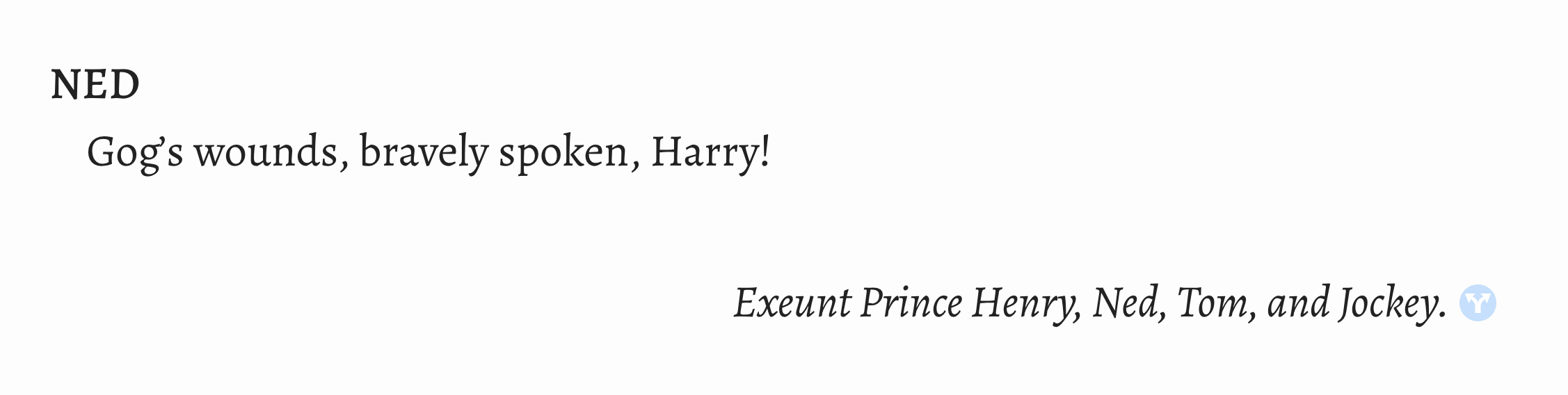
Encoding:
<sp> <speaker>Ned</speaker> <p>Gog’s wounds, bravely spoken, Harry!</p> </sp><stage type="exit">Exeunt Prince Henry, Ned, Tom, and Jockey.</stage>
Rendering:
Inline Stage Directions
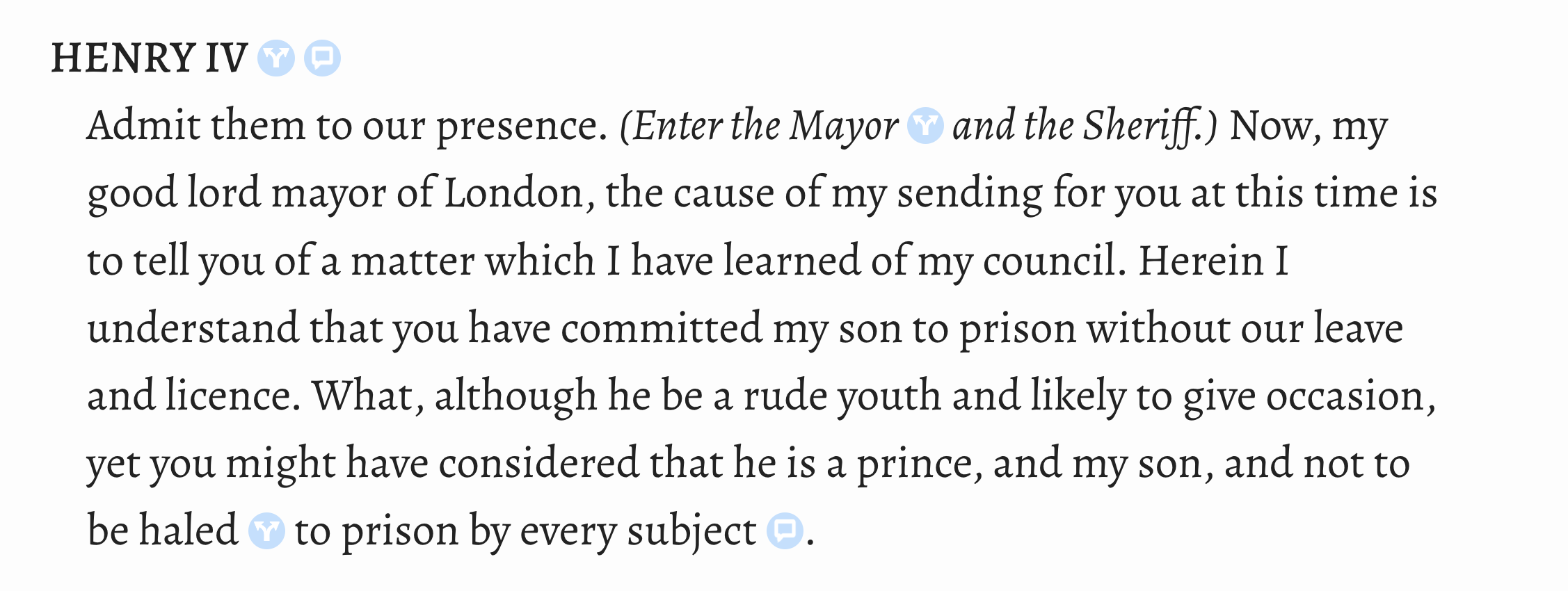
Encoding:
<sp> <speaker>Henry IV</speaker> <p>Admit them to our presence. <stage type="entrance">Enter the Mayor and the Sheriff.</stage> Now, my good lord mayor of London, <!-- … --></p> </sp>
Rendering:
Inline Supplied Stage Direction
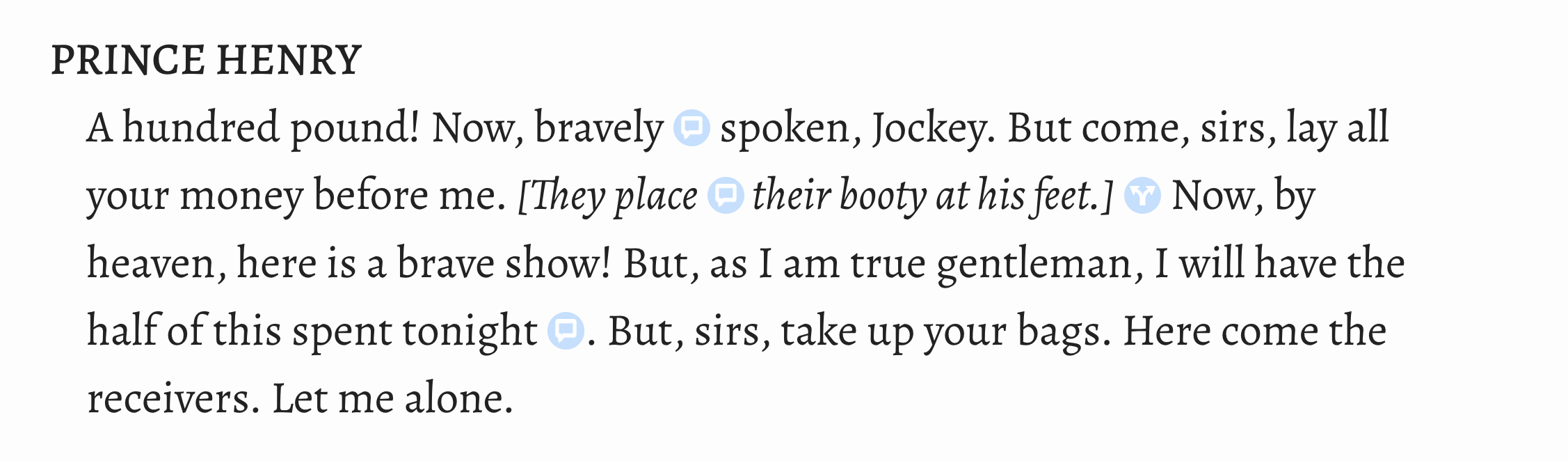
Encoding:
<sp> <speaker>Prince Henry</speaker> <p><!-- … --> But come, sirs, lay all your money before me. <stage type="business"> <supplied>They place their booty at his feet.</supplied> </stage> Now, by heaven, here is a brave show! <!-- … --></p> </sp>
Rendering:
Appendix: Countable Units
This documentation gives a quick reference guide to the patterns that LEMDO uses for
giving literary divisions (e.g., acts, scenes, speeches, and stage directions) xml:ids.
It is for encoders who are already familiar with encoding xml:ids in modernized texts.
1.In many cases, LEMDO will have prepared a semi-diplomatic transcription for you, and
your job will be to proofread it carefully.↑
2.The normal workflow is: collation, then emendation, then modernization.↑
3.The LEMDO Team is aware that the value castList is potentially confusing, given that we use the
<castList>
element in semi-diplomatic transcriptions to encode lists of characters/roles and
actors.↑
4.This policy decision on capitalization is designed to ensure that editions with literary
divisions that are similar to a character name (e.g., a Chorus who speaks a chorus,
a Prologue who speaks a prologue) are disambiguating the xml:id values for division
and character in the same way.↑
5.There is usually no need to include paratext in your edition of a play. All of the
paratexts from the Early Modern Dramatic Paratexts project are being added to LEMDO as a standalone anthology and as components of editions.
DRE and NISE editions will include EMDP files as a matter of course. Other anthologies
may choose to include EMDP files.↑
7.Note that we are choosing with this example not to treat the dumbshow as stage directions.
We use the special
@type value of dumbShow on the
<div>
element in order to make these longer dumbshows findable alongside stage directions.↑
8.You might have more than one epilogue in cases where the play has different epilogues
for different audiences.↑
10.The xml:id for scenes contain by acts must begin with the number of the act: _a1,
_a2, and so on.↑
Prosopography
Chloe Mee
Chloe Mee (she/her) worked as a research assistant with the LEMDO team over several
periods from 2022 to 2025. She graduated from the University of Victoria in 2025 with
a BA (Hons with distinction) in English. She will be studying at the University of
British Columbia to complete her MA in English. Chloe collaborated with the LEMDO
team on a VKURA internship in summer 2022, mainly focusing on Hamlet quartos. Following
her internship, she also worked as a research assistant in 2022–23 and 2025.
Illya
Illya has a BA in English and Sociocultural Anthropology and an MA in English. Prior
to joining the HCMC, he was a PhD candidate in English and Book History at the University
of Toronto and worked on Records of Early English Drama and on the Modernist Archives Publishing Project. His work at the HCMC focuses on creating web-based applications for research projects
led by members of the faculty of Humanities at the University of Victoria. This involves
creating schemas for new and existing datasets, writing XSLT and build files to transform
datasets into structured TEI and HTML formats, implementing staticSearch, and ensuring
that new projects are Endings Principles compliant.
Isabella Seales
Isabella Seales is a fourth year undergraduate completing her Bachelor of Arts in
English at the University of Victoria. She has a special interest in Renaissance and
Metaphysical Literature. She is assisting Dr. Jenstad with the MoEML Mayoral Shows
anthology as part of the Undergraduate Student Research Award program.
Janelle Jenstad
Janelle Jenstad is a Professor of English at the University of Victoria, Director
of The Map of Early Modern London, and Director of Linked Early Modern Drama Online. With Jennifer Roberts-Smith and Mark Beatrice Kaethler, she co-edited Shakespeare’s Language in Digital Media: Old Words, New Tools (Routledge). She has edited John Stow’s A Survey of London (1598 text) for MoEML and is currently editing The Merchant of Venice (with Stephen Wittek) and Heywood’s 2 If You Know Not Me You Know Nobody for DRE. Her articles have appeared in Digital Humanities Quarterly, Elizabethan Theatre, Early Modern Literary Studies, Shakespeare Bulletin, Renaissance and Reformation, and The Journal of Medieval and Early Modern Studies. She contributed chapters to Approaches to Teaching Othello (MLA); Teaching Early Modern Literature from the Archives (MLA); Institutional Culture in Early Modern England (Brill); Shakespeare, Language, and the Stage (Arden); Performing Maternity in Early Modern England (Ashgate); New Directions in the Geohumanities (Routledge); Early Modern Studies and the Digital Turn (Iter); Placing Names: Enriching and Integrating Gazetteers (Indiana); Making Things and Drawing Boundaries (Minnesota); Rethinking Shakespeare Source Study: Audiences, Authors, and Digital Technologies (Routledge); and Civic Performance: Pageantry and Entertainments in Early Modern London (Routledge). For more details, see janellejenstad.com.
Joey Takeda
Joey Takeda is LEMDO’s Consulting Programmer and Designer, a role he assumed in 2020
after three years as the Lead Developer on LEMDO.
Kate LeBere
Project Manager, 2020–2021. Assistant Project Manager, 2019–2020. Textual Remediator
and Encoder, 2019–2021. Kate LeBere completed her BA (Hons.) in History and English
at the University of Victoria in 2020. During her degree she published papers in The Corvette (2018), The Albatross (2019), and PLVS VLTRA (2020) and presented at the English Undergraduate Conference (2019), Qualicum History
Conference (2020), and the Digital Humanities Summer Institute’s Project Management
in the Humanities Conference (2021). While her primary research focus was sixteenth
and seventeenth century England, she completed her honours thesis on Soviet ballet
during the Russian Cultural Revolution. She is currently a student at the University
of British Columbia’s iSchool, working on her masters in library and information science.
Mahayla Galliford
Project Manager, 2025-present; Assistant Project Manager, 2024-2025; Research Assistant,
2021-present. Mahayla Galliford (she/her) graduated from the University of Victoria
with a BA (honours with distinction) in 2024, and an MA English in 2026. Mahayla’s
undergraduate research explored early modern stage directions and civic water pageantry.
Her SSHRC-funded MA thesis project focuses on transcribing, editing, and encoding
early modern girls’ manuscripts, specifically Lady Rachel Fane’s May Masque in collaboration with LEMDO.
Martin Holmes
Martin Holmes has worked as a developer in the UVic’s Humanities Computing and Media
Centre for over two decades, and has been involved with dozens of Digital Humanities
projects. He has served on the TEI Technical Council and as Managing Editor of the
Journal of the TEI. He took over from Joey Takeda as lead developer on LEMDO in 2020.
He is a collaborator on the SSHRC Partnership Grant led by Janelle Jenstad.
Navarra Houldin
Training and Documentation Lead 2025–present. LEMDO project manager 2022–2025. Textual
remediator 2021–present. Navarra Houldin (they/them) completed their BA with a major
in history and minor in Spanish at the University of Victoria in 2022. Their primary
research was on gender and sexuality in early modern Europe and Latin America. They
are continuing their education through an MA program in Gender and Social Justice
Studies at the University of Alberta where they will specialize in Digital Humanities.
Nicole Vatcher
Technical Documentation Writer, 2020–2022. Nicole Vatcher completed her BA (Hons.)
in English at the University of Victoria in 2021. Her primary research focus was women’s
writing in the modernist period.
Samuel Seaberg
Samuel Seaberg, a University of Victoria English undergrad, enjoys riding his bike.
During the summer of 2025, he began working with LEMDO as a recipient of the Valerie
Kuehne Undergraduate Research Award (VKURA). Unfortunately, due to his summer being
spent primarily in working to establish an edition of Thomas Heywood’s If You Know Not Me, You Know Nobody, Part 2 and consequently working out how to represent multi-text works in a digital space,
his bike has suffered severely of sheltered seclusion from the sun. Note: Samuel now
works for LEMDO as the Assistant Project Manager, much to his bike’s chagrin.
Sofia Spiteri
Sofia Spiteri is currently completing her Bachelor of Arts in History at the University
of Victoria. During the summer of 2023, she had the opportunity to work with LEMDO
as a recipient of the Valerie Kuehne Undergraduate Research Award (VKURA). Her work
with LEMDO primarily includes semi-diplomatic transcriptions for The Winter’s Tale and Mucedorus.
Tracey El Hajj
Junior Programmer 2019–2020. Research Associate 2020–2021. Tracey received her PhD
from the Department of English at the University of Victoria in the field of Science
and Technology Studies. Her research focuses on the algorhythmics of networked communications. She was a 2019–2020 President’s Fellow in Research-Enriched
Teaching at UVic, where she taught an advanced course on Artificial Intelligence and Everyday Life. Tracey was also a member of the Map of Early Modern London team, between 2018 and 2021. Between 2020 and 2021, she was a fellow in residence
at the Praxis Studio for Comparative Media Studies, where she investigated the relationships
between artificial intelligence, creativity, health, and justice. As of July 2021,
Tracey has moved into the alt-ac world for a term position, while also teaching in
the English Department at the University of Victoria.
Bibliography
Connor, Francis X., ed. The Second Part of Henry the Fourth. By William Shakespeare. The New Oxford Shakespeare. Ed. Gary Taylor, John Jowett, Terri Bourus, and Gabriel Egan. Oxford University Press, 2016. 1359–1436. WSB aaag2304.
Craik, T.W., ed. King Henry V. By William Shakespeare. Arden Shakespeare. Routledge, 1995. WSB ai7.
Crystal, David. Pronouncing Shakespeare: The Globe Experiment. Cambridge University Press, 2005. WSB aaq125.
Gurr, Andrew, ed. King Henry V. New Cambridge Shakespeare. Cambridge University Press, 1992; rpt. 2005. WSB aaq278.
Malone, Edmond, ed. The Plays and Poems of William Shakespeare. 10 vols. London: J. Rivingston and Sons, 1790. ESTC T138858.
OED: The Oxford English Dictionary. 2nd ed. Oxford University Press, 1989.
Schneider, Brian W.The Framing Text in Early Modern English Drama “Whining” Prologues and “Armed” Epilogues. Routledge, 2011.
Shakespeare, William. The Chronicle History of Henry the Fifth
with his Battle Fought at Agincourt in France. London,
1600. STC 22289. ESTC S111105.
Taylor, Gary, John Jowett, Terri Bourus, and Gabriel Egan, eds. The New Oxford Shakespeare. Oxford University Press, 2016. WSB aaag2304.